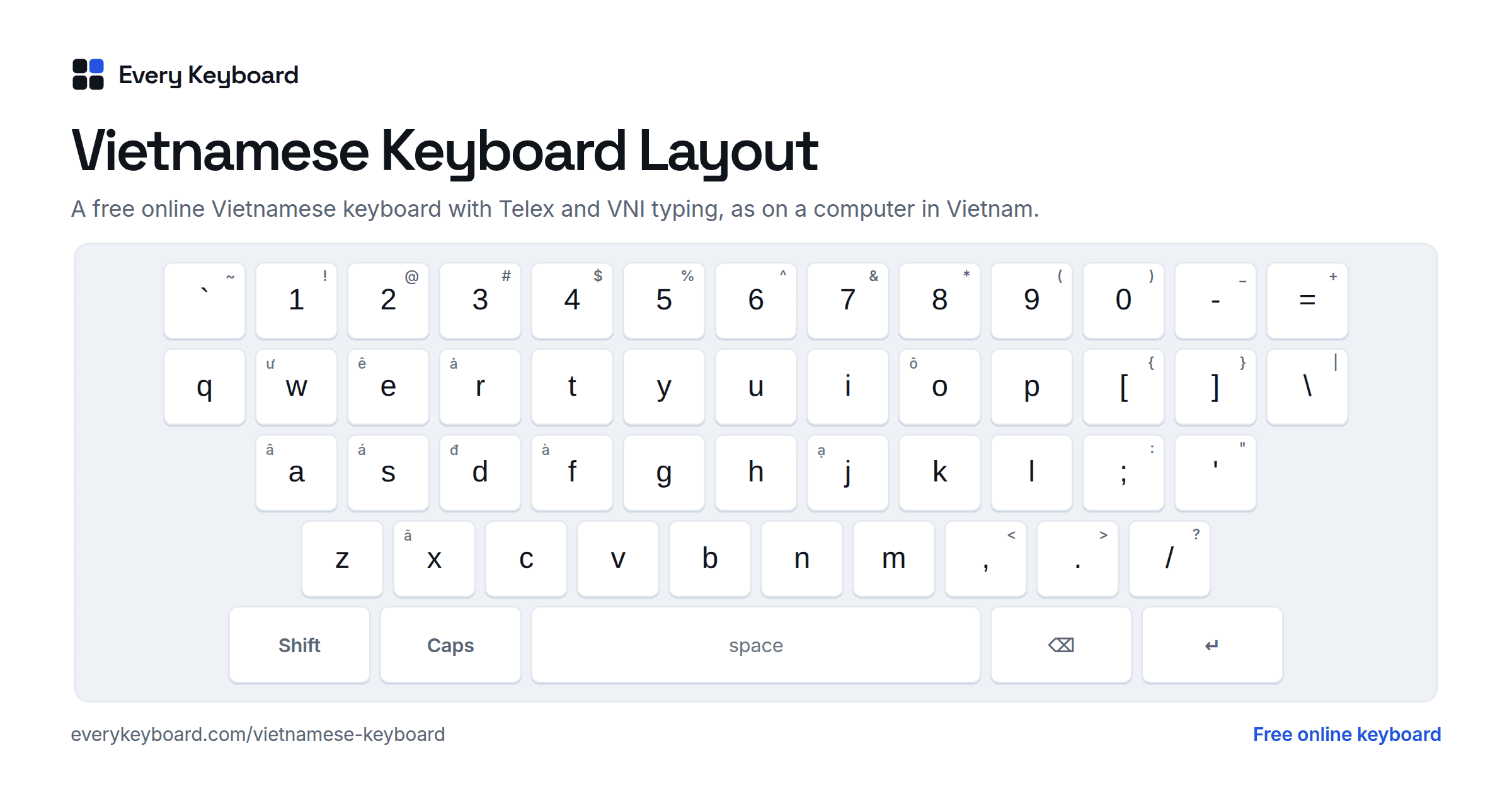
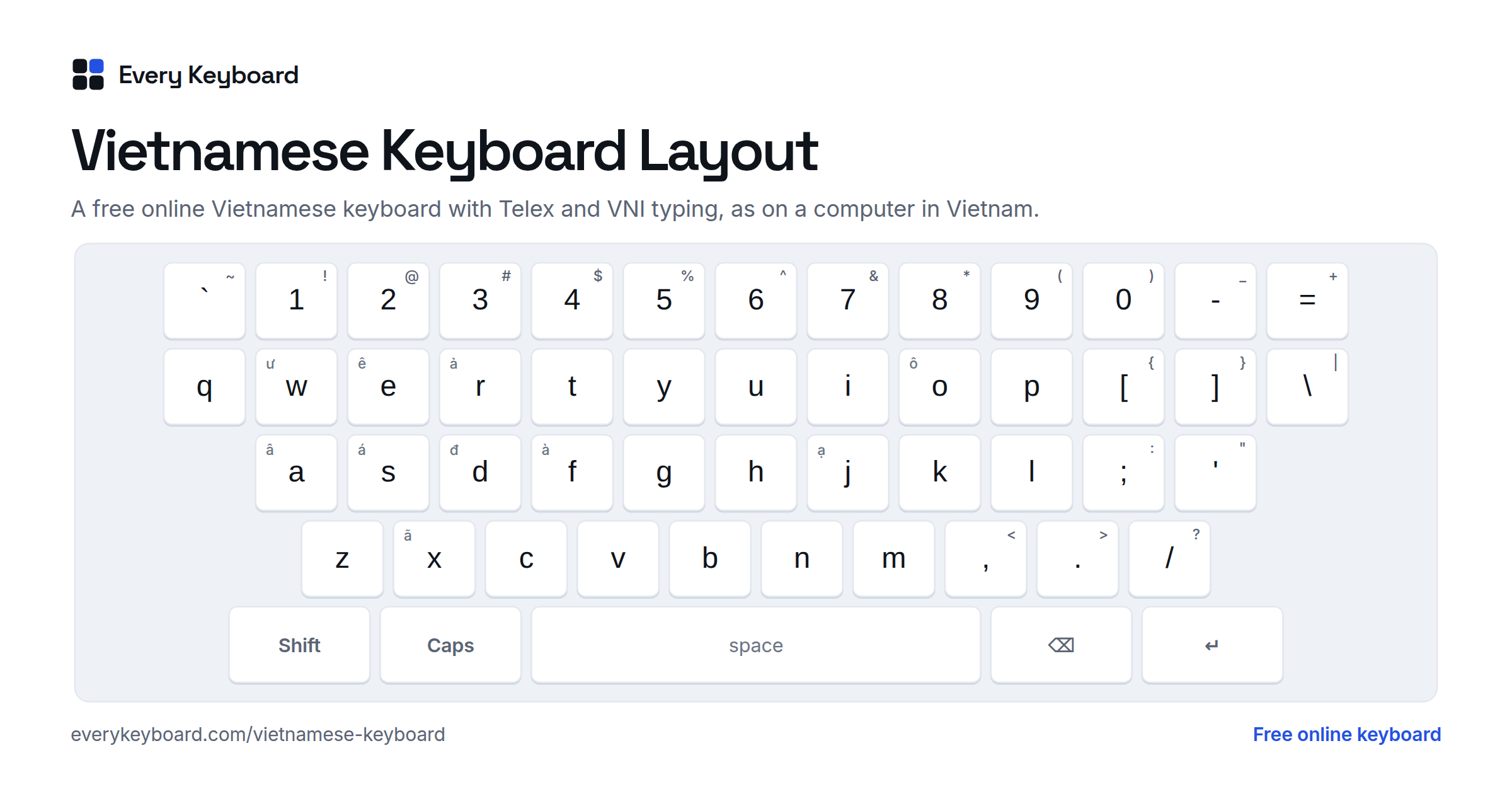
How to type Vietnamese with this keyboard
Vietnamese is written in the Latin alphabet with extra letters (ă â đ ê ô ơ ư) and five tone marks, so there is no special keyboard layout to learn. Instead you use an input method that turns ordinary letters into Vietnamese as you type. Choose one with the tabs on the keyboard:
- Telex (the default): letters make the marks and tones. t i e e n g s gives tiếng. This is what most Vietnamese people use.
- VNI: digits make the marks and tones. V i e 6 5 t gives Việt.
- Direct (click the letters): your keys type normally. Click the letter buttons, then a tone button to put the tone on the word you just typed, or open All vowels with tones for all 60 toned vowels. Alt+A gives ă (twice for â), Alt+O gives ô (twice for ơ), Alt+E ê, Alt+U ư and Alt+D đ.
In every mode the tone always lands on the right vowel, even if you type it at the end of the word or change the word afterwards (hòa + n → hoàn). The tone buttons work in Telex and VNI too. Clicking the on-screen keys types exactly like your own keyboard, and the small letter in the corner of a key shows what it does in Telex or VNI. Backspace deletes one letter at a time, and you can keep typing after it: delete the t of việt and type n to get viện.
Everything you type is saved as standard precomposed Unicode (NFC), so it looks right and searches correctly in Word, Google Docs, email and social media.
Vietnamese Telex: how it works
Telex needs no extra keys. Double a vowel for the circumflex, add w for the horn or breve, and type dd for đ:
| Type | You get | Example |
|---|---|---|
aa | â | caan → cân |
aw | ă | awn → ăn |
ee | ê | tieeng → tiêng |
oo | ô | coo → cô |
ow | ơ | own → ơn |
uw or w | ư | tuw or tw → tư |
uow | ươ | nguowif → người |
dd | đ | ddi → đi |
Then add the tone with one of these letters. It can come right after the vowel or at the end of the word:
| Key | Tone | Mark | Example |
|---|---|---|---|
| s | sắc | á | cas → cá |
| f | huyền | à | gaf → gà |
| r | hỏi | ả | car → cả |
| x | ngã | ã | ngax → ngã |
| j | nặng | ạ | maj → mạ |
| z | (remove) | a | casz → ca |
- Press a key twice to cancel it:
as→ á,ass→ as. The same works for marks (aaa→ aa,ddd→ dd,ww→ w). After that, the rest of the word is typed as it is, which is handy for English words and names. - Change the tone by typing another tone letter (
casthenf→ cà), or remove it with z. - w on its own is ư:
tw→ tư,nhw→ như.uowgives ươ, as innguowif→ người. - Capitals work as usual:
Vieetj→ Việt,VIEETJ→ VIỆT,DDaf→ Đà.
Vietnamese VNI: how it works
VNI puts everything on the number row. Type the letter, then the digit. Like Telex, the tone digit can go at the end of the word, and pressing the same digit twice cancels it.
| Key | Adds | Example |
|---|---|---|
| 1 | sắc: á | ca1 → cá |
| 2 | huyền: à | ga2 → gà |
| 3 | hỏi: ả | ca3 → cả |
| 4 | ngã: ã | nga4 → ngã |
| 5 | nặng: ạ | ma5 → mạ |
| 6 | circumflex: â ê ô | ca6n → cân, co6 → cô |
| 7 | horn: ơ ư | o7n → ơn, tu7 → tư, nguo7i2 → người |
| 8 | breve: ă | a8n → ăn |
| 9 | stroke: đ | d9i → đi |
| 0 | remove the tone | ca10 → ca |
A digit that can't apply to the word before it is typed as a normal digit, so 2024, mp3 and Windows 10 stay as they are. On a French AZERTY keyboard you don't need Shift for the digits: the number keys count as VNI digits whenever they add a mark.
Common words in Telex and VNI
| Word | Telex | VNI |
|---|---|---|
| tiếng Việt | tieengs Vieetj | tie6ng1 Vie65t |
| xin chào | xin chaof | xin chao2 |
| cảm ơn | camr own | cam3 o7n |
| người | nguowif | nguo7i2 |
| được | dduwowcj | d9uo7c5 |
| Nguyễn | Nguyeenx | Nguye64n |
| Hà Nội | Haf Nooij | Ha2 No65i |
| thương | thuowng | thuo7ng |
| quốc | quoocs | quo61c |
| giữa | giwxa | giu74a |
| khuya | khuya | khuya |
| gì | gif | gi2 |
Other spellings work as well: vietj → việt, nguowif or nguwowif → người, and dduwocj → được.
The six Vietnamese tones
Vietnamese is a tonal language: the pitch of your voice changes the meaning of a syllable. Standard (Northern) Vietnamese has six tones. One has no mark, and the other five are written with a mark on the main vowel. The classic example is the syllable ma:
| Word | Tone | Mark | Meaning | How it sounds |
|---|---|---|---|---|
| ma | ngang | (no mark) | ghost | level, mid pitch, held steady |
| má | sắc | acute ´ | cheek; mother (in the South) | rising, high |
| mà | huyền | grave ` | but | falling, low and relaxed |
| mả | hỏi | hook above ̉ | tomb | dipping: falls, then rises (in the South it merges with ngã) |
| mã | ngã | tilde ~ | horse (in compounds); code | rising with a break or catch in the voice |
| mạ | nặng | dot below ̣ | rice seedling | low and short, cut off in the throat |
The 12 Vietnamese vowels and đ
The Vietnamese alphabet (chữ Quốc ngữ) has 29 letters. It has no f, j, w or z, and it adds ă, â, đ, ê, ô, ơ and ư. There are 12 vowel letters, and each can take any of the five tone marks, which gives 72 vowel forms in all. The sounds below are approximate.
| Vowel | Sound | Example | With tones |
|---|---|---|---|
| a | long a, as in father | ba (three) | á à ả ã ạ |
| ă | short a, like a quick u in cut | ăn (eat) | ắ ằ ẳ ẵ ặ |
| â | short uh, as in but | cân (scale) | ấ ầ ẩ ẫ ậ |
| e | open e, as in bed | em (younger sibling) | é è ẻ ẽ ẹ |
| ê | closed e, like ay in say without the glide | tên (name) | ế ề ể ễ ệ |
| i | ee, as in see | đi (go) | í ì ỉ ĩ ị |
| o | open o, as in law | to (big) | ó ò ỏ õ ọ |
| ô | closed o, like go without the glide | cô (aunt, Miss) | ố ồ ổ ỗ ộ |
| ơ | uh as in fur, unrounded | ơn (favor) | ớ ờ ở ỡ ợ |
| u | oo, as in food | mua (buy) | ú ù ủ ũ ụ |
| ư | oo said with spread lips, not rounded | thư (letter) | ứ ừ ử ữ ự |
| y | ee, the same sound as i | Mỹ (America) | ý ỳ ỷ ỹ ỵ |
Đ đ (d with a stroke) is the sound of English d, as in day. Plain d sounds like z in the North (dạ, "yes") and like y in the South. In Telex type dd, in VNI d9.
Every toned vowel is also in the All vowels with tones panel on the keyboard and in the copy-and-paste grid above.
Where the tone mark goes
The tone mark always sits on one vowel of the syllable. The keyboard places it for you with these rules:
- If a vowel has a mark of its own (ă â ê ô ơ ư), the tone goes there: tiếng, người, được, nguyễn. In ươ it goes on ơ.
- With a single vowel, it goes on that vowel: má, gì.
- With three vowels, it goes on the middle one: ngoài, khuỷu, xoáy.
- With two vowels followed by a consonant, it goes on the second: hoàn, toán, loạn.
- With two vowels at the end of a syllable, it goes on the first: mía, của, túi, cháo. The pairs oa, oe and uy are the exception that depends on the style (see below).
In qu and gi, the u and i belong to the consonant, so the tone goes on the next vowel: quá, quốc, giá, giữa. When gi has no other vowel, the i is the vowel: gì.
Old style and new style: hòa or hoà
For oa, oe and uy with no final consonant there are two accepted styles. The classic one, still the most common in everyday writing and the default in Unikey, puts the tone on the first vowel: hòa, khỏe, thủy. The newer rule from the spelling reforms, used in many textbooks, puts it on the second: hoà, khoẻ, thuỷ. This keyboard uses the classic style. Tick New-style tone placement in the tips on the keyboard to switch. Both styles agree whenever a consonant follows (hoàn, thuận).
How to add a Vietnamese keyboard to your device
Every major system can type Vietnamese with Telex or VNI once you add it. The rules are the same as on this page.
Windows
Windows 10 and 11 include a Vietnamese Telex keyboard. Open Settings → Time & language → Language & region → Add a language → Vietnamese (Tiếng Việt). Then click ⋯ next to Vietnamese → Language options → Keyboards → Add a keyboard → Vietnamese Telex (or Vietnamese Number Key-based for VNI). Switch keyboards with Windows+Space.
The plain "Vietnamese" keyboard that Windows adds first is an older layout that puts the letters and tone marks on the number row, so most people remove it and keep Telex.
Many Vietnamese users install Unikey instead, a small free program that works in every app and supports Telex, VNI and VIQR. Turn Vietnamese on and off with Ctrl+Shift (the default) and make sure the character set is Unicode.
Mac
System Settings → Keyboard → Text Input → Edit → + → Vietnamese, then choose Telex, Simple Telex or VNI. Simple Telex is the same without the shortcuts that can get in the way of English, such as w on its own turning into ư. Switch with Control+Space or the Globe key.
iPhone and iPad
Settings → General → Keyboard → Keyboards → Add New Keyboard → Vietnamese, and choose the Telex or VNI layout. Tap the globe key to switch. You can also touch and hold a vowel to pick its toned forms.
Android
In Gboard, open Settings → Languages → Add keyboard → Vietnamese (Tiếng Việt) and choose the Telex layout. Tap the globe key or hold the space bar to switch languages.
Chromebook
Settings → Device → Keyboard and inputs → Input settings → Add input methods → Vietnamese, and pick Telex or VNI. Switch with Ctrl+Space.
Frequently asked questions
What is Telex?
Telex is the most widely used way to type Vietnamese on a normal English keyboard. You type letters twice for the marks (aa → â, dd → đ), w for the horn and breve (ow → ơ, aw → ă, w → ư), and add the tone with a letter that doesn't end Vietnamese words: s, f, r, x or j. For example, tieengs Vieetj becomes tiếng Việt. It takes its name from the conventions once used to send Vietnamese by telex, without accents.
Should I use Telex or VNI?
Use Telex if you're starting out: your hands stay on the letters and it is the default on Windows, Mac, phones and Unikey. VNI uses the number row (1 to 9) for tones and marks, which some people find easier to remember, and it never turns an ordinary letter into a mark. Both give exactly the same text.
Is it hòa or hoà?
Both are correct. The classic placement puts the tone on the first vowel of oa, oe and uy at the end of a syllable (hòa, khỏe, thủy), and it is what this keyboard and Unikey do by default. The newer rule, used in many schoolbooks, puts it on the second vowel (hoà, khoẻ, thuỷ). Tick New-style tone placement in the tips on the keyboard to switch. With a final consonant both agree: hoàn, thuận.
How do I type a word like 'class' or 'was' without it turning Vietnamese?
Press the key that changed it a second time and it goes back: ass → as, and the rest of the word is then typed as it is. In VNI mode, digits only act as marks when they follow a Vietnamese vowel, so numbers like 2024 type normally. Or switch to Direct mode, where your keys type normally.
Why do I get việt when I type vietj?
Because iet is only ever spelled iêt in Vietnamese, the keyboard adds the circumflex when you add a tone to ie, ye or uye (vietj → việt, tiengs → tiếng, nguyenx → nguyễn). In the same way, ưo before a final consonant becomes ươ (dduwocj → được). Typing the full vieetj works too.
Is my text private?
Yes. Everything runs in your browser. Your draft is kept on your own device so it survives a refresh, and it's never uploaded.