How to type Hindi with this keyboard
Choose how you want to type with the tabs above the text box:
- Phonetic (transliteration): type Hindi in English letters and it turns into Devanagari as you type. namaste becomes नमस्ते, dhanyavaad becomes धन्यवाद, kya haal hai becomes क्या हाल है. This is the easiest way if you don't know a Hindi layout.
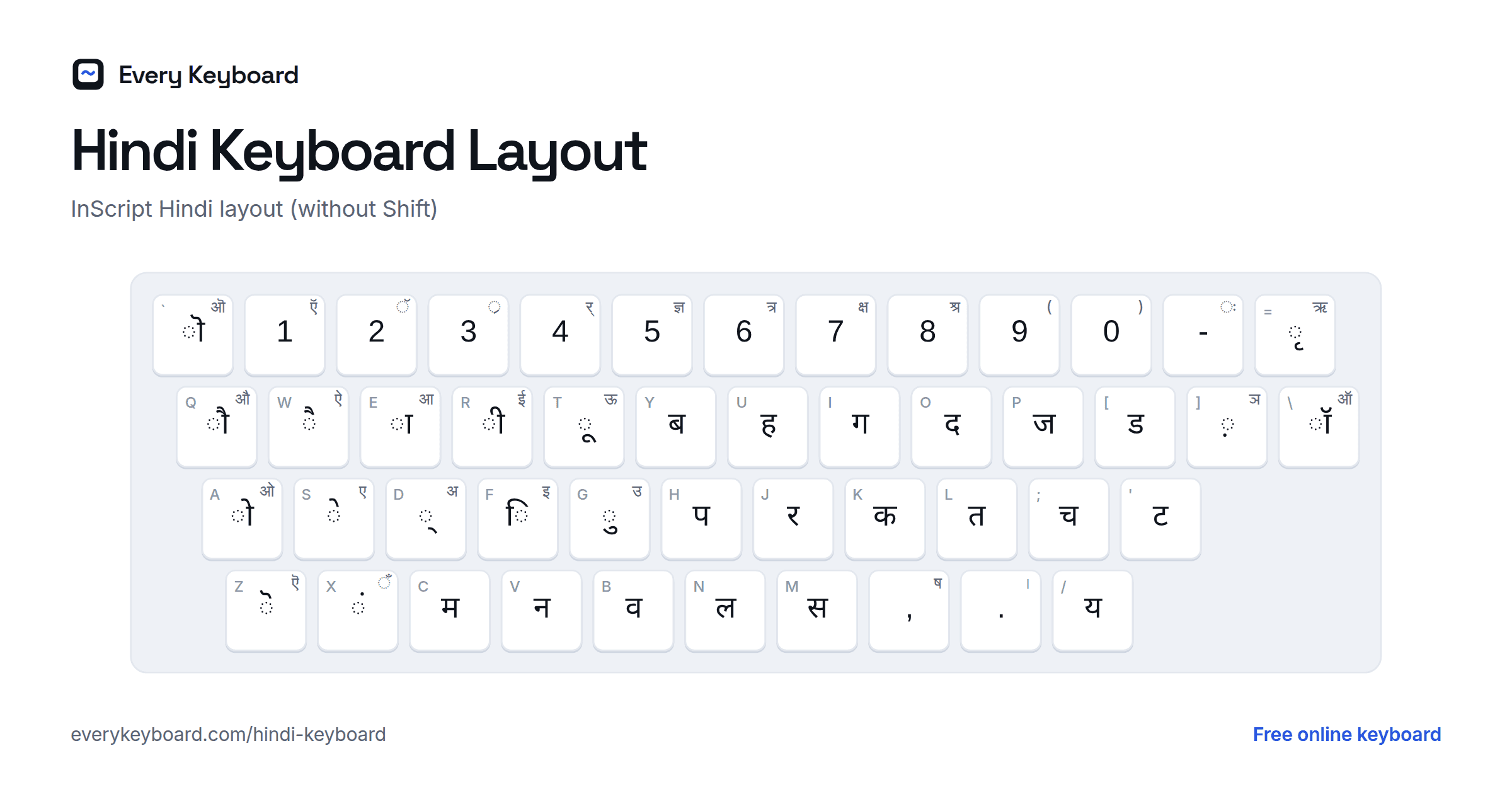
- InScript: the official Indian layout, key by key, as printed on Hindi keyboards. Your keys type the Devanagari character in the same position.
- Alphabet: the whole Hindi alphabet (varnamala) in its traditional order, each letter labelled with its English spelling. Click a consonant, then a vowel sign from the last row: क + ि gives कि.
The buttons above the keyboard add the halant ◌्, anusvara ◌ं, chandrabindu ◌ँ, visarga ◌ः, nukta ◌़, the danda । and ॥, the rupee sign ₹ and ॐ. Open Digits for the Devanagari numerals ० to ९.
Phonetic typing rules
Hindi is written in syllables: each consonant carries a short a sound unless another vowel sign or a halant replaces it. The phonetic mode follows these rules, based on the widely used ITRANS scheme with a few Hinglish-friendly changes. Letters are case-sensitive, so t is त but T is ट. At the start of a word, capitals that can't begin a Hindi word are read as lowercase, so names like Shiv, Ram and Neha work.
| What you type | What you get | Example |
|---|---|---|
| Consonant + consonant | joins them with a halant | patr → पत्र, dost → दोस्त |
| Consonant at the end of a word | keeps its silent built-in a | ghar → घर, bharat → भारत |
| a after a consonant | the built-in vowel (no sign) | kab → कब, namak → नमक |
| a at the end of a word | ◌ा, as in Hinglish | kya → क्या, mera → मेरा |
| a at the end, after a conjunct with r | stays short | mitra → मित्र, chandra → चंद्र |
| aa, ii / ee, uu / oo | long vowels | aap → आप, tiin → तीन, duudh → दूध |
| T D N, Th Dh | retroflex letters | TamaaTar → टमाटर, Dar → डर |
| n before a consonant | anusvara ◌ं | hindii → हिंदी, sundar → सुंदर |
| M | anusvara ◌ं | haiM → हैं, saMsaar → संसार |
| ~ | chandrabindu ◌ँ | haa~ → हाँ, maa~ → माँ |
| H | visarga ◌ः | duHkh → दुःख |
| R, Rh | ड़, ढ़ | laRkaa → लड़का, paRhnaa → पढ़ना |
| O | ऑ / ◌ॉ for English words | DOkTar → डॉक्टर |
| _ (underscore) | separates letters | hin_dii → हिन्दी, a_i → अइ, g_y → ग्य |
| | and || | । and ॥ | namaste| → नमस्ते। |
Hinglish spellings often leave out vowels that Hindi writes, so the page also recognizes about ninety common words spelled the usual way: bharat → भारत, hindi → हिंदी, nahi → नहीं, main → मैं, accha → अच्छा, karna → करना. For other words, write every vowel that Hindi spells: karanaa, paanii. Backspace removes the last English letter of the word you're typing, so you can fix a spelling without starting over.
Hindi vowels and matras
Every vowel has two forms: a full letter used at the start of a word or after another vowel, and a vowel sign (matra) attached to a consonant. The short a has no matra because every consonant already includes it: क is ka.
| Vowel | Matra | Type | Sound | InScript (matra, vowel) |
|---|---|---|---|---|
| अ | (none) | a | a as in about | Shift+D |
| आ | ◌ा का | aa, A | a as in father | E, Shift+E |
| इ | ◌ि कि | i | i as in sit | F, Shift+F |
| ई | ◌ी की | ii, ee, I | ee as in see | R, Shift+R |
| उ | ◌ु कु | u | u as in put | G, Shift+G |
| ऊ | ◌ू कू | uu, oo, U | oo as in food | T, Shift+T |
| ऋ | ◌ृ कृ | RRi | ri as in rich (in Hindi) | =, Shift+= |
| ए | ◌े के | e | a as in late, without the glide | S, Shift+S |
| ऐ | ◌ै कै | ai | a as in cat, held long | W, Shift+W |
| ओ | ◌ो को | o | o as in go, without the glide | A, Shift+A |
| औ | ◌ौ कौ | au | aw as in law | Q, Shift+Q |
| ऑ | ◌ॉ कॉ | O | o as in hot (English words) | \, Shift+\ |
On InScript, the key without Shift types the matra and Shift types the full vowel. For example E types ◌ा and Shift+E types आ.
Hindi consonants
The consonants are arranged by where they are made in the mouth. Hindi separates sounds that English doesn't: with and without a puff of air (क k, ख kh), and with the tongue on the teeth or curled back (त t, ट T). The letters with a dot underneath (nukta) are used for sounds from Urdu, Persian and English.
| Letter | Type | Sound |
|---|---|---|
| क | k | k as in skin (no puff of air) |
| ख | kh | k with a puff of air, as in kite |
| ग | g | g as in go |
| घ | gh | g with a breathy h |
| ङ | ~N | ng as in sing (mostly in Sanskrit words) |
| च | ch, c | ch as in church, no puff of air |
| छ | chh, Ch | ch with a strong puff of air |
| ज | j | j as in jam |
| झ | jh | j with a breathy h |
| ञ | ~n | ny as in canyon (mostly in Sanskrit words) |
| ट | T | t with the tongue curled back (retroflex) |
| ठ | Th | retroflex t with a puff of air |
| ड | D | d with the tongue curled back |
| ढ | Dh | retroflex d with a breathy h |
| ण | N | n with the tongue curled back |
| त | t | t with the tongue on the teeth (dental) |
| थ | th | dental t with a puff of air (not the th in thin) |
| द | d | d with the tongue on the teeth |
| ध | dh | dental d with a breathy h |
| न | n | n |
| प | p | p as in spin (no puff of air) |
| फ | ph | p with a puff of air |
| ब | b | b |
| भ | bh | b with a breathy h |
| म | m | m |
| य | y | y as in yes |
| र | r | a tapped r |
| ल | l | l |
| व | v, w | between v and w |
| श | sh | sh as in shoe |
| ष | Sh | sh (retroflex in Sanskrit; like श in everyday Hindi) |
| स | s | s |
| ह | h | h |
| ड़ | R | a flapped r made with the tongue curled back |
| ढ़ | Rh | the same flap with a breathy h |
| क़ | q | k made further back in the throat (Urdu and Arabic words) |
| ज़ | z | z |
| फ़ | f | f |
Conjuncts (half letters)
When two consonants meet with no vowel between them, the first loses its built-in a. In writing, a halant (◌्) joins them and they usually merge into a conjunct: the first letter drops its vertical stroke and becomes a "half letter" (स्त, क्य), or the two combine into a new shape. र is special: before a consonant it becomes a small hook on top (र्म), and after one it becomes a slanted stroke at the bottom (प्र).
| Conjunct | Made of | Type | Example |
|---|---|---|---|
| क्ष | क + ◌् + ष | kSh, ksh, x | क्षमा (kShamaa) |
| त्र | त + ◌् + र | tr | मित्र (mitra) |
| ज्ञ | ज + ◌् + ञ | gy, jn | ज्ञान (gyaan) |
| श्र | श + ◌् + र | shr | श्रम (shram) |
| स्त | स + ◌् + त | st | नमस्ते (namaste) |
| क्य | क + ◌् + य | ky | क्या (kya) |
| द्ध | द + ◌् + ध | ddh | युद्ध (yuddh) |
| र्म | र + ◌् + म | rm | कर्म (karm) |
| प्र | प + ◌् + र | pr | प्रेम (prem) |
In phonetic mode you never type the halant: consonants next to each other join automatically. To keep a visible halant or type a letter combination the rules would change, put an underscore between the letters: g_y gives ग्य instead of ज्ञ.
Hindi InScript keyboard layout
InScript (Indian Script) is the standard keyboard for Devanagari, defined by the Bureau of Indian Standards and shipped with Windows as "Hindi Traditional". Vowel signs sit under the left hand and consonants under the right. The halant is on D, so a conjunct is consonant, D, consonant. The small letter on each key is the English key in the same place.
With Shift, most keys give the aspirated consonant or the full vowel:
How to add a Hindi keyboard to your device
Windows
Settings → Time & language → Language & region → Add a language → Hindi. Under the language options you can add Hindi Traditional (InScript) or Hindi Phonetic, which turns English letters into Hindi with suggestions. Switch with Windows+Space. With the English (India) keyboard, Right Alt+4 types ₹.
Mac
System Settings → Keyboard → Text Input → Edit → + → Hindi. Choose Hindi - Transliteration to type in English letters, or a Devanagari layout such as Devanagari - QWERTY. Switch with Control+Space or the Globe key.
iPhone and iPad
Settings → General → Keyboard → Keyboards → Add New Keyboard → Hindi, then choose Devanagari or Transliteration. Tap the globe key to switch.
Android
In Gboard, open Settings → Languages → Add keyboard → Hindi. Pick a Devanagari layout, or the transliteration option to type in English letters and get Hindi. Tap the globe key or hold the space bar to switch.
Chromebook
Settings → Device → Keyboard and inputs → Input settings → Add input methods → Hindi. Switch with Ctrl+Space.
Frequently asked questions
How do I type in Hindi using an English keyboard?
Use the Phonetic mode on this page and type Hindi words the way they sound in English letters: namaste becomes नमस्ते, aap kaise hain becomes आप कैसे हैं. Double a vowel to make it long (aa for आ, ii or ee for ई) and use capital T, D and N for ट, ड and ण. When you're done, press Copy.
How do I type half letters and conjuncts like क्ष, त्र and ज्ञ?
In Phonetic mode, just type the consonants next to each other: tr gives त्र, st gives स्त, and kSh (or ksh, or x) gives क्ष. ज्ञ is gy or jn. On InScript, type the first consonant, then the halant key (D), then the second consonant: J D M gives र्स, K D L gives क्त. InScript also has क्ष, त्र, ज्ञ and श्र on Shift+7, Shift+6, Shift+5 and Shift+8.
Why did I get भरत when I wanted भारत?
In the phonetic rules a single a is the short built-in vowel, and aa is the long आ. Type bhaarat for भारत. The page also knows the usual Hinglish spellings of common words, so bharat, hindi, nahi and pani come out as भारत, हिंदी, नहीं and पानी. Add _ at the end of a word to skip that list.
How do I type ◌ं (bindu) and ◌ँ (chandrabindu)?
Type n before a consonant (hindii → हिंदी) or a capital M anywhere (haiM → हैं) for the anusvara ◌ं. Type ~ after a vowel for the chandrabindu: haa~ → हाँ. Both are also buttons above the keyboard.
What is the InScript keyboard?
InScript is the standard Devanagari layout set by the Government of India and built into Windows, Linux and many phones. Vowels and vowel signs are on the left side of the keyboard and consonants on the right, and the same key positions work for other Indian scripts too, so learning it once helps with Marathi, Bengali, Tamil and more.
Is my text private?
Yes. Everything runs in your browser. Your draft is kept on your own device so it survives a refresh, and it's never uploaded.