How to type Hungarian accents with this keyboard
Pick a layout with the tabs on the keyboard. US keyboard + accents keeps your keyboard as it is and adds the Hungarian letters. Hungarian QWERTZ shows the keyboard sold in Hungary. With either one, there are three ways to type the accents:
- Click or tap the buttons above the keyboard. Hold Shift while clicking (or press Shift on the on-screen keyboard first) for capitals.
- Alt shortcuts: hold Alt (Option on a Mac) and press A, E or I for á é í. Alt+O types ó; press it again for ö and a third time for ő. Alt+U works the same way: ú, ü, ű. Add Shift for capitals.
- Quick codes: switch on quick codes and type a letter followed by = signs:
a=á,e=é,i=í,o=ó,o==ö,o===ő,u=ú,u==ü,u===ű. They're off by default so that = signs stay as typed.
Used to a Hungarian keyboard? Click Type as if on a Hungarian keyboard under the keyboard. Your keys then type what they would in Hungary: Y and Z swap, 0 (left of 1) gives 0, the keys after 9 give ö ü ó, and [ ] give ő ú. For symbols such as @, click AltGr first. Press Esc to go back to normal typing at any time.
Hungarian vowels: short and long
Hungarian has 14 vowel letters: seven short ones and seven long ones. An acute accent (á é í ó ú) or a double acute (ő ű) marks a long vowel. With i, o, ö, u and ü, the long vowel is the same sound held longer. With a and e, the accent also changes the sound itself: a and á are two different vowels.
| Short · long | Short sounds like | Long sounds like | Examples |
|---|---|---|---|
| a · á | o in British "hot", with rounded lips | a in "father" (a different vowel, not just longer) | alma (apple) · ágy (bed) |
| e · é | e in "bet", quite open | ay in "say", without the glide (a different vowel) | hely (place) · kép (picture) |
| i · í | i in "bit", but tenser | ee in "see" | kis (small) · híd (bridge) |
| o · ó | o in "pot", rounded | oa in "boat", without the glide | bor (wine) · jó (good) |
| ö · ő | German ö: e said with rounded lips | the same sound held longer | öt (five) · nő (woman) |
| u · ú | u in "put" | oo in "moon" | kutya (dog) · út (road) |
| ü · ű | German ü: ee said with rounded lips | the same sound held longer | ül (sits) · tű (needle) |
Vowel length is not optional. Leave an accent off and you may write a different word:
| Short vowel | Long vowel |
|---|---|
| kor (age) | kór (disease) |
| öt (five) | őt (him, her) |
| tor (feast) | tőr (dagger) |
| szel (slices) | szél (wind) |
| kerek (round) | kerék (wheel) |
| sok (many) | sók (salts) |
The double acute. ő and ű are special to Hungarian. The two slanted strokes are not an umlaut and not a tilde: õ, ô and û are wrong, even though you still see them on old websites and signs, from the days when computers had no ő or ű.
The Hungarian alphabet and consonants
The Hungarian alphabet has 44 letters. Besides the accented vowels, it counts two- and three-letter combinations as single letters: cs, dz, dzs, gy, ly, ny, sz, ty and zs. They have fixed sounds, and some are the opposite of what English speakers expect: s sounds like sh, and sz like s.
| Letter | Sounds like | Example |
|---|---|---|
| c | ts in "cats" | cukor (sugar) |
| cs | ch in "church" | csók (kiss) |
| dz | ds in "beds" | edz (trains) |
| dzs | j in "jam" | dzsem (jam) |
| gy | a soft d, like d in British "duke" | magyar (Hungarian) |
| j, ly | y in "yes" | jó (good), hely (place) |
| ny | ny in "canyon" | nyár (summer) |
| s | sh in "ship" | só (salt) |
| sz | s in "sun" | szó (word) |
| ty | a soft t, like t in British "tube" | kutya (dog) |
| zs | s in "measure" | zseb (pocket) |
The stress is always on the first syllable of a word. Double consonants are held longer: tol (pushes) and toll (feather) are different words.
Hungarian characters and Alt codes
For Windows Alt codes, hold Alt and type the number on the number pad, with Num Lock on. ő and ű have no Alt code, because they aren't in the Western European character set these codes come from. In Word, type the Unicode code and press Alt+X: 0151 for ő, 0150 for Ő, 0171 for ű and 0170 for Ű.
| Character | Name | Example | Alt code (Windows) | HTML |
|---|---|---|---|---|
| á Á | a acute | ágy, Ádám | Alt+0225 · Alt+0193 | á Á |
| é É | e acute | kép, Éva | Alt+0233 · Alt+0201 | é É |
| í Í | i acute | híd, Írország | Alt+0237 · Alt+0205 | í Í |
| ó Ó | o acute | jó, Óbuda | Alt+0243 · Alt+0211 | ó Ó |
| ö Ö | o umlaut | öt, Ödön | Alt+0246 · Alt+0214 | ö Ö |
| ő Ő | o double acute | nő, Őrség | none (see below) | ő Ő |
| ú Ú | u acute | út, Újpest | Alt+0250 · Alt+0218 | ú Ú |
| ü Ü | u umlaut | ül, Üllő | Alt+0252 · Alt+0220 | ü Ü |
| ű Ű | u double acute | tű, űrhajó | none (see below) | ű Ű |
| „ | opening quote | „Szia” | Alt+0132 | „ |
| ” | closing quote | „Szia” | Alt+0148 | ” |
Hungarian quotation marks open low and close high, both pointing the same way: „Szia”. A quote inside a quote uses » and «, pointing inward: „Azt mondta: »Igen«”. Hungarian writes the decimal comma (3,5) and dates year first: 2026. 09. 26.
The Hungarian QWERTZ keyboard layout
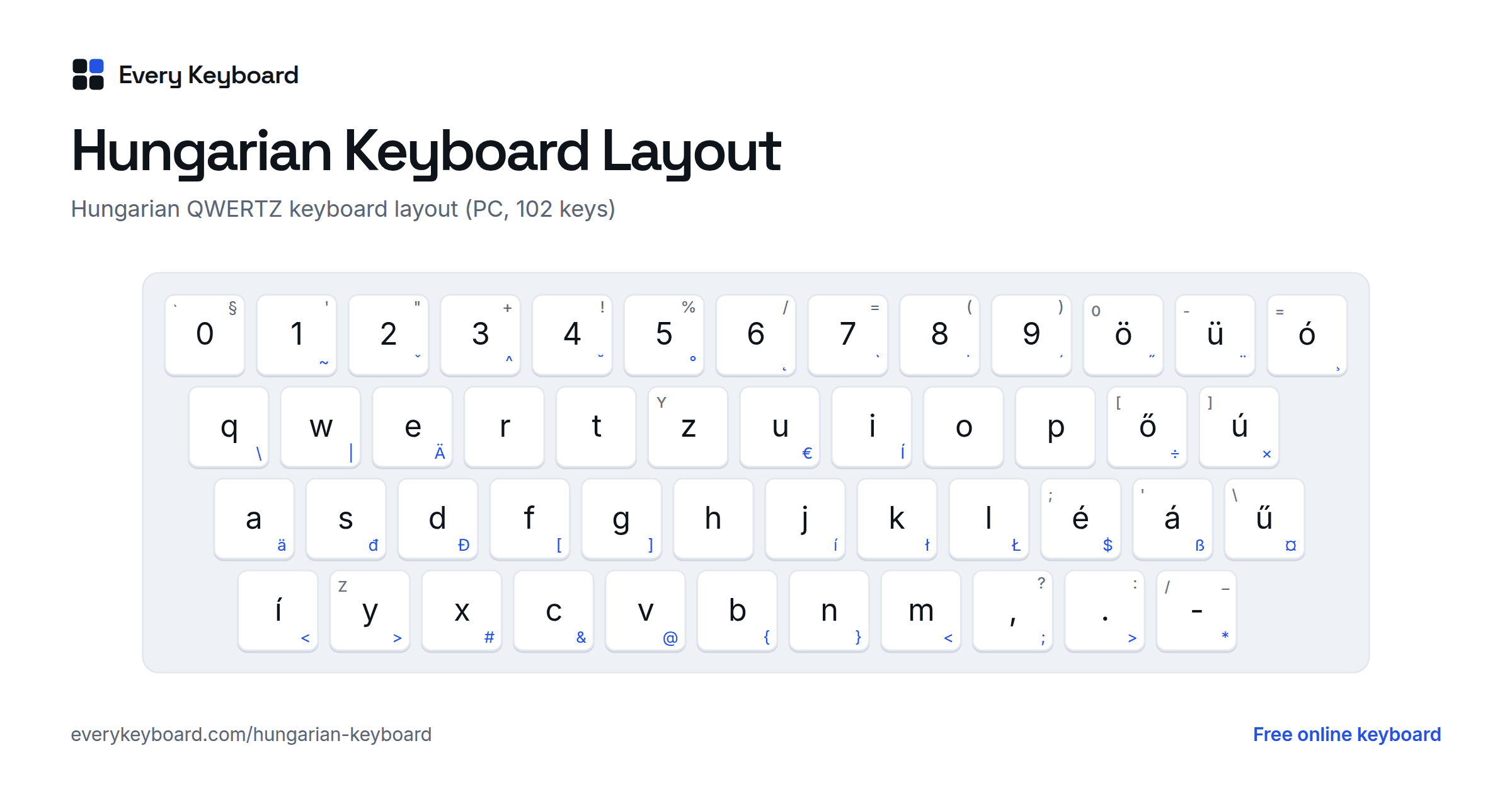
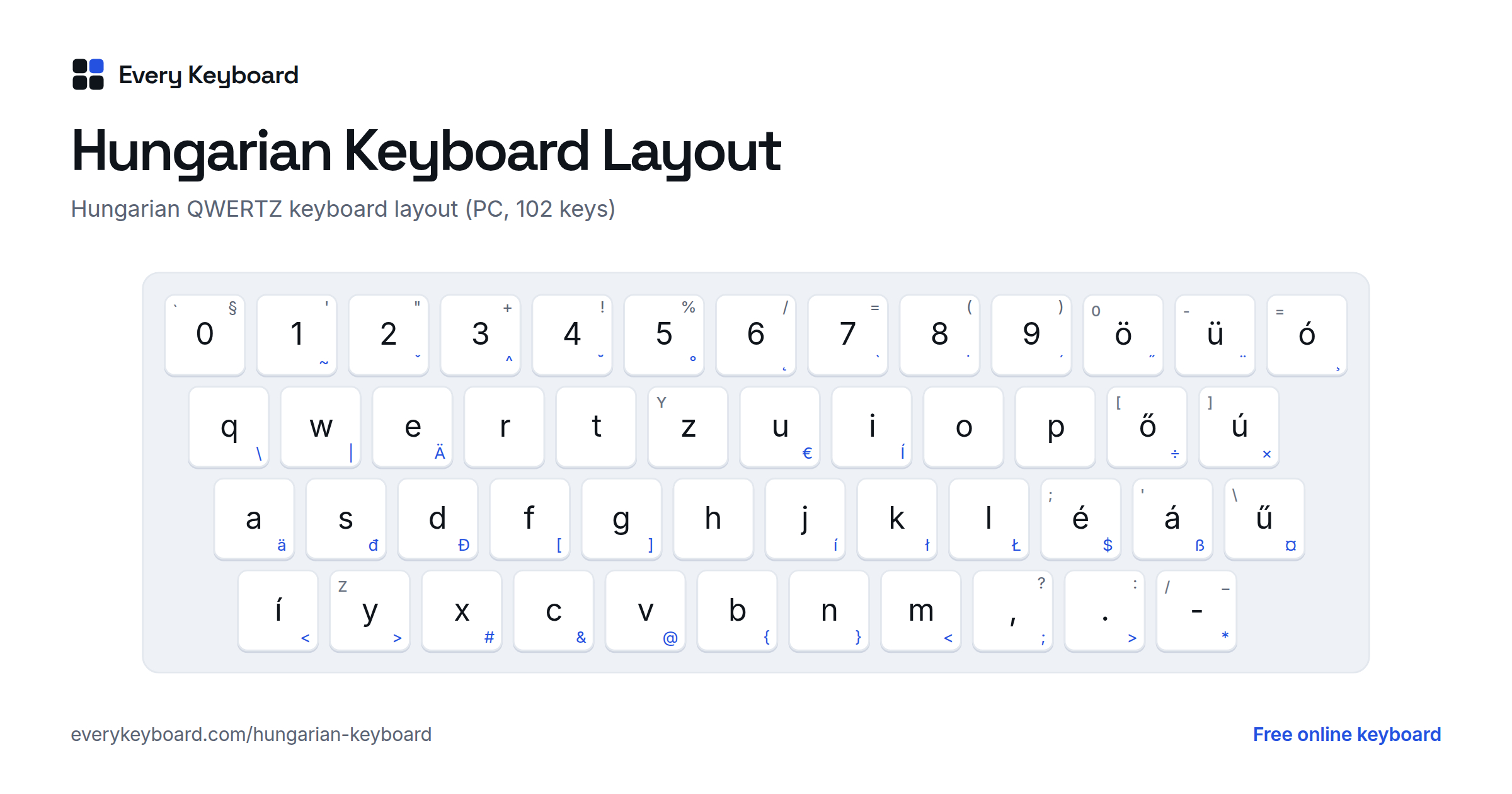
Keyboards in Hungary use a QWERTZ layout, like German ones, with all nine accented vowels on their own keys. This is the standard Hungarian layout as Windows has it. The small letter on each key is the US key in the same place, and the blue characters need AltGr (the right Alt key).
- 0 is left of 1, and ö ü ó take the three keys after 9.
- ő ú are right of P, é á right of L, and ű is left of Enter.
- í is on the extra key between left Shift and Y. Keyboards without that key (common on laptops made for the US) use the Hungarian 101-key layout in Windows, which puts í left of 1 instead.
- Z and Y are swapped compared with English keyboards.
- The digit keys with AltGr give accent marks for other languages (˜ ˇ ^ ˘ ° ˛ ˙ ´ ˝ ¨ ¸). Most are dead keys: press one, then a letter, for example AltGr+2 then c for č.
Where the symbols are on a Hungarian PC keyboard:
| Character | Hungarian keys |
|---|---|
| @ | AltGr + V |
| $ | AltGr + É |
| € | AltGr + U |
| [ ] | AltGr + F, AltGr + G |
| { } | AltGr + B, AltGr + N |
| \ | | AltGr + Q, AltGr + W |
| # & | AltGr + X, AltGr + C |
| < > | AltGr + Í (or M), AltGr + Y (or .) |
| ; * | AltGr + , and AltGr + - |
| ' " + ! % | Shift + 1, 2, 3, 4, 5 |
| / = ( ) | Shift + 6, 7, 8, 9 |
| § | Shift + 0 (left of 1) |
| ? : _ | Shift + , . - |
Hungarian Mac keyboards have the same accented letters, but put some symbols in other places. Check the printed key labels there.
How to type Hungarian accents on your computer or phone
Windows
- Hold Alt and type the code on the number pad (see the table above), e.g. Alt+0225 for á. There are no Alt codes for ő and ű.
- For the Hungarian layout, go to Settings → Time & language → Language & region → Add a language and pick Hungarian (Magyar). Its keyboard is called Hungarian. Switch keyboards with Windows+Space.
- The US-International keyboard types á é í ó ú and ö ü with ' or " then the vowel, but it has no ő or ű.
Mac
- Option+E, then the vowel: á é í ó ú. Option+U, then o or u: ö ü.
- ő and ű aren't in the English keyboards' shortcuts, so for those add the Hungarian input source: System Settings → Keyboard → Text Input → Edit → + → Hungarian.
Microsoft Word
- Ctrl+', then the vowel: á é í ó ú
- Ctrl+Shift+:, then the vowel: ö ü
- Type
0151or0171and press Alt+X: ő ű
iPhone and iPad
Go to Settings → General → Keyboard → Keyboards → Add New Keyboard → Hungarian. Press and hold a vowel to pick its accented forms, including ő and ű. Tap the globe key to switch keyboards.
Android
In Gboard, open Settings → Languages → Add keyboard → Magyar, and pick the layout you prefer. Press and hold a vowel for its accents. Tap the globe key or hold the space bar to switch.
Chromebook
Settings → Device → Keyboard and inputs → Input settings → Add input methods → Hungarian keyboard. Switch with Ctrl+Space.
Frequently asked questions
How do I type ő and ű?
On this page, click the ő or ű button, or hold Alt (Option on a Mac) and press O three times for ő, or U three times for ű. With quick codes on, type o=== or u===. On a Hungarian keyboard they have their own keys: ő right of P, ű left of Enter. On Windows, ő and ű have no Alt code; in Word, type 0151 or 0171 and press Alt+X.
Can I write õ or û instead of ő and ű?
No, that's a leftover from old computer character sets that had no ő or ű. Hungarian uses the double acute (˝), and õ, ô, û are simply wrong. Every modern device and font supports ő and ű, so there's no reason to substitute them.
What is the difference between ö and ő?
They're the same vowel, but ő is held longer. Length changes the meaning: öt means five and őt means him or her. The same goes for ü and ű. In Hungarian spelling, the acute and double acute mark long vowels.
Why is 0 to the left of 1 on a Hungarian keyboard?
To make room for ö, ü and ó in the top row. Moving 0 to the key left of 1 frees the three keys after 9. Hungarian keyboards are also QWERTZ, like German ones, so Z and Y are swapped.
How do I type @ on a Hungarian keyboard?
Press AltGr (the right Alt key) and V. On Windows, Ctrl+Alt+V also works if your keyboard has no AltGr key. Other common ones: AltGr+F and AltGr+G for [ ], AltGr+B and AltGr+N for { }.
Is my text saved or sent anywhere?
No. Everything happens in your browser. Your draft is kept on your own device so it's still there if you refresh, and it's never uploaded.