How to type Norwegian letters with this keyboard
Pick a layout with the tabs on the keyboard. US keyboard + accents keeps your keyboard as it is and adds the Norwegian letters. Norwegian layout shows the keyboard sold in Norway. With either one, there are three ways to type æ ø å:
- Click or tap the buttons above the keyboard. Hold Shift while clicking (or press Shift on the on-screen keyboard first) for Æ Ø Å.
- Alt shortcuts: hold Alt (Option on a Mac) and press A for å, ' for æ and O for ø. Add Shift for capitals. Press the same shortcut again to cycle: Alt+A goes å, æ, â, à; Alt+O goes ø, ó, ò, ô; Alt+E goes é, è, ê. Alt+, and Alt+. type « and ».
- Quick codes: switch on quick codes and type
a=for å,a==for æ,o=for ø ande=for é.<<and>>give « and ». They're off by default so that = signs stay as typed.
Used to a Norwegian keyboard? Click Type as if on a Norwegian keyboard under the keyboard. Your keys then type what they would in Norway: [ gives å, ; gives ø and ' gives æ. The ¨ key right of å is a dead key, as on a real Norwegian keyboard: press it, then u for ü. For é, click AltGr, then ´ (left of Backspace), then e. Press Esc to go back to normal typing at any time.
The Norwegian alphabet: æ, ø and å
Norwegian has 29 letters: the 26 of English plus æ, ø and å, which come last, in that order. So in a Norwegian dictionary or phone book, Ålesund comes after Zimbabwe, not next to Alta. The letters c, q, w, x and z mostly appear in names and loanwords.
Æ, ø and å are separate letters, not a with accents. Writing a or o instead can turn one word into another:
| Without | With the Norwegian letter |
|---|---|
| far (father) | får (sheep; gets) |
| ga (gave) | gå (to walk) |
| for (for; too) | fôr (fodder; lining) |
| en (a, an) | én (one (stressed)) |
| bla (to leaf through) | blå (blue) |
The vowels are where Norwegian sounds most different from English. Here's a rough guide to the nine vowel letters; pronunciation varies a lot between dialects, and there is no official spoken standard.
| Letter | Sounds like | Examples |
|---|---|---|
| a | a in "father" | mat (food), takk (thanks) |
| e | long: ay in "say" without the glide; short: e in "bet" | se (see), penn (pen) |
| i | ee in "see" | vi (we), fisk (fish) |
| o | usually oo in "moon"; sometimes like å | bok (book), sol (sun) |
| u | a tight, rounded "ee", between oo and German ü | hus (house), du (you) |
| y | ee with rounded lips, like German ü or French u | by (town), fly (plane) |
| æ | a in "cat" | lære (learn), være (be) |
| ø | e said with rounded lips, like German ö or the u in "fur" | øl (beer), søster (sister) |
| å | aw in "law" (long) or o in "more" | på (on), år (year) |
The letter å replaced the old spelling aa in the spelling reform of 1917. You still see aa in family names and some older place names, and it's the accepted fallback when å isn't available.
Accents in Norwegian: é, ò, ô and more
Norwegian uses a few accents, mostly to tell words apart. They're optional in some words and required in others:
- é marks stress on the last syllable of loanwords: kafé, idé, allé, entré. It also shows that én means "one" and not "a".
- ô appears in fôr (fodder, or the lining of a coat), to tell it from for.
- ó appears in fór, the past tense of fare (to travel).
- à means "at ... each" in prices: 5 stk. à 10 kr.
Bokmål and Nynorsk. Norway has two official written standards. Bokmål is used by most people; Nynorsk is used by roughly one in ten, mostly in western Norway. They share the alphabet, the keyboard and most of the accents above. Nynorsk also has òg (also) with a grave accent, and vêr (weather) with a circumflex.
Norwegian characters and Alt codes
For Windows Alt codes, hold Alt and type the number on the number pad, with Num Lock on. The codes starting with 0 work in almost every Windows app.
| Character | Name | Example | Alt code (Windows) | HTML | Without it |
|---|---|---|---|---|---|
| å Å | a with ring (bolle-å) | på, år, Ålesund | Alt+0229 · Alt+0197 | å Å | aa |
| æ Æ | ae ligature (ask) | lære, ærlig | Alt+0230 · Alt+0198 | æ Æ | ae |
| ø Ø | o with stroke | øl, Østfold | Alt+0248 · Alt+0216 | ø Ø | oe |
| é É | e acute | kafé, idé | Alt+0233 · Alt+0201 | é É | e |
| « | opening quote | «Hei» | Alt+0171 | « | " |
| » | closing quote | «Hei» | Alt+0187 | » | " |
| – | dash (tankestrek) | 10–12, Oslo–Bergen | Alt+0150 | – | - |
Older three-digit codes also work for some letters: Alt+134 for å, Alt+143 for Å, Alt+145 for æ and Alt+146 for Æ.
Norwegian quotation marks are the angle quotes « and », with no spaces inside: «Hei på deg». A quote inside a quote uses single quotes: ‘ ’. Norwegian writes the decimal comma (3,5) and puts kr after the amount (100 kr).
The Norwegian keyboard layout
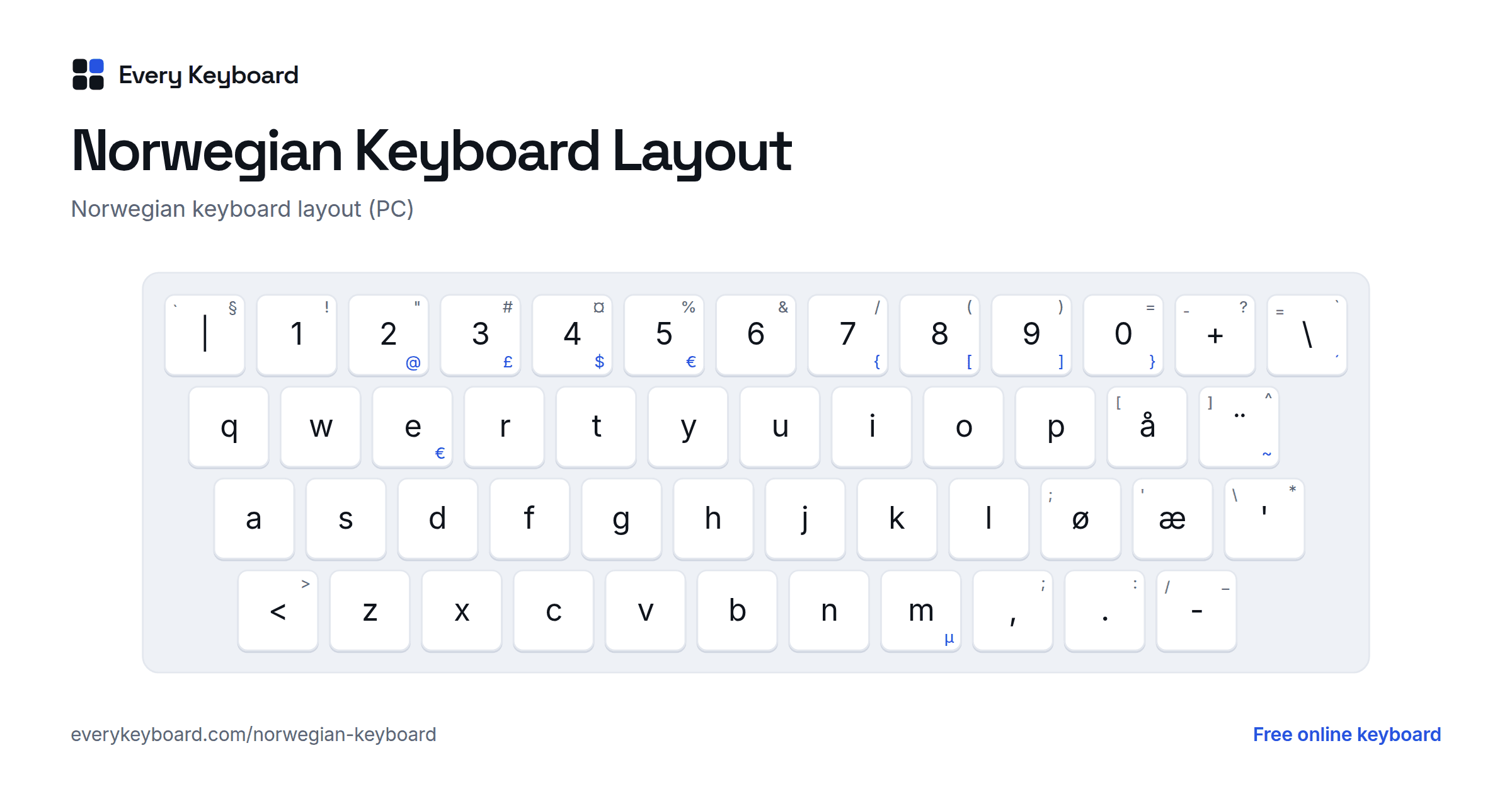
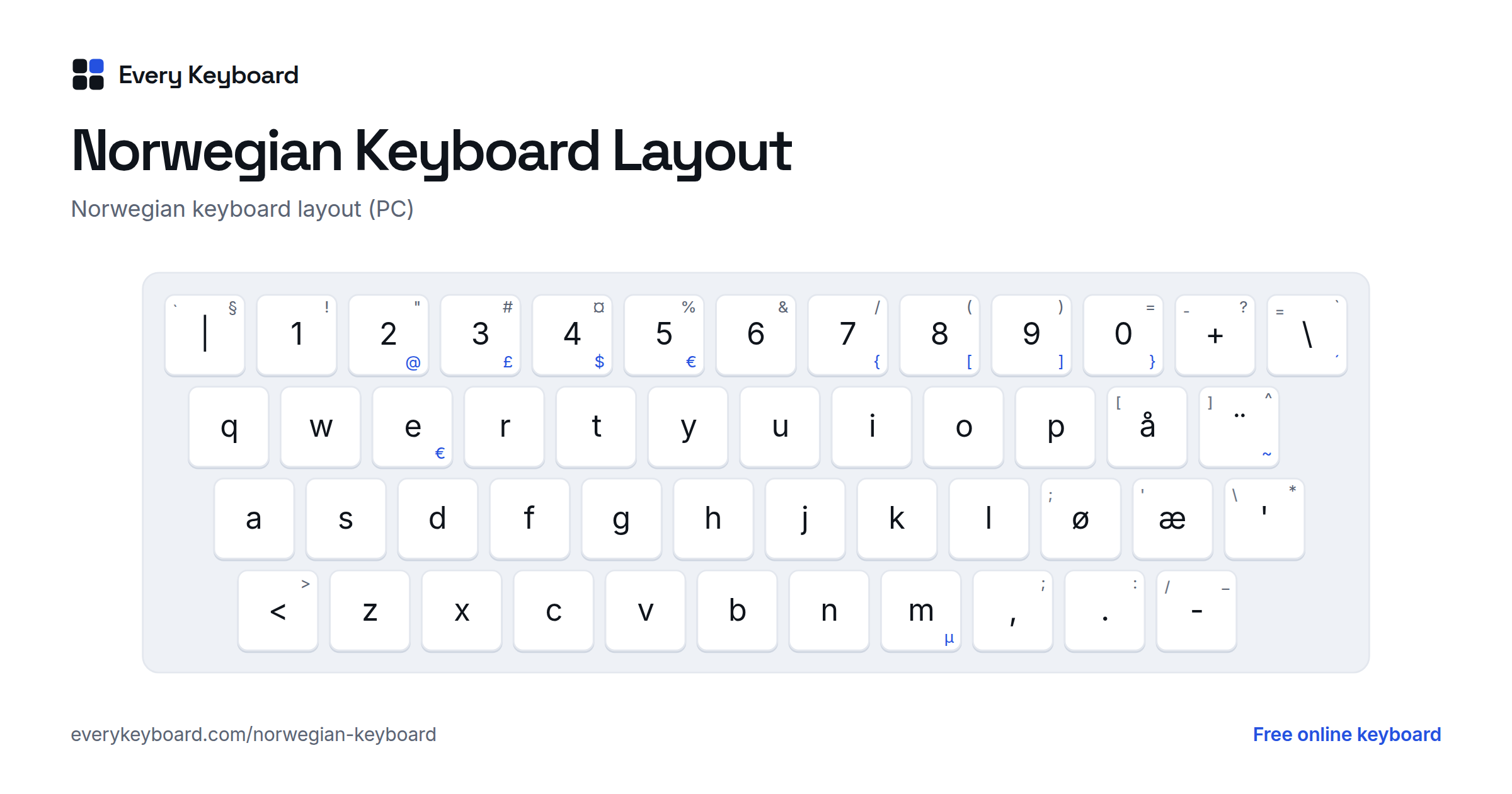
This is the Norwegian layout as Windows and most PCs have it. The letters are in the same QWERTY order as in English; the changes are at the right edge and in the symbols. The small letter on each key is the US key in the same place, and the blue characters need AltGr (the right Alt key).
- å is right of P, and ø æ are right of L, where US keyboards have [ ; '.
- Dead keys: ¨ (right of å) adds ¨ to the next letter, Shift+¨ adds ^ and AltGr+¨ adds ~. Shift+\ (left of Backspace) adds ` and AltGr+\ adds ´, so é is AltGr+\ then e. Press a dead key and then Space to type the mark on its own.
- There's an extra key between left Shift and Z for < >, and a ' * key left of Enter.
Where the symbols are on a Norwegian PC keyboard:
| Character | Norwegian keys |
|---|---|
| @ | AltGr + 2 |
| £ $ € | AltGr + 3, 4, 5 (€ also AltGr + E) |
| { [ ] } | AltGr + 7, 8, 9, 0 |
| \ | the key left of Backspace |
| | § | the key left of 1, with Shift for § |
| " # ¤ & / | Shift + 2, 3, 4, 6, 7 |
| ( ) = | Shift + 8, 9, 0 |
| + ? | the key right of 0, with Shift for ? |
| ' * | the key left of Enter, with Shift for * |
| < > | the key left of Z, with Shift for > |
| ; : _ | Shift + , . - |
| µ | AltGr + M |
Norwegian Mac keyboards have the same letters in the same places, but put some symbols elsewhere. Danish keyboards swap the æ and ø keys, and Swedish keyboards have ö ä in their place.
How to type æ ø å on your computer or phone
Windows
- Hold Alt and type the code on the number pad (see the table above), e.g. Alt+0229 for å.
- No number pad? Add the United States-International keyboard (Settings → Time & language → Language & region → ⋯ next to your language → Language options → Add a keyboard). Then Right Alt+W types å, Right Alt+Z types æ and Right Alt+L types ø. Add Shift for capitals.
- For the real Norwegian layout, go to Settings → Time & language → Language & region → Add a language and pick Norwegian Bokmål (or Nynorsk). Its keyboard is called Norwegian. Switch keyboards with Windows+Space.
Mac
- Option+A: å, Option+': æ, Option+O: ø. Add Shift for Å Æ Ø.
- Or press and hold a or o and pick the letter from the pop-up.
- For the Norwegian layout: System Settings → Keyboard → Text Input → Edit → +, then search for Norwegian.
Microsoft Word
- Ctrl+Shift+@, then a: å
- Ctrl+Shift+&, then a: æ
- Ctrl+/, then o: ø
iPhone and iPad
Press and hold a for å and æ, or o for ø. To add a Norwegian keyboard with its own æ ø å keys, go to Settings → General → Keyboard → Keyboards → Add New Keyboard → Norwegian. Tap the globe key to switch.
Android
Press and hold a or o to pick a letter. To add Norwegian in Gboard, open Settings → Languages → Add keyboard → Norsk bokmål (or Norsk nynorsk). Tap the globe key or hold the space bar to switch.
Chromebook
Settings → Device → Keyboard and inputs → Input settings → Add input methods → Norwegian keyboard. Switch with Ctrl+Space.
Frequently asked questions
How do I type æ, ø and å on an English keyboard?
On this page, click the buttons, or hold Alt (Option on a Mac) and press A for å, ' for æ and O for ø. Add Shift for capitals. On a Mac, Option+A, Option+' and Option+O work in every app. On Windows, use the Alt codes in the table above or the US-International keyboard (Right Alt + W, Z or L).
What can I write if I can't type æ, ø and å?
The standard replacements are ae for æ, oe for ø and aa for å: Tromsoe, Aalesund. Older names and family names often keep aa (Aasen, Haakon). Don't just write a or o: for example, far means father but får means sheep.
Is there a different keyboard for Bokmål and Nynorsk?
No. Bokmål and Nynorsk are two written standards of the same language, and both use the same 29-letter alphabet and the same Norwegian keyboard. Windows lists the language as Norwegian Bokmål or Norwegian Nynorsk, but the keyboard layout is called Norwegian in both cases.
What is the difference between the Norwegian, Danish and Swedish keyboards?
Norwegian and Danish keyboards both have æ ø å, but the keys right of L are swapped: Norwegian has ø then æ, Danish has æ then ø. Swedish keyboards have ö and ä there instead. The å key right of P is the same on all three.
How do I type @ on a Norwegian keyboard?
Press AltGr (the right Alt key) and 2. On Windows, Ctrl+Alt+2 also works. Norwegian Mac keyboards place some symbols differently, so check the keys' printed labels there.
Is my text saved or sent anywhere?
No. Everything happens in your browser. Your draft is kept on your own device so it's still there if you refresh, and it's never uploaded.