How to type in Hebrew with this keyboard
Pick the input mode that suits you with the tabs above the text box:
- Phonetic (best for learners): each English key types the Hebrew letter with a similar sound. B types ב, M types מ, W types ש (sh) and X types ח (ch). Final letters are added for you at the end of each word.
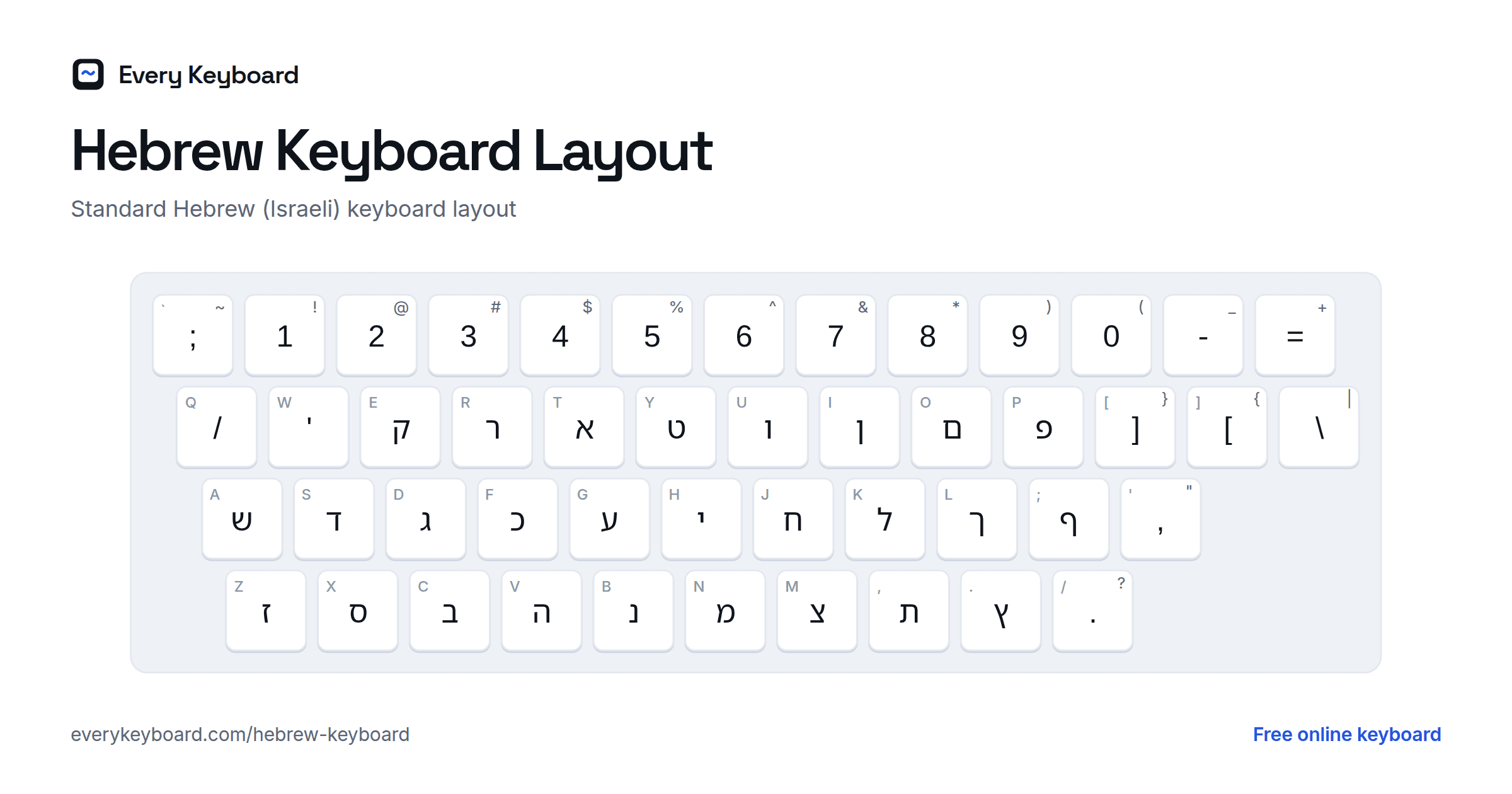
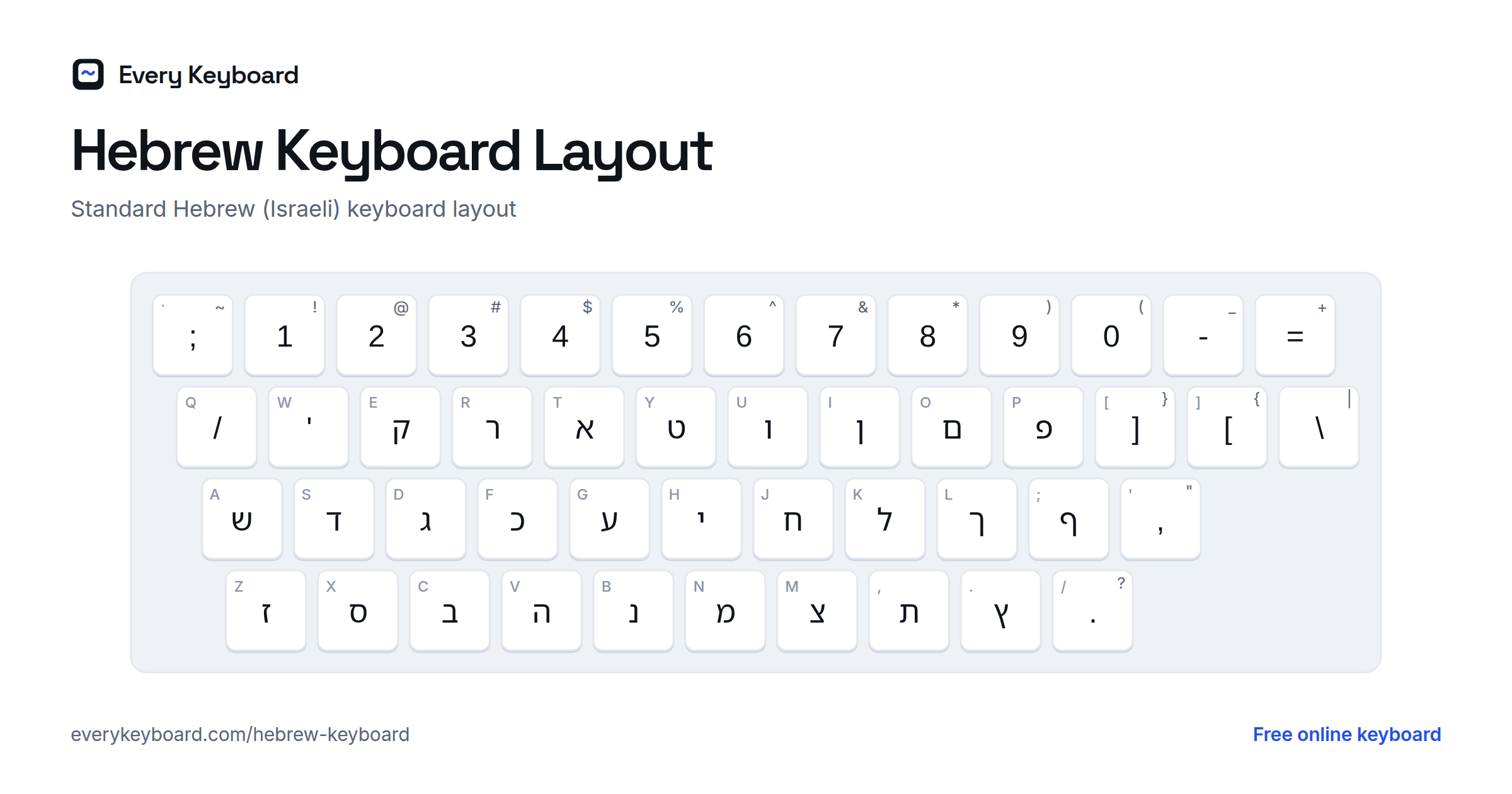
- Standard (Israeli): the layout printed on keyboards in Israel. Use this if you already know it or want to learn it.
- Alphabet: all 22 letters in order, plus final forms and dotted letters, to click one by one.
To add a vowel, open Vowels (nikud), type the letter and then click a vowel; the mark attaches to the letter before it. Press Esc to switch between Hebrew and normal English typing at any time.
Hebrew keyboard layout
This is the standard Israeli keyboard layout (SI-1452). The small letter on each key is the English key it shares, so you can see where every Hebrew letter sits on a normal keyboard.
The phonetic layout puts letters where English speakers expect them, by sound:
The Hebrew alphabet
Hebrew has 22 letters, all consonants, written right to left. Five letters have a different shape at the end of a word, and every letter also has a number value (used in gematria and for Hebrew dates).
| Letter | Name | Sound | Transliteration | Final form | Value |
|---|---|---|---|---|---|
| א | Alef | silent (carries a vowel) | ʾ / a | 1 | |
| ב | Bet / Vet | b (with dot), v | b, v | 2 | |
| ג | Gimel | g as in go | g | 3 | |
| ד | Dalet | d | d | 4 | |
| ה | He | h | h | 5 | |
| ו | Vav | v, or the vowels o / u | v, o, u | 6 | |
| ז | Zayin | z | z | 7 | |
| ח | Chet | ch as in Bach | ḥ, ch | 8 | |
| ט | Tet | t | t | 9 | |
| י | Yod | y, or the vowel i | y, i | 10 | |
| כ | Kaf / Khaf | k (with dot), ch as in Bach | k, kh | ך | 20 |
| ל | Lamed | l | l | 30 | |
| מ | Mem | m | m | ם | 40 |
| נ | Nun | n | n | ן | 50 |
| ס | Samekh | s | s | 60 | |
| ע | Ayin | silent in modern Hebrew | ʿ | 70 | |
| פ | Pe / Fe | p (with dot), f | p, f | ף | 80 |
| צ | Tsadi | ts as in cats | ts, tz | ץ | 90 |
| ק | Qof | k | q, k | 100 | |
| ר | Resh | r (from the throat) | r | 200 | |
| ש | Shin / Sin | sh (dot on right), s (dot on left) | sh, s | 300 | |
| ת | Tav | t | t | 400 |
Hebrew vowels (nikud)
Everyday Hebrew is usually written without vowels, but they're used in children's books, poetry, prayer books and for learners. Here's what each vowel button makes:
| Mark | Name | Sound |
|---|---|---|
| בַ | Patach | a |
| בָ | Kamatz | a |
| בֵ | Tzere | e |
| בֶ | Segol | e |
| בִ | Hiriq | i |
| בֹ | Holam | o |
| בֻ | Kubutz | u |
| בְ | Shva | ə / silent |
| בּ | Dagesh | dot |
| בׁ | Shin dot | sh |
| בׂ | Sin dot | s |
How to add a Hebrew keyboard to your device
Windows
Settings → Time & language → Language & region → Add a language → Hebrew. Switch between keyboards with Windows+Space or Alt+Shift.
Mac
System Settings → Keyboard → Text Input → Edit → + → Hebrew. Choose "Hebrew" for the standard layout or "Hebrew-QWERTY" for a phonetic one. Switch with Control+Space or the Globe key.
iPhone and iPad
Settings → General → Keyboard → Keyboards → Add New Keyboard → Hebrew. Tap the globe key to switch.
Android
In Gboard, open Settings → Languages → Add keyboard → Hebrew. Tap the globe key or hold the space bar to switch.
Chromebook
Settings → Device → Keyboard and inputs → Input settings → Add input methods → Hebrew. Switch with Ctrl+Space.
Frequently asked questions
How do I type Hebrew without a Hebrew keyboard?
Use the Phonetic mode on this page: each English key types the Hebrew letter that sounds like it (b → ב, m → מ, sh sound on W → ש). You can also click the on-screen keys or pick letters from the Alphabet tab, then press Copy.
Does it add final letters automatically?
Yes, in Phonetic mode. When a word ends with כ, מ, נ, פ or צ and you type a space or punctuation, the letter changes to its final form (ך ם ן ף ץ). If you keep typing the word, it switches back.
How do I add vowels (nikud)?
Type a letter, then click a vowel button above the keyboard. The vowel attaches to the letter before it. Each button shows the sound it makes, for example patach and kamatz are both 'a'.
Which way does Hebrew text go?
Right to left. The text box here is set to right-to-left automatically, so punctuation and the cursor behave as they should in Hebrew.
What's the difference between the Phonetic and Standard layouts?
Standard is the layout printed on keyboards sold in Israel (for example, ש is on the A key). Phonetic places letters on the English keys that sound alike, which is much easier if you're learning or only type Hebrew occasionally.
Is my text private?
Yes. Everything runs in your browser. Your draft is kept on your own device so it survives a refresh, and it's never uploaded.