How to type Ukrainian with this keyboard
- Phonetic: each English key types the Ukrainian letter that sounds like it. D is д, I is і and Y is и. The letters with no English match are close by: ` is ї, \ is є and = is ґ.
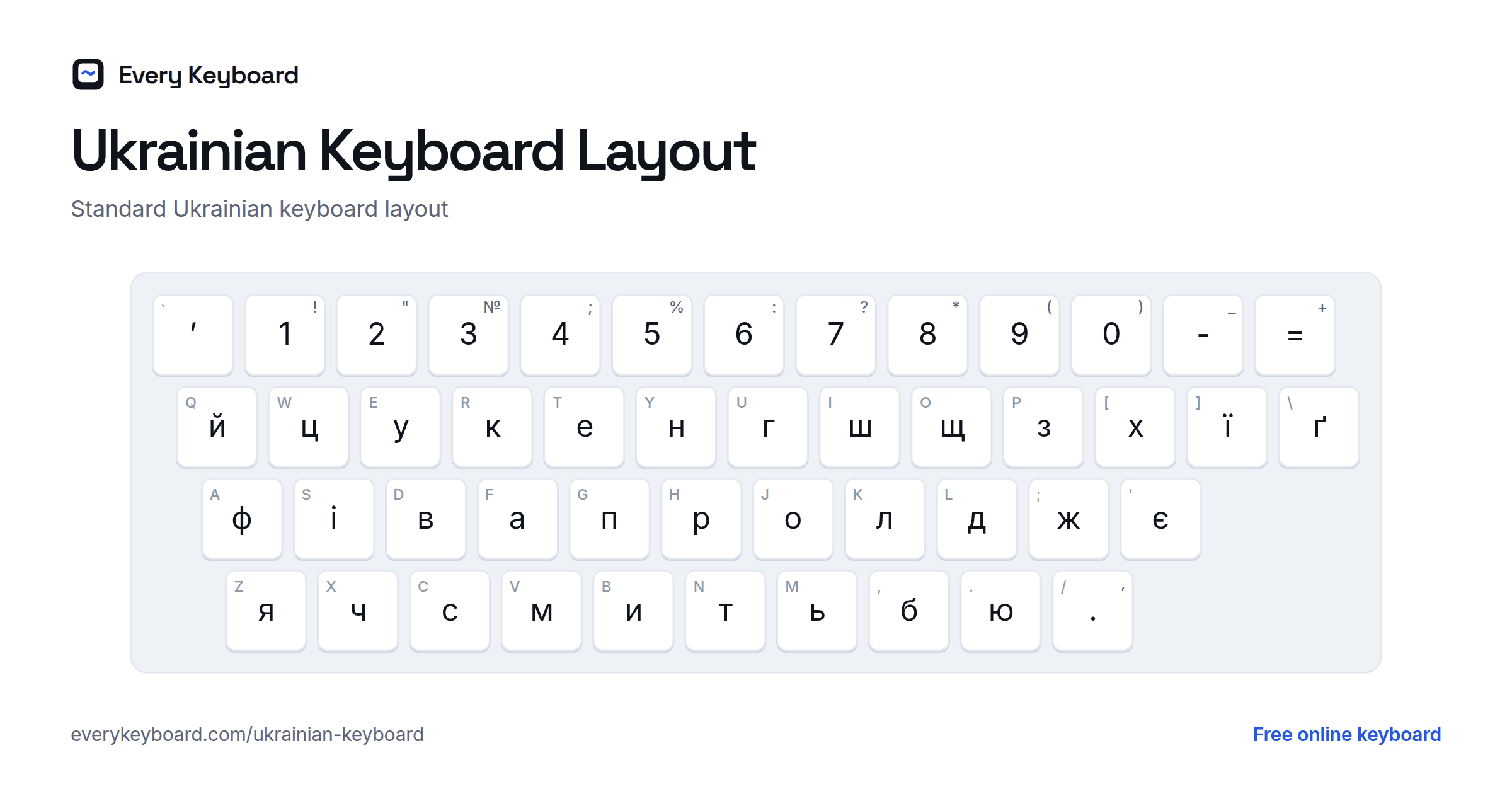
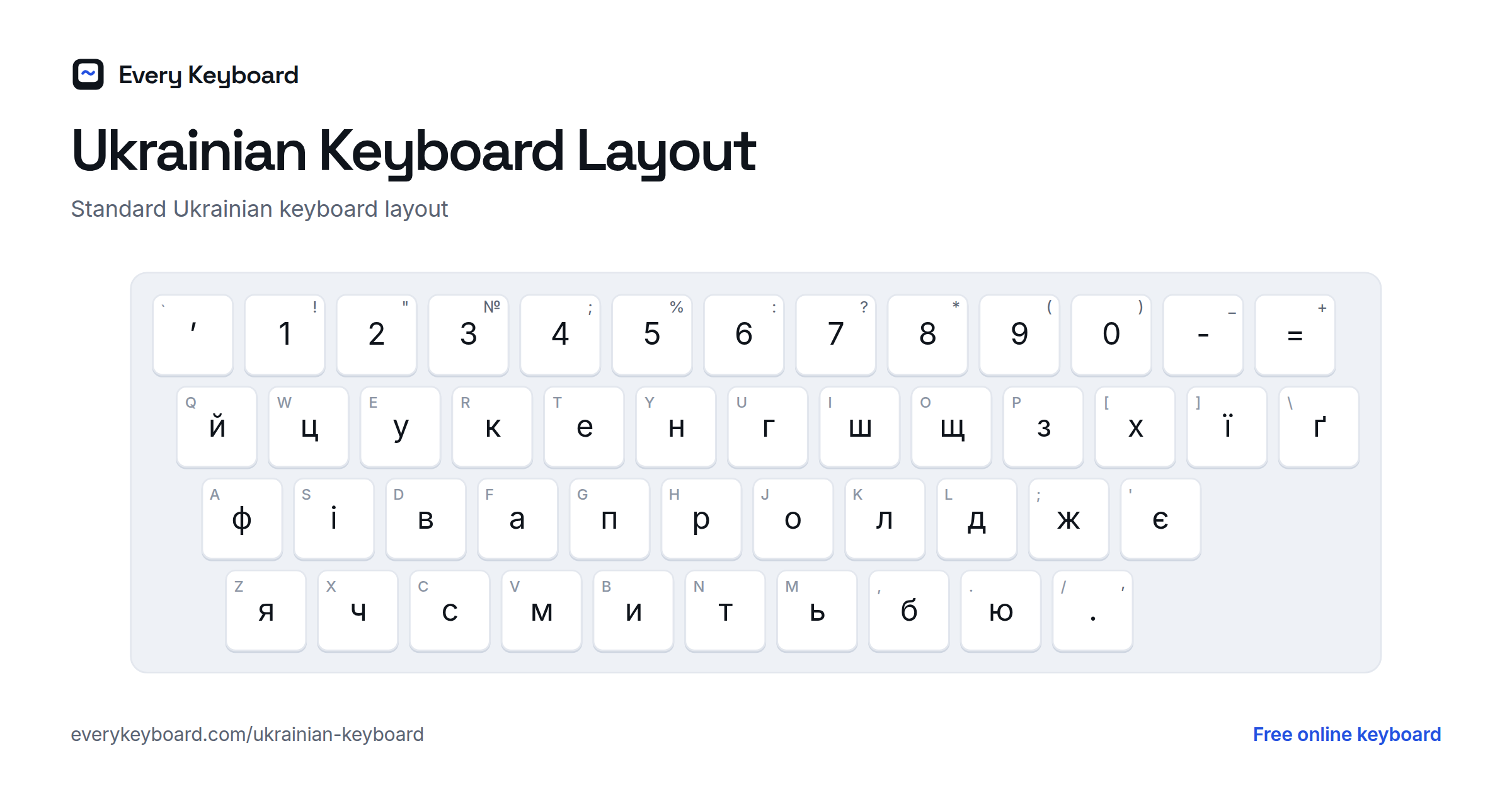
- Standard ЙЦУКЕН: the layout used on keyboards in Ukraine, with ґ included.
- Translit: type in Latin letters and they become Cyrillic. dyakuyu becomes дякую, pryvit becomes привіт.
Press Esc to switch between Ukrainian and normal English typing. The buttons above the keyboard add the apostrophe ʼ, « » quotes, the hryvnia sign ₴ and stress marks.
Ukrainian keyboard layout
The standard Ukrainian layout is based on ЙЦУКЕН, with і, ї, є and ґ in place of the Russian-only letters. The small letter on each key is the English key in the same place.
The phonetic layout on this page puts letters where English speakers expect them:
The Ukrainian alphabet
Ukrainian has 33 letters, plus the apostrophe. Here is each letter with its sound and Latin spelling.
| Letter | Sound | Latin |
|---|---|---|
| А а | a as in father | a |
| Б б | b | b |
| В в | v (w at the end of a syllable) | v |
| Г г | a soft h, from the throat | h |
| Ґ ґ | g as in go | g |
| Д д | d | d |
| Е е | e as in met | e |
| Є є | ye as in yes | ye |
| Ж ж | s as in pleasure | zh |
| З з | z | z |
| И и | i as in bit | y |
| І і | ee as in meet | i |
| Ї ї | yee as in yield | yi |
| Й й | y as in boy | y, i |
| К к | k | k |
| Л л | l | l |
| М м | m | m |
| Н н | n | n |
| О о | o as in more | o |
| П п | p | p |
| Р р | rolled r | r |
| С с | s | s |
| Т т | t | t |
| У у | oo as in boot | u |
| Ф ф | f | f |
| Х х | ch as in Scottish loch | kh |
| Ц ц | ts as in cats | ts |
| Ч ч | ch as in chair | ch |
| Ш ш | sh as in shop | sh |
| Щ щ | shch, as in fresh cheese | shch |
| Ь ь | soft sign: no sound, softens the letter before | ' |
| Ю ю | yu as in use | yu |
| Я я | ya as in yard | ya |
How Ukrainian differs from Russian
The two alphabets look alike, but a Russian keyboard can't type Ukrainian correctly. The key differences:
| Letters | Difference |
|---|---|
| і, ї, є, ґ | Ukrainian only. Russian has none of these letters. |
| ы, э, ъ, ё | Russian only. Ukrainian doesn't use them. |
| г | An h sound in Ukrainian, a g sound in Russian. Ukrainian writes the g sound as ґ. |
| и | Like i in bit in Ukrainian, like ee in meet in Russian (Ukrainian writes that sound as і). |
| ʼ | The apostrophe is part of Ukrainian spelling (сімʼя, мʼясо), where Russian uses ъ or ь. |
Translit: typing Ukrainian in Latin letters
| Cyrillic | Type |
|---|---|
| а б в г ґ д е з и і й к л м н о п р с т у ф ц | a b v h g d e z y i j k l m n o p r s t u f c |
| ж | zh |
| х | kh, x |
| ч | ch |
| ш | sh |
| щ | shch |
| є | ye, je |
| ї | yi, ji |
| ю | yu, ju |
| я | ya, ja |
| ь (soft sign) | ' |
| ʼ (apostrophe) | '' |
How to add a Ukrainian keyboard to your device
Windows
Settings → Time & language → Language & region → Add a language → Ukrainian. Choose the Ukrainian (Enhanced) keyboard to get ґ. Switch with Windows+Space.
Mac
System Settings → Keyboard → Text Input → Edit → + → Ukrainian. Switch with Control+Space.
iPhone and iPad
Settings → General → Keyboard → Keyboards → Add New Keyboard → Ukrainian.
Android
In Gboard, open Settings → Languages → Add keyboard → Ukrainian.
Chromebook
Settings → Device → Keyboard and inputs → Input settings → Add input methods → Ukrainian.
Frequently asked questions
How do I type Ukrainian letters like ї, є and ґ?
Click them on the on-screen keyboard, or use Phonetic mode where ` types ї, \ types є and = types ґ. In Translit mode, type yi for ї, ye for є and g for ґ.
How do I type the Ukrainian apostrophe?
Click the ʼ button above the keyboard, press the ` key in Standard mode, or type two apostrophes ('') in Translit mode. It's used in words like сімʼя (family) and мʼясо (meat).
Can I use a Russian keyboard to type Ukrainian?
Not properly. A Russian layout is missing і, ї, є, ґ and the apostrophe, all of which Ukrainian needs. Use this Ukrainian keyboard or add a Ukrainian layout to your device.
What's the difference between the standard and phonetic Ukrainian layouts?
The standard layout is the one printed on keyboards in Ukraine. The phonetic layout puts each letter on the English key that sounds similar, which is much easier if you're learning Ukrainian or only type it occasionally.
Is my text private?
Yes. Everything runs in your browser and your draft is kept on your own device. Nothing is uploaded.