How to type Italian accents with this keyboard
There are three ways to type Italian accents here. Use whichever feels quickest:
- Click or tap the accent buttons above the keyboard. Hold Shift while clicking (or press Shift on the on-screen keyboard first) for capitals such as À or È.
- Alt shortcuts: hold Alt (Option on a Mac) and press the vowel. Alt+A gives à, Alt+E gives è, and pressing Alt+E twice gives é. Add Shift for capitals. Alt+, and Alt+. type « and », and Alt+4 types €.
- Quick codes: switch on quick codes and type a vowel followed by a backtick for the grave accent: a` → à, e` → è, o` → ò. Type e' for é, and << or >> for « and ». Quick codes are off by default because Italian uses the apostrophe a lot (l'amico, un po').
Used to an Italian keyboard? Choose Italian layout above the text box. Your keyboard then types like one bought in Italy: ò and à sit right of L, è and + right of P. Press Esc to switch back to normal typing. The Rare accents button shows ó, í, ú and î, which you'll only need for dictionary-style spelling.
Italian accents: grave and acute
Italian uses two accents. The grave accent (accento grave, `) goes on à, è, ì, ò and ù. The acute accent (accento acuto, ´) is only needed on é. In everyday writing, accents appear almost only on the last letter of a word, to show that the stress falls there.
- à, ì, ò, ù always take the grave accent: città, così, però, più. Some publishers write í and ú, but ì and ù are the standard spelling.
- è is an open e: è (is), caffè, cioè, tè.
- é is a closed e: perché, poiché, affinché, benché, né, sé and the compounds of tre, like ventitré. Writing perchè is a common mistake.
- Short words that would otherwise look the same: è (is) and e (and), là (there) and la (the), sì (yes) and si (oneself), dà (gives) and da (from), né (nor) and ne (of it).
- No accent on other one-syllable words: qui, qua, su, re, tre, fa, va, sto, blu. But ciò, già, giù, più, può do take one.
- An apostrophe is not an accent. Un po' (short for poco) takes an apostrophe, and qual è takes neither.
Dictionaries and language courses also mark open and closed e and o inside words: pésca (fishing) and pèsca (peach), bótte (barrel) and bòtte (blows). You won't see this in normal texts, but the Rare accents buttons cover ó if you need it.
Italian accent codes (Windows Alt codes, Mac, HTML)
To type these characters in other apps: on Windows, hold Alt and type the code on the number pad with Num Lock on. On a Mac with a US or UK layout, use the Option shortcuts.
| Character | Name | Example | Alt code (Windows) | Mac | HTML |
|---|---|---|---|---|---|
| à À | a with grave accent | città, già | Alt+0224 · Alt+0192 | Option+` then a | à |
| è È | e with grave accent (open e) | è, caffè, cioè | Alt+0232 · Alt+0200 | Option+` then e | è |
| é É | e with acute accent (closed e) | perché, né, ventitré | Alt+0233 · Alt+0201 | Option+E then e | é |
| ì Ì | i with grave accent | così, lunedì | Alt+0236 · Alt+0204 | Option+` then i | ì |
| ò Ò | o with grave accent | però, può | Alt+0242 · Alt+0210 | Option+` then o | ò |
| ù Ù | u with grave accent | più, virtù | Alt+0249 · Alt+0217 | Option+` then u | ù |
| « » | angle quotes (virgolette basse) | «Ciao», disse. | Alt+0171 · Alt+0187 | Option+\ and Option+Shift+\ | « » |
| € | euro sign | 10 € | Alt+0128 | Option+Shift+2 | € |
The Italian keyboard layout
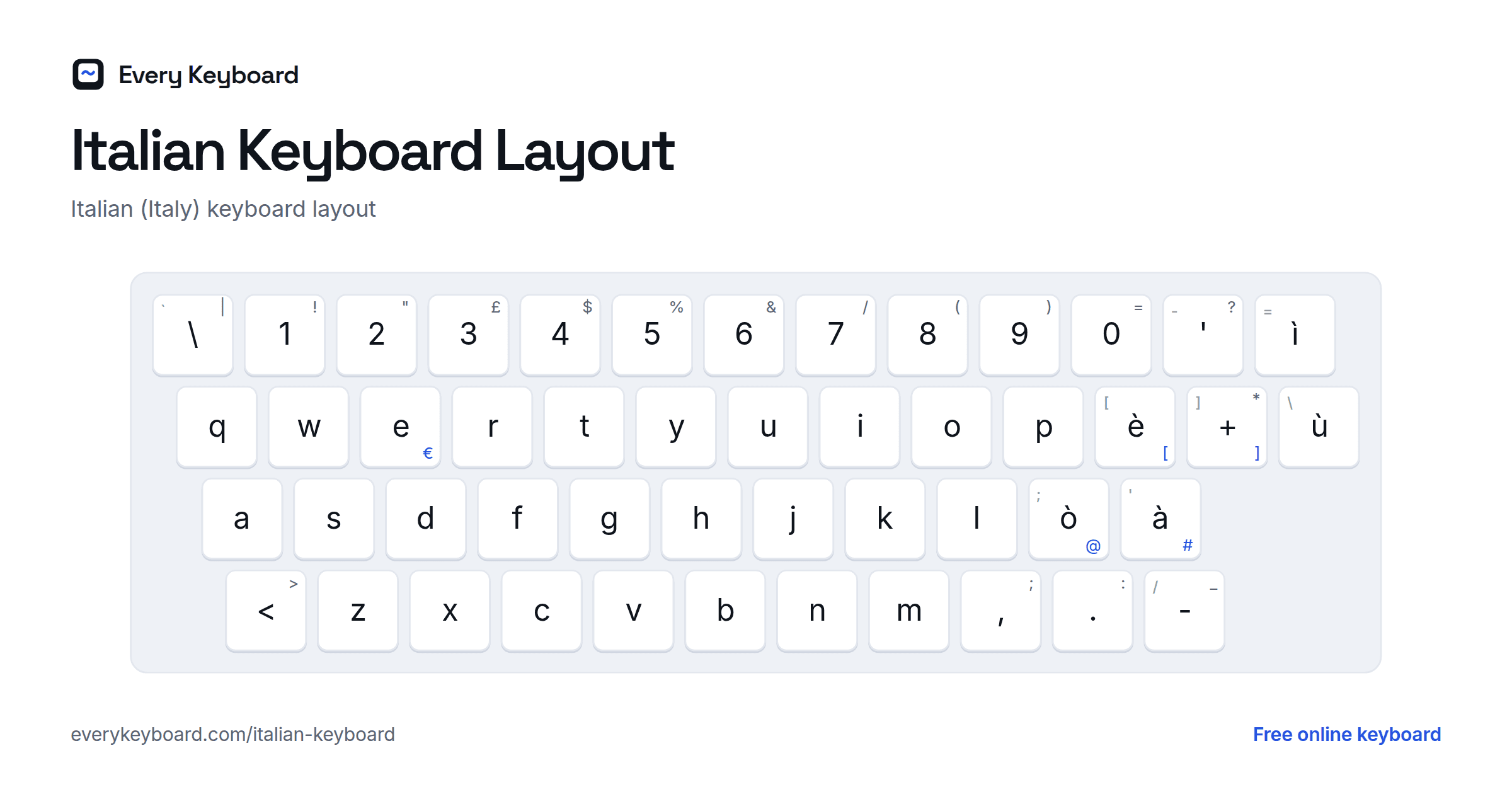
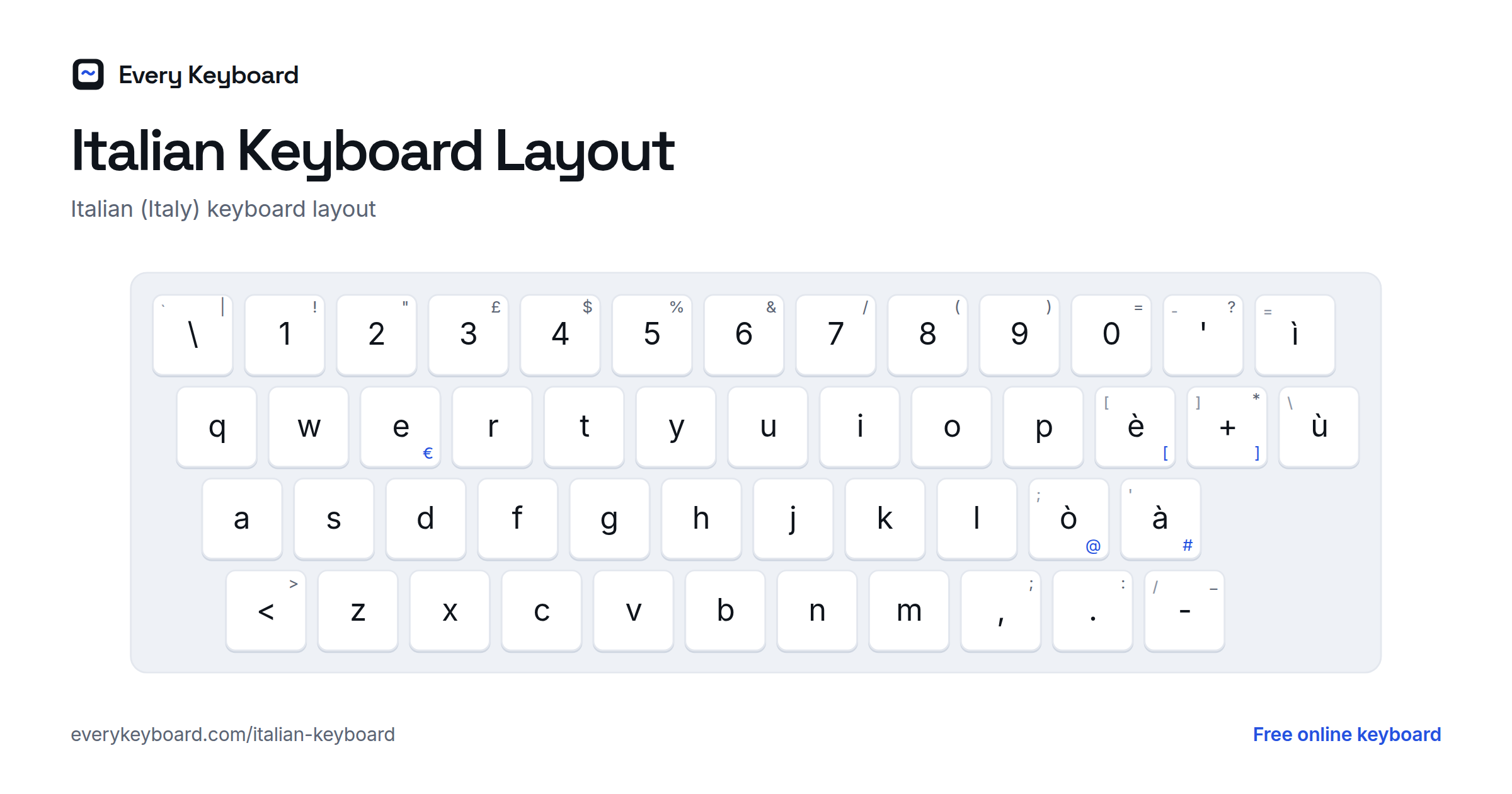
Keyboards sold in Italy use a QWERTY layout with the accented letters on their own keys, to the right of the letters. The small letter on each key below is the US key in the same place. This is the Windows layout; Mac keyboards sold in Italy are arranged differently.
- ò à ù are on the home row, right of L. è is right of P, and ì is right of 0 and '.
- Shift turns è into é, ò into ç, à into ° and ù into §.
- AltGr (the right Alt key) gives the symbols with no key of their own: AltGr+ò is @, AltGr+à is #, AltGr+è and AltGr++ are [ and ], and AltGr+E is €.
- There are no dead keys and no key for ~ or ` on the Windows Italian layout. Use Alt+126 for ~ and Alt+96 for `.
How to type a capital È
È ("it is") often starts a sentence, but the Italian keyboard has no key for it: Shift+è gives é instead. Many people write E' as a workaround, but that is a typewriter habit and not correct Italian. Here are the proper ways:
- On this page: hold Shift and click è, or press Alt+Shift+E.
- Windows: hold Alt and type 0200 on the number pad.
- Mac (US layout): press Option+`, then Shift+E. Or hold Shift+E and pick È from the pop-up.
- Microsoft Word: press Ctrl+`, then Shift+E.
- iPhone and Android: turn on Shift, then press and hold E and slide to È.
How to type Italian accents on your own computer or phone
Windows
Settings → Time & language → Language & region → Add a language → Italian (Italy). This adds the Italian keyboard shown above. Switch with Windows+Space. If you'd rather keep your US layout, add the United States-International keyboard instead (⋯ next to your language → Language options → Add a keyboard): then ` followed by a vowel types à è ì ò ù, and ' followed by e types é.
Mac
With your usual US layout, press Option+` then a vowel for à è ì ò ù, and Option+E then e for é. You can also press and hold a letter key to pick an accent. To add the Italian layout: System Settings → Keyboard → Text Input → Edit → + → Italian. Switch with Control+Space.
Microsoft Word
- Ctrl+`, then the vowel: à è ì ò ù
- Ctrl+', then e: é
iPhone and iPad
Press and hold a vowel and slide to the accent you need. To add an Italian keyboard: Settings → General → Keyboard → Keyboards → Add New Keyboard → Italian. Tap the globe key to switch.
Android
In Gboard, press and hold a vowel for its accents. To add Italian: Gboard Settings → Languages → Add keyboard → Italian. Tap the globe key or hold the space bar to switch.
Chromebook
Settings → Device → Keyboard and inputs → Input settings → Add input methods → Italian. Switch with Ctrl+Space. You can also type any character with Ctrl+Shift+U, its Unicode code (e.g. e8 for è), then Space.
Frequently asked questions
How do I type Italian accents without an Italian keyboard?
Click the accent buttons above the keyboard on this page, or hold Alt (Option on a Mac) and press the vowel: Alt+A gives à, Alt+E gives è, and Alt+E twice gives é. Then press Copy and paste the text wherever you need it.
What is the difference between è and é?
Both are e, but è (grave accent) is an open e, as in è (is) and caffè, while é (acute accent) is a closed e, as in perché, né and ventitré. Words ending in -ché always take é.
How do I type a capital È?
On this page, hold Shift and click è, or press Alt+Shift+E. On Windows, hold Alt and type 0200 on the number pad. On a Mac, press Option+` then Shift+E. Don't write E' instead: it's a typewriter habit, and È is correct.
Is it perchè or perché?
Perché, with an acute accent. The same goes for poiché, affinché, benché, finché and the other words ending in -ché, because the final e is closed.
Is it po' or pò?
Po', with an apostrophe. It's short for poco, so the apostrophe marks the missing letters. Pò is a common mistake. The quick codes on this page leave o' alone for this reason.
Is my text saved or sent anywhere?
No. Everything happens in your browser. Your draft is kept on your own device so it's still there if you refresh, and it's never uploaded.