How to type German letters with this keyboard
Pick a mode above the text box. US keyboard + umlauts keeps your keyboard as it is and adds the German letters. German QWERTZ makes your keyboard type like one bought in Germany or Austria. In the first mode, there are three ways to type umlauts:
- Click or tap the blue buttons above the keyboard. Hold Shift while clicking (or press Shift on the on-screen keyboard first) for capitals.
- Alt shortcuts: hold Alt (Option on a Mac) and press A, O, U or S for ä ö ü ß. Add Shift for Ä Ö Ü ẞ. Alt+, and Alt+. type the German quotes „ and “, and Alt+4 types €.
- Quick codes: switch on quick codes and type ae, oe or ue to get ä, ö or ü, and s= for ß. They're off by default because plenty of words really are spelled with these pairs, like Michael, Israel, Poet or aktuell. The tool leaves ue alone after q, a and e (Quelle, Mauer, neue).
In German QWERTZ mode, the ´ key (left of Backspace) and the ^ key (left of 1) are dead keys, as on a real German keyboard: press ´ then e for é, Shift+´ then a for à, ^ then o for ô. Press Esc to switch back to normal typing at any time.
German umlauts and ß explained
German adds four letters to the Latin alphabet. The dots are not decoration: they change the sound, and often the meaning.
- ä sounds like the e in "bet" when short (Männer) and like a long "eh" when long (spät, Käse).
- ö has no English equivalent: say "ay" (or "eh") with your lips rounded as for "oh". It's close to the eu in French peu: schön, Öl, können.
- ü is "ee" said with rounded lips, like the u in French tu: über, Tür, müde.
- ß, called Eszett or scharfes S, is a sharp s sound. Since the 1996 spelling reform it is written after long vowels and diphthongs (Straße, groß, heißen, Fuß), while short vowels take ss (Fluss, muss, dass). Switzerland and Liechtenstein don't use ß at all and always write ss.
- Umlauts often mark plurals and other word forms: Apfel → Äpfel, Haus → Häuser, alt → älter.
Leaving the dots off can turn one word into another:
| Without umlaut | With umlaut |
|---|---|
| schon (already) | schön (beautiful) |
| zahlen (to pay) | zählen (to count) |
| Bruder (brother) | Brüder (brothers) |
| drucken (to print) | drücken (to press) |
| Mutter (mother) | Mütter (mothers) |
The ae, oe, ue and ss rule
When you can't type umlauts, the standard fallback is to write the vowel followed by e: ä → ae, ö → oe, ü → ue, and ß → ss. Müller becomes Mueller, Straße becomes Strasse, Größe becomes Groesse. Germans read this without trouble, and it's what you'll see in email addresses, web addresses and the machine-readable lines of German passports.
Two things to keep in mind: writing plain a, o, u instead (Muller) is wrong and can change the meaning, and some names are spelled with oe or ue on purpose, like Goethe, so the replacement only works in one direction. In all-caps text, ß becomes SS or the capital ẞ: STRASSE or STRAẞE.
German characters and Alt codes
For Windows Alt codes, hold Alt and type the number on the number pad, with Num Lock on. The capital ẞ has no Alt code: in Word, type 1e9e and press Alt+X, or copy it from this page.
| Character | Name | Example | Alt code (Windows) | HTML | Without it |
|---|---|---|---|---|---|
| ä Ä | a umlaut | Mädchen, spät | Alt+0228 · Alt+0196 | ä | ae |
| ö Ö | o umlaut | schön, Österreich | Alt+0246 · Alt+0214 | ö | oe |
| ü Ü | u umlaut | über, Tür | Alt+0252 · Alt+0220 | ü | ue |
| ß ẞ | Eszett (sharp s) | Straße, groß | Alt+0223 | ß · ẞ | ss |
| „ | low opening quote | „Hallo“ | Alt+0132 | „ | |
| “ | closing quote | „Hallo“ | Alt+0147 | “ | |
| € | euro sign | 20 € | Alt+0128 | € |
Older three-digit codes work too: Alt+132 for ä, Alt+148 for ö, Alt+129 for ü, Alt+142 for Ä, Alt+153 for Ö, Alt+154 for Ü and Alt+225 for ß. They come from the old DOS character set; the codes starting with 0 are the ones that work the same everywhere.
German quotation marks open low and close high: „Guten Tag“. Books also use guillemets pointing inward: »Guten Tag«. Like French, German uses a decimal comma (3,5 %) and puts the euro sign after the amount (20 €).
The German QWERTZ keyboard layout
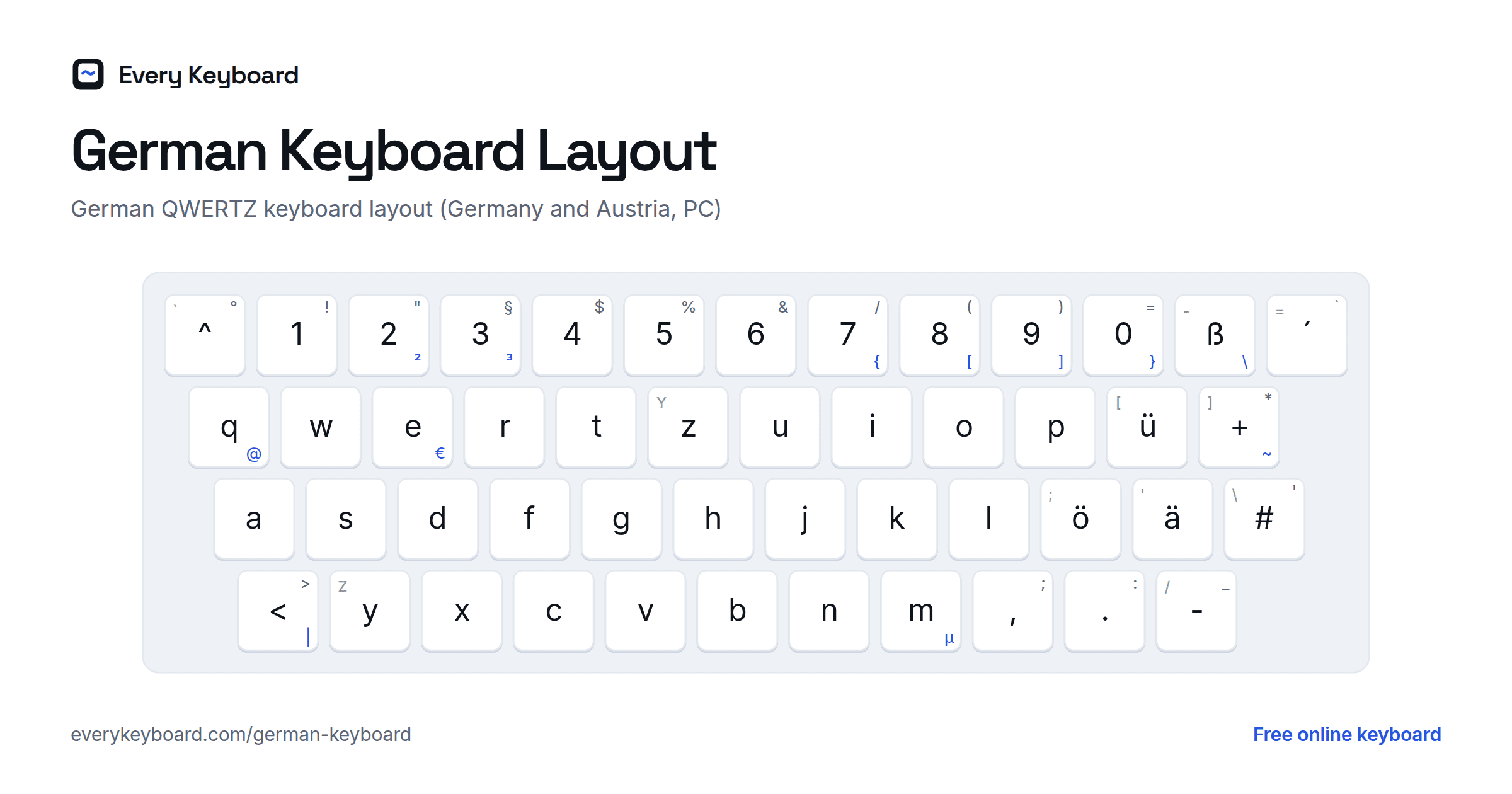
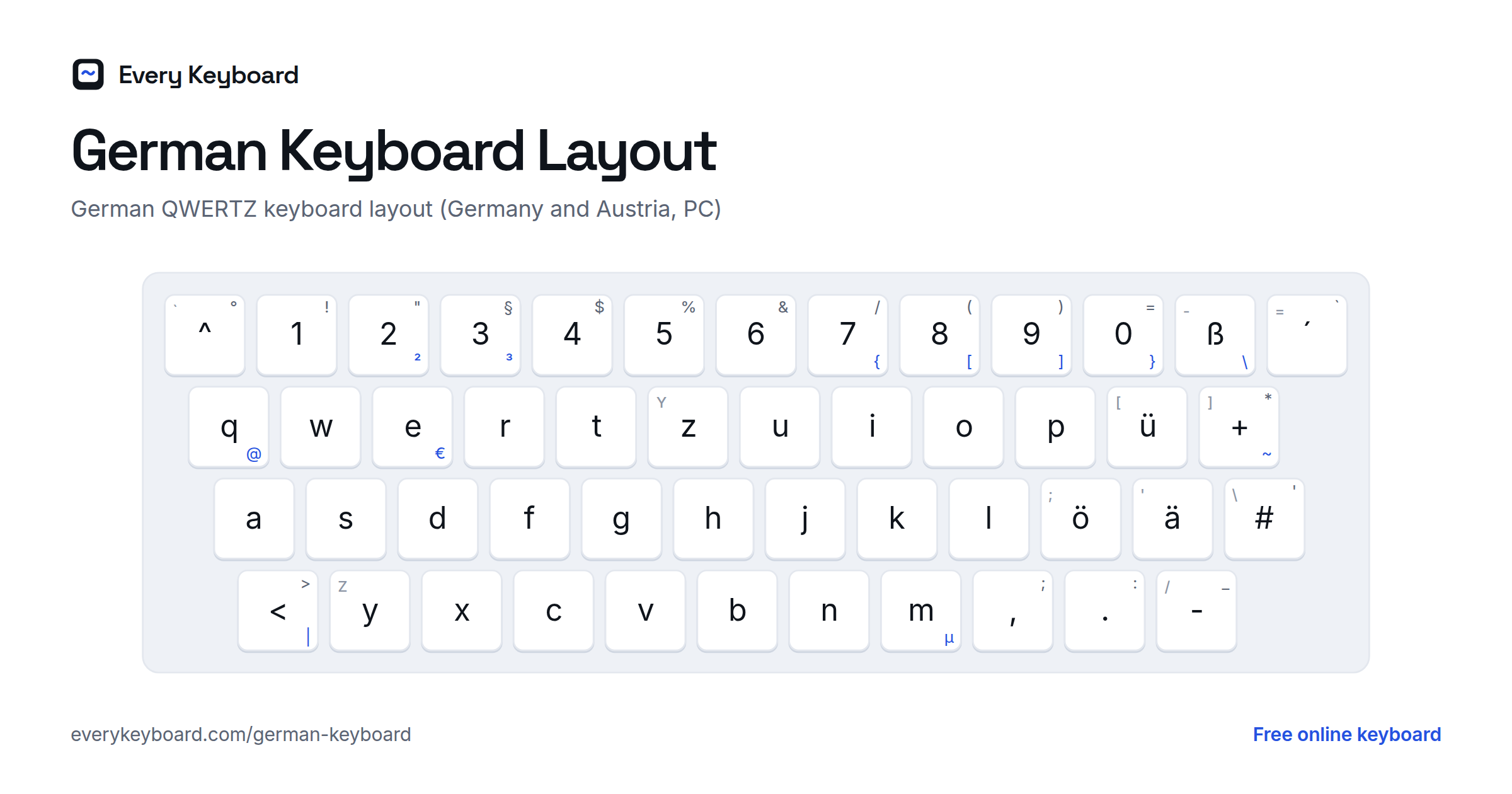
Keyboards in Germany and Austria use QWERTZ, named after the first six letters of the top row. This is the layout as Windows and most PCs have it (the German "T1" layout). The small letter on each key is the US key in the same place.
- Z and Y are swapped compared with English keyboards.
- ü ö ä sit where US keyboards have [ ; ', and ß is right of 0.
- Dead keys: ^ (left of 1) and ´ ` (left of Backspace) add an accent to the next letter. Press them and then Space to type the mark on its own.
- There's an extra key between left Shift and Y for < > and |, and a # key left of Enter.
Symbols move around too. On a German PC keyboard, many of them need Shift or AltGr (the right Alt key):
| Character | QWERTZ keys |
|---|---|
| @ | AltGr + Q |
| € | AltGr + E |
| { [ ] } | AltGr + 7, 8, 9, 0 |
| \ | AltGr + ß |
| ~ | AltGr + + |
| | | AltGr + < |
| µ | AltGr + M |
| ² ³ | AltGr + 2, AltGr + 3 |
| " § | Shift + 2, Shift + 3 |
| / ( ) = | Shift + 7, 8, 9, 0 |
| ? | Shift + ß |
| ' (apostrophe) | Shift + # |
German Mac keyboards have the same letters but put some symbols elsewhere: @ is Option+L and € is Option+E. Swiss keyboards are also QWERTZ, but with no ß key and with French accents where the umlauts are.
How to type umlauts on your computer or phone
Mac (US keyboard)
- Option+U, then the vowel: ä ö ü (add Shift to the vowel for Ä Ö Ü)
- Option+S: ß
- Option+Shift+W: „ and Option+[: “
- Or press and hold a, o, u or s to pick from the pop-up.
Windows
- Hold Alt and type the code on the number pad (see the table above), e.g. Alt+0252 for ü.
- No number pad? Add the United States-International keyboard (Settings → Time & language → Language & region → ⋯ next to your language → Language options → Add a keyboard). Then type " then a vowel for ä ö ü, and Right Alt+S for ß. To type a plain quote mark, press " then Space.
- To type on a real QWERTZ layout, add the German (Germany) language on the same page. Its default keyboard is German QWERTZ. Switch keyboards with Windows+Space.
Microsoft Word
- Ctrl+Shift+:, then the vowel: ä ö ü
- Ctrl+Shift+&, then s: ß
iPhone and iPad
Press and hold a, o or u for the umlaut, and s for ß. To add a German keyboard, go to Settings → General → Keyboard → Keyboards → Add New Keyboard → German, where you can choose QWERTZ or QWERTY. Tap the globe key to switch.
Android
Press and hold a letter to pick an umlaut. To add German in Gboard, open Settings → Languages → Add keyboard → Deutsch (Deutschland), then choose QWERTZ or QWERTY. Tap the globe key or hold the space bar to switch.
Chromebook
Settings → Device → Keyboard and inputs → Input settings → Add input methods → German keyboard for QWERTZ, or US International for QWERTY with umlauts. Switch with Ctrl+Space.
Frequently asked questions
How do I type German umlauts on an English keyboard?
On this page, click the ä ö ü ß buttons, or hold Alt (Option on a Mac) and press A, O, U or S. Add Shift for capitals. In other apps, use the Mac Option+U shortcut, the Windows Alt codes in the table above, or the US-International keyboard.
Can I write ae, oe, ue and ss instead?
Yes, when umlauts or ß aren't available, ae, oe, ue and ss are the accepted replacements (Mueller, Strasse). Don't just drop the dots: schon and schön are different words. Names on passports and tickets are often written this way too.
Why are Z and Y swapped on a German keyboard?
Z is far more common in German than Y, so the German QWERTZ layout puts Z where English keyboards have Y, under an easy index-finger reach. Y moves to the bottom left.
How do I type @ on a German keyboard?
Press AltGr (the right Alt key) and Q. On a German Mac keyboard it's Option+L. Ctrl+Alt+Q also works on Windows if your keyboard has no AltGr key.
Is there a capital ß?
Yes. The capital ẞ was officially added to German spelling in 2017. In all caps you can write either STRASSE or STRAẞE. On this page, hold Shift and click ß, or press Alt+Shift+S.
Is my text saved or sent anywhere?
No. Everything happens in your browser. Your draft is kept on your own device so it's still there if you refresh, and it's never uploaded.