How to type Turkish letters with this keyboard
Pick a layout with the tabs on the keyboard. Turkish Q shows the layout used on almost every computer in Turkey. US keyboard + accents shows a plain US keyboard. In both, there are four ways to type the Turkish letters:
- Click or tap the buttons above the keyboard, or the keys on the keyboard. Hold Shift while clicking (or press Shift or Caps on the on-screen keyboard first) for capitals. The capitals follow Turkish rules: ı becomes I, and i becomes İ.
- Alt shortcuts: hold Alt (Option on a Mac) and press C, G, I, O, S or U for ç ğ ı ö ş ü. Add Shift for Ç Ğ Ö Ş Ü, and Alt+Shift+I for the dotted capital İ. Press Alt+I twice for î, Alt+U twice for û, and Alt+A for â. Alt+T types the lira sign ₺.
- Quick codes: switch on quick codes and type a letter followed by
=:c=→ ç,g=→ ğ,s=→ ş,o=→ ö,u=→ ü. For the i,=toggles the dot:i=→ ı andI=→ İ. Typea^,i^oru^for â î û. They're off by default so that an ordinary = sign stays as typed. - Type as on a Turkish keyboard: click Type as if on a Turkish keyboard under the keyboard, and your own keys type like a Turkish Q keyboard: the key right of P gives ğ, the key right of L gives ş, and so on. Shift+3 is the ^ dead key: press it, then a vowel, for â î û. Press Esc to go back to normal typing.
Dotted i and dotless ı: the Turkish I explained
Turkish has two different letter i's, and each has its own capital:
- i and İ (dotted): sounds like the ee in "see", only shorter. The capital keeps its dot: İstanbul, İzmir, İngilizce.
- ı and I (dotless): a sound English doesn't have, close to the a in "about" said with the lips spread. The capital has no dot: Isparta, ılık, kız.
They are not interchangeable. Replacing one with the other gives a different word, or no word at all:
| With ı | With i |
|---|---|
| kıl (body hair) | kil (clay) |
| kır (countryside) | kir (dirt) |
| sınır (border) | sinir (nerve) |
| ılık (lukewarm) | ilik (bone marrow) |
The two letters come from the 1928 alphabet reform, which gave Turkish one letter per sound. Because a plain capital I belongs to ı, a word like istanbul in capitals is İSTANBUL, and ılık is ILIK. Software set to English gets this wrong and writes ISTANBUL, which a Turkish reader sees as a misspelling. It's such a common bug that programmers call it "the Turkish I problem". On this keyboard, Shift and Caps always follow the Turkish rule.
On the Turkish Q layout the letters sit on two keys: the key where English keyboards have I types ı (Shift: I), and the key right of ş types i (Shift: İ). People switching from an English keyboard often type ı by mistake at first.
The Turkish alphabet and how to pronounce it
The Turkish alphabet has 29 letters. It has no Q, W or X, and adds six letters English doesn't have: Ç, Ğ, dotless I ı, Ö, Ş and Ü. The dotted i is the ordinary i, except that its capital keeps the dot (İ). Spelling is very regular: each letter has one sound, so once you know the letters you can read any word aloud.
| Letter | Name | Sound | Example |
|---|---|---|---|
| A a | a | a as in father, but short | anne (mother) |
| B b | be | b | baba (father) |
| C c | ce | j as in jam, never k or s | cami (mosque) |
| Ç ç | çe | ch as in church | çay (tea) |
| D d | de | d | deniz (sea) |
| E e | e | e as in bed | ev (house) |
| F f | fe | f | fil (elephant) |
| G g | ge | g as in go | gün (day) |
| Ğ ğ | yumuşak ge | silent: it lengthens the vowel before it, or glides like a light y after e and i | dağ (mountain), değil (not) |
| H h | he | h as in hat | hava (weather) |
| I ı | ı | no English match: like the a in about, said with the lips spread | kız (girl), ılık (lukewarm) |
| İ i | i | ee as in see, but short | iki (two), İstanbul |
| J j | je | s as in measure | garaj (garage) |
| K k | ke | k | kitap (book) |
| L l | le | l | lale (tulip) |
| M m | me | m | masa (table) |
| N n | ne | n | nar (pomegranate) |
| O o | o | o as in more, but short | okul (school) |
| Ö ö | ö | like German ö or the eu in French peu: say e with rounded lips | göz (eye) |
| P p | pe | p | para (money) |
| R r | re | a lightly tapped r | renk (color) |
| S s | se | s as in sun | su (water) |
| Ş ş | şe | sh as in shoe | şeker (sugar) |
| T t | te | t | tuz (salt) |
| U u | u | oo as in book | uzun (long) |
| Ü ü | ü | like German ü or French u: say ee with rounded lips | gül (rose) |
| V v | ve | v, often softer than in English | var (there is) |
| Y y | ye | y as in yes | yol (road) |
| Z z | ze | z | zaman (time) |
Two letters surprise English speakers most: c always sounds like the j in "jam" (Cuma, Friday, is "joo-mah"), and ğ is never pronounced as a g. It never starts a word; it makes the vowel before it longer, so dağ (mountain) sounds like "daa" and yağmur (rain) like "yaa-moor".
Â, Î and Û: the circumflex
The circumflex (şapka, "hat") appears mostly in words from Arabic and Persian. It marks a long vowel, or a softer k, g or l before it, and sometimes it's the only thing that tells two words apart: kar (snow) and kâr (profit), hala (aunt) and hâlâ (still). Î is used in adjectives such as millî (national) and askerî (military), and Û in a few words such as mahkûm (convict). Many writers leave the circumflex out, but dictionaries and careful writing keep it.
Turkish characters and Alt codes
For Windows Alt codes, hold Alt and type the number on the number pad, with Num Lock on. The codes for ç ö ü â î û work on any Windows PC. The codes marked "Turkish PC" depend on Windows' language settings: on a PC set up for Turkish they type ğ ı İ ş, while on an English PC the same numbers type ð ý Ý þ. The Unicode code works everywhere in Word: type it, then press Alt+X.
| Character | Name | Alt code (Windows) | Unicode (Word: Alt+X) | HTML |
|---|---|---|---|---|
| ç Ç | c cedilla | Alt+0231 · Alt+0199 | 00E7 · 00C7 | ç |
| ğ Ğ | soft g (g breve) | Alt+0240 · Alt+0208 (Turkish PC) | 011F · 011E | ğ |
| ı I | dotless i | Alt+0253 (Turkish PC) | 0131 | ı |
| İ | dotted i (capital İ) | Alt+0221 (Turkish PC) | 0130 (İ) | İ (İ) |
| ö Ö | o umlaut | Alt+0246 · Alt+0214 | 00F6 · 00D6 | ö |
| ş Ş | s cedilla | Alt+0254 · Alt+0222 (Turkish PC) | 015F · 015E | ş |
| ü Ü | u umlaut | Alt+0252 · Alt+0220 | 00FC · 00DC | ü |
| â Â | a circumflex | Alt+0226 · Alt+0194 | 00E2 · 00C2 | â |
| î Î | i circumflex | Alt+0238 · Alt+0206 | 00EE · 00CE | î |
| û Û | u circumflex | Alt+0251 · Alt+0219 | 00FB · 00DB | û |
Turkish uses the same quotation marks as English (“ ”), and sometimes « ». An apostrophe separates a suffix from a proper name: İstanbul’da (in Istanbul), Ayşe’nin (Ayşe's). The Turkish lira sign ₺ was introduced in 2012.
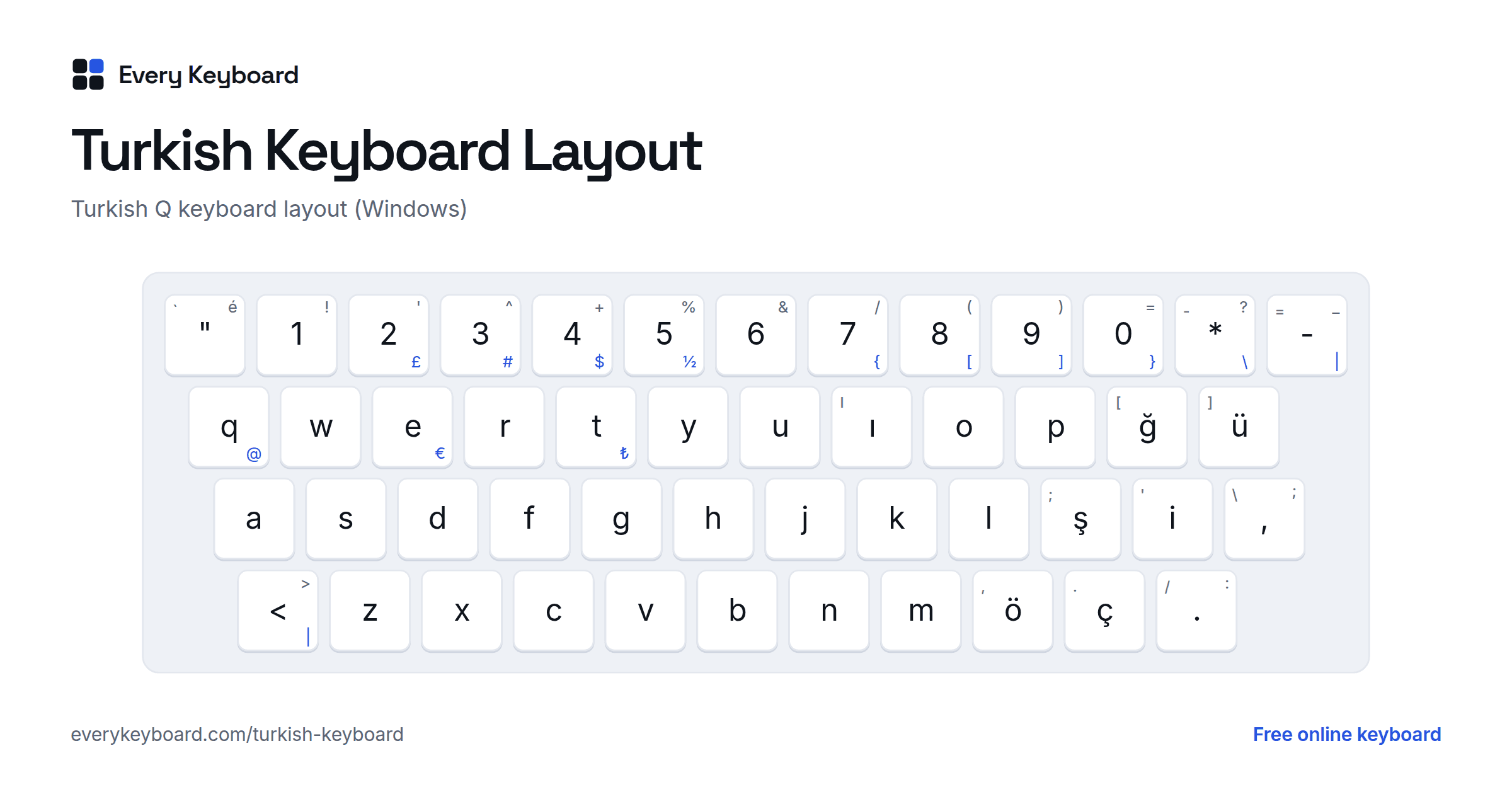
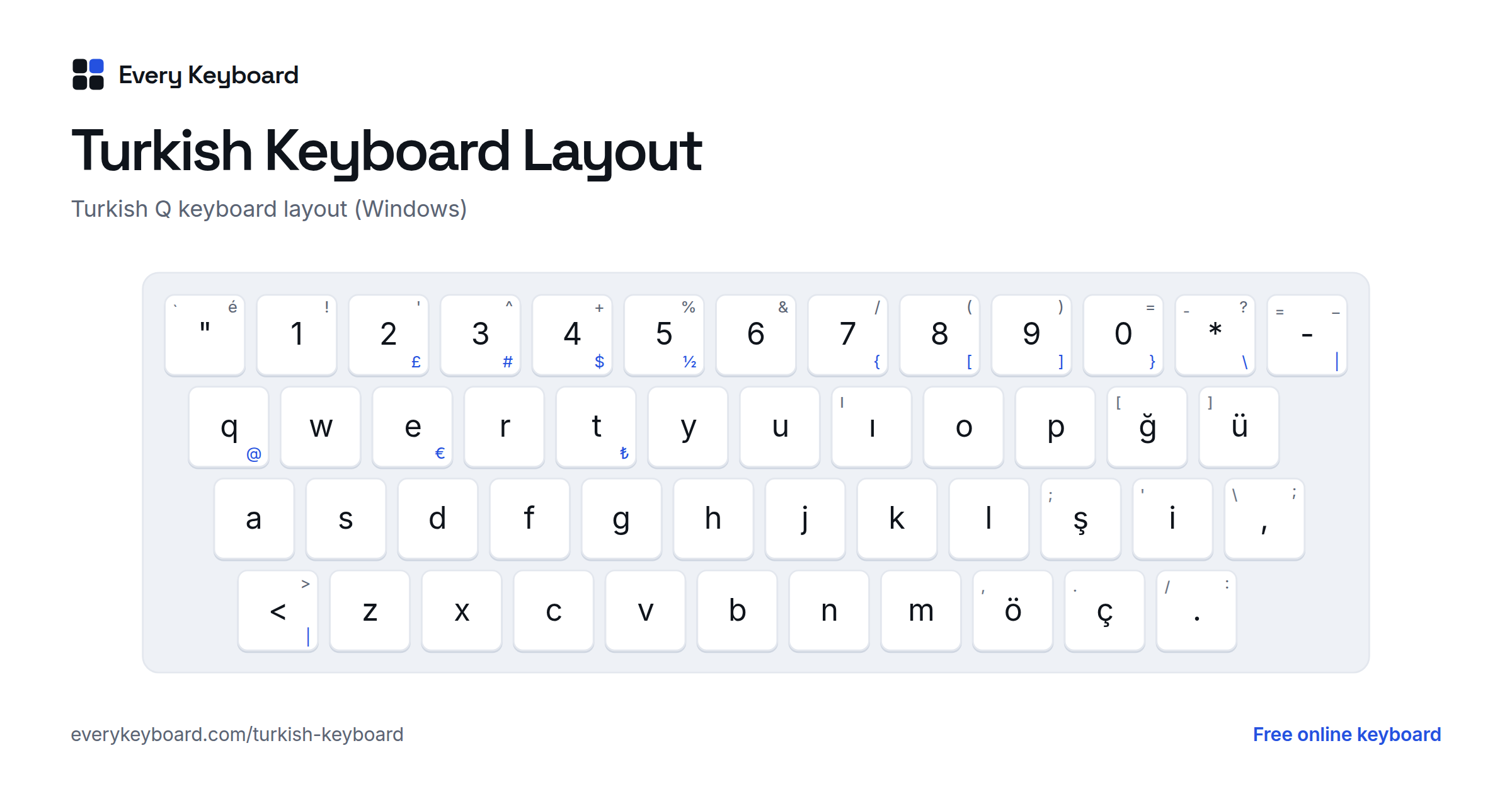
The Turkish Q keyboard layout
Nearly all computers in Turkey use Turkish Q. The letters are in the usual QWERTY places, and the Turkish letters sit on the keys English keyboards use for punctuation. This is the Windows layout; the small letter on each key is the US key in the same place, and the blue characters need AltGr (the right Alt key).
- ğ ü are right of P, ş i right of L, and ö ç right of M.
- The I key types dotless ı, and dotted i has its own key right of ş. Shift gives I and İ.
- The key left of 1 types ", with é on Shift. The key right of 0 is * (Shift: ?) and the next one is - (Shift: _).
- Shift + 3 is a dead key for the circumflex: press it, then a, i or u for â î û. Press it and then Space for a plain ^.
- There's an extra key between left Shift and Z for < >, and a , ; key left of Enter.
Many symbols move compared with a US keyboard:
| Character | Turkish Q keys |
|---|---|
| @ | AltGr + Q |
| € | AltGr + E |
| ₺ (Turkish lira) | AltGr + T |
| { [ ] } | AltGr + 7, 8, 9, 0 |
| \ | AltGr + * (right of 0) |
| | | AltGr + - (left of Backspace) |
| # $ | AltGr + 3, AltGr + 4 |
| ' (apostrophe) | Shift + 2 |
| + % | Shift + 4, Shift + 5 |
| / ( ) = | Shift + 7, 8, 9, 0 |
| ? | Shift + * |
| " and é | The " key left of 1, and Shift + that key |
| , ; | The key left of Enter, and Shift + that key |
| . : | The key right of ç, and Shift + that key |
Turkey also has a second layout, Turkish F, named after its first key. It arranges the letters by how often they appear in Turkish and puts the vowels under the left hand. It's an official standard and popular in typing competitions, but far fewer people use it. Turkish Mac keyboards use a Turkish Q layout with the letters in the same places and some symbols elsewhere.
How to add a Turkish keyboard to your computer or phone
Windows
- Go to Settings → Time & language → Language & region → Add a language, and choose Türkçe. Its default keyboard is Turkish Q. For Turkish F, click ⋯ next to Türkçe → Language options → Add a keyboard.
- Switch keyboards with Windows+Space, or from the language button on the taskbar.
- Without a Turkish keyboard, use the Alt codes in the table above, or type here and paste.
Mac
- Go to System Settings → Keyboard → Text Input → Edit → + → Turkish, and pick Turkish Q. Switch with the input menu in the menu bar or Control+Space.
- On a US keyboard: Option+C types ç, and Option+U then o or u types ö or ü. The other letters need the Turkish input source or this page.
Microsoft Word
- Type the Unicode code from the table above and press Alt+X:
011F→ ğ,0131→ ı,0130→ İ,015F→ ş. - Ctrl+, then c: ç. Ctrl+Shift+: then o or u: ö ü.
- Set the language to Turkish (Review → Language) so that spelling and capitals follow Turkish rules.
iPhone and iPad
Go to Settings → General → Keyboard → Keyboards → Add New Keyboard → Turkish, and choose the Q or F layout. Tap the globe key to switch. On the English keyboard you can also press and hold a letter, such as c, s or g, and slide to the accented version.
Android
In Gboard, open Settings → Languages → Add keyboard → Türkçe, then choose a layout (Q or F). Tap the globe key or hold the space bar to switch. On other keyboards, press and hold a letter to see its accented versions.
Chromebook
Go to Settings → Device → Keyboard and inputs → Input settings → Add input methods, and choose the Turkish keyboard (Q) or Turkish-F. Switch with Ctrl+Space.
Frequently asked questions
How do I type Turkish letters on an English keyboard?
On this page, click the buttons above the keyboard, or hold Alt (Option on a Mac) and press C, G, I, O, S or U for ç ğ ı ö ş ü. Alt+Shift+I gives the capital İ. With quick codes on, type c= for ç, s= for ş, i= for ı and I= for İ. Then press Copy and paste the text anywhere.
What is the difference between i and ı in Turkish?
They are two separate letters with different sounds. Dotted i sounds like ee in see, and its capital keeps the dot: İ. Dotless ı is a back vowel close to the a in about, and its capital is a plain I. Swapping them changes words: kil is clay, kıl is body hair.
How do I type a capital İ with a dot?
Click the İ button, press Alt+Shift+I on this page, or turn on quick codes and type I=. On the Turkish Q layout, press Shift and the i key right of ş. In Word on Windows, type 0130 and press Alt+X. On phones, a Turkish keyboard gives İ when you press Shift and i.
Why does my text say ISTANBUL instead of İSTANBUL in capitals?
Programs that aren't set to Turkish use the English rule, where the capital of i is I. In Turkish the capital of i is İ, and I is the capital of ı. Set the document or app language to Turkish, or type the capitals yourself. This keyboard always follows the Turkish rule: Shift + i gives İ and Shift + ı gives I.
What is the difference between the Turkish Q and Turkish F keyboards?
Turkish Q keeps the English QWERTY letter order and adds ç ğ ı ö ş ü on the keys to the right, so it's easy to learn and it's what most computers in Turkey use. Turkish F was designed in the 1950s around how often each letter appears in Turkish, and is still favored by some professional typists. This page uses Turkish Q.
How do I type the Turkish lira sign ₺?
Click the ₺ button or press Alt+T on this page. On a Turkish Q keyboard in Windows, press AltGr+T. Its Unicode code is 20BA: in Word, type 20BA and press Alt+X.