How to type in Urdu with this keyboard
- Roman Urdu: type Urdu in English letters, the way you would in a chat, and it turns into Urdu script as you type. aap kaise hain becomes آپ کیسے ہیں. See the rules below.
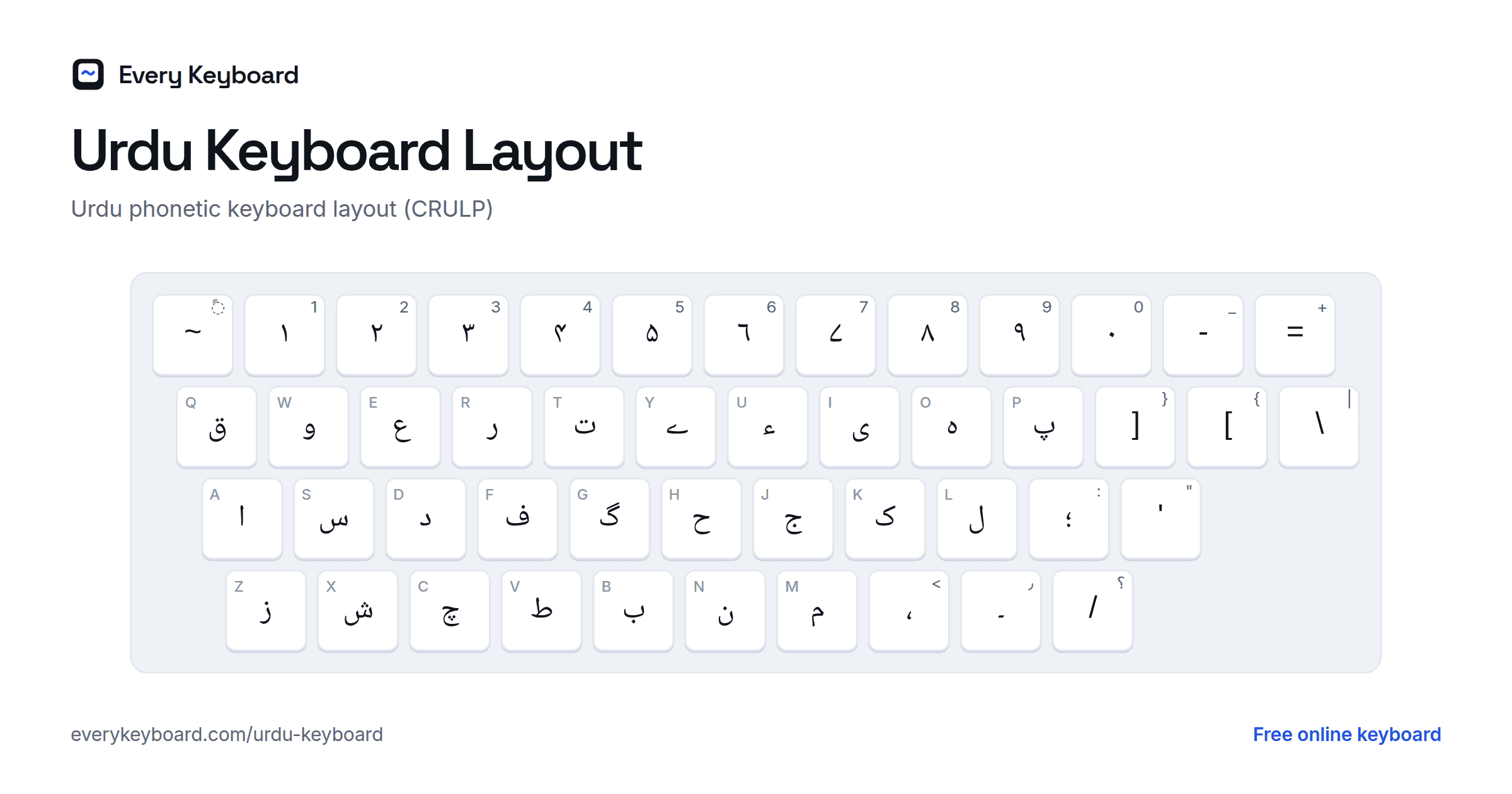
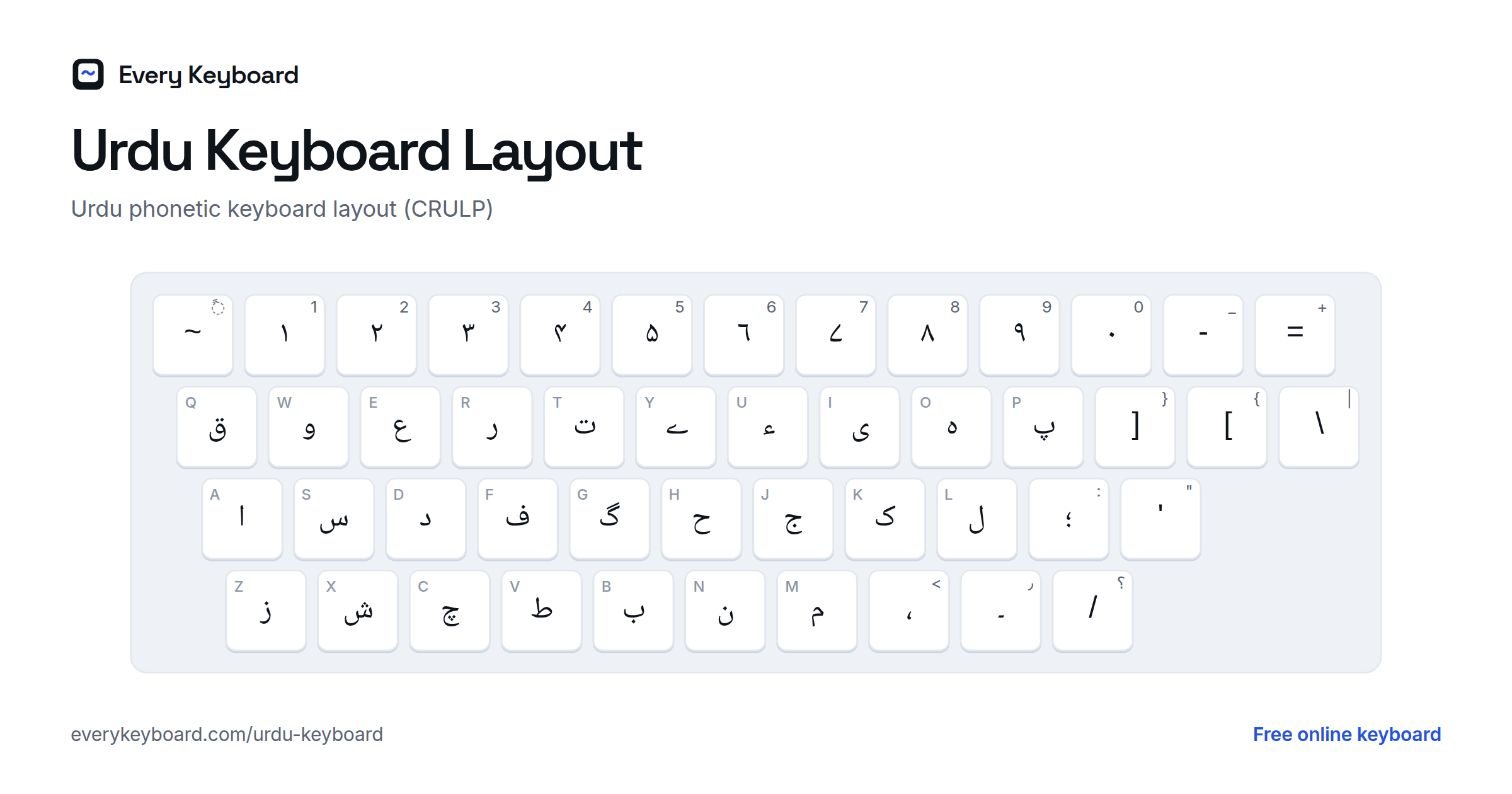
- Phonetic: type on your normal keyboard and each key gives the Urdu letter that sounds like it. This is the CRULP phonetic layout, the one most people in Pakistan learn. S types س, L types ل, M types م, and Shift gives a related letter: Shift+T is ٹ.
- Alphabet: all 39 letters in order, plus آ ؤ ئ ۃ and Urdu digits, to click one by one.
Try typing pakistan: P A K I S T A N gives پاکیستان; Urdu drops the ی, so the correct spelling پاکستان is P A K S T A N. The buttons above the keyboard add ۔ ، ؟ and the hardest letters to find. Open Aerab for zabar, zer, pesh and the other marks. Press Esc to switch between Urdu and normal English typing.
Roman Urdu: typing Urdu in English letters
Roman Urdu spelling varies from person to person, so this mode follows the most common habits and knows the spelling of everyday words (hai, nahi, kya, mujhe, pakistan and about 180 more). Short vowels inside a word are left out, as they are in written Urdu. For a long vowel, double it: paani, naam. Backspace removes the last English letter, so you can fix a word as you go.
| Urdu | Type |
|---|---|
| ب پ ت ج د ر ز س ف ق ک گ ل م ن | b p t j d r z s f q k g l m n |
| ٹ ڈ ڑ | tt dd rr |
| چ / چھ | ch / chh |
| خ / کھ | kh / khh |
| غ / گھ | gh / ghh |
| بھ پھ تھ جھ دھ | bh ph th jh dh |
| ش ژ | sh zh |
| ہ و ی | h, w or v, y |
| ا (آ at the start) | aa (a at the start or end) |
| ی (ے at the end of a word) | ee, e, ai |
| و | o, oo |
| ں (main, hain get it automatically) | N |
| ص ظ ض ط ح | S Z D T H |
| ع | ' (apostrophe) |
| ۔ ، ؟ | . , ? |
kh gives خ at the start of a word (khush) and کھ inside one (dekho, rakhna). gh gives گھ (ghar); type gh' for غ.
Urdu phonetic keyboard layout (CRULP)
The small letter on each key is the English key it shares. The number row types Urdu digits (۱۲۳), and Shift plus a number types a Western digit.
With Shift held, you get the retroflex letters, ں, ھ, the heavier Arabic letters and the aerab:
The Urdu alphabet
Urdu is written right to left in a form of the Perso-Arabic script, usually in the flowing Nastaliq style. The alphabet most often taught in Pakistan has 39 letters (some lists count 38, or add آ). Like Arabic, the letters join up, and short vowels are normally left out.
| Letter | Name | Sound | Transliteration | Phonetic key |
|---|---|---|---|---|
| ا | alif | a as in about, or long a (carries vowels at the start of a word) | a, ā | A |
| ب | be | b | b | B |
| پ | pe | p | p | P |
| ت | te | soft t, tongue on the teeth | t | T |
| ٹ | ṭe | hard t, tongue curled back (retroflex) | ṭ | Shift+T |
| ث | se | s (in Arabic loanwords) | s, s̱ | Shift+C |
| ج | jīm | j as in jam | j | J |
| چ | che | ch as in chair | ch | C |
| ح | baṛī he | h (in Arabic loanwords) | h, ḥ | H |
| خ | khe | ch as in Scottish loch | kh | Shift+K |
| د | dāl | soft d, tongue on the teeth | d | D |
| ڈ | ḍāl | hard d, tongue curled back (retroflex) | ḍ | Shift+D |
| ذ | zāl | z (in Arabic loanwords) | z, ẕ | Shift+Z |
| ر | re | tapped r | r | R |
| ڑ | ṛe | a flapped r with the tongue curled back; no English equivalent | ṛ | Shift+R |
| ز | ze | z | z | Z |
| ژ | zhe | s as in measure (rare, from Persian) | zh | Shift+X |
| س | sīn | s | s | S |
| ش | shīn | sh as in shop | sh | X |
| ص | su'ād | s (in Arabic loanwords) | s, ṣ | Shift+S |
| ض | zu'ād | z (in Arabic loanwords) | z, ẓ | Shift+J |
| ط | to'e | t (in Arabic loanwords) | t, ṭ | V |
| ظ | zo'e | z (in Arabic loanwords) | z, ẓ | Shift+V |
| ع | ʿain | usually silent; carries or lengthens a vowel | ʿ | E |
| غ | ghain | like a French r, gargled | gh | Shift+G |
| ف | fe | f | f | F |
| ق | qāf | a k made further back in the throat | q | Q |
| ک | kāf | k | k | K |
| گ | gāf | g as in go | g | G |
| ل | lām | l | l | L |
| م | mīm | m | m | M |
| ن | nūn | n | n | N |
| ں | nūn ghunna | no n sound: makes the vowel before it nasal, as in French bon | ṉ, ñ | Shift+N |
| و | vā'o | v or w, or the vowels o and ū | v, w, o, ū | W |
| ہ | choṭī he | h; at a word end often a short a sound | h, a | O |
| ھ | do-chashmī he | adds breath to the letter before it: بھ bh, پھ ph, کھ kh, گھ gh | h (in bh, ph...) | Shift+H |
| ء | hamza | separates two vowels, as in جرأت or آئے | ʾ | U |
| ی | choṭī ye | y, or the vowel ī as in machine | y, ī | I |
| ے | baṛī ye | e as in café, or ai; only at the end of a word | e, ai | Y |
Aspirated letters with ھ
Urdu writes breathy consonants as a letter plus ھ (do-chashmī he, Shift+H). Use ھ only for these, and ہ (O) for an ordinary h:
| Letters | Sound |
|---|---|
| بھ | bh |
| پھ | ph |
| تھ | th |
| ٹھ | ṭh |
| جھ | jh |
| چھ | chh |
| دھ | dh |
| ڈھ | ḍh |
| ڑھ | ṛh |
| کھ | kh |
| گھ | gh |
Aerab (Urdu vowel marks)
Urdu normally leaves out short vowels. Aerab are added in textbooks, poetry, religious text or to show how a word is pronounced. Type the letter first, then the mark:
| Example | Name | Use | Phonetic key |
|---|---|---|---|
| بَ | Zabar | short a | Shift+Y |
| بِ | Zer | short i | Shift+I |
| بُ | Pesh | short u | Shift+P |
| بْ | Jazm | no vowel after the letter | Shift+Q |
| بّ | Tashdeed | doubles the letter | Shift+W or Shift+F |
| بٰ | Khari zabar | long ā (as in علیٰ) | Shift+E |
| بً | Do zabar (tanween) | -an (as in فوراً) | Shift+` |
| بٔ | Hamza above | izafat / hamza (as in خانۂ) | Shift+L |
| ب٘ | Noon ghunna mark | nasal sound | Shift+M |
How Urdu letters differ from Arabic
Urdu takes the 28 Arabic letters and adds letters for sounds Arabic doesn't have. From Persian it has پ چ ژ گ (p, ch, zh, g). Its own additions are the retroflex ٹ ڈ ڑ, marked with a small ط on top, plus ں for nasal vowels, ھ for aspirated sounds and ے for a final e.
Some letters look almost the same but are different characters. If you type Arabic ones in Urdu text, it may look slightly wrong and won't match in search. This keyboard always types the Urdu characters:
| Urdu | Arabic | Letter | Difference |
|---|---|---|---|
| ک | ك | kāf | Urdu kāf (U+06A9) has no small mark inside; Arabic kāf (U+0643) does. |
| ی | ي | ye | Urdu choṭī ye (U+06CC) has no dots at the end of a word; Arabic yāʾ (U+064A) keeps them. |
| ہ | ه | he | Urdu choṭī he (U+06C1) joins differently from Arabic hāʾ (U+0647). |
| ۃ | ة | tā marbūṭa | Urdu writes Arabic loanwords with ۃ or ت, as in صلوٰۃ and رحمت. |
| ۴ ۵ ۶ ۷ | ٤ ٥ ٦ ٧ | digits | The digits used for Urdu (U+06F0 to U+06F9) have different shapes for 4, 5, 6 and 7. |
Urdu also has its own punctuation: the full stop is ۔ (a dash-like mark, called khatma), and the comma and question mark are the reversed ، and ؟.
How to add an Urdu keyboard to your device
Android (Gboard)
Open the Gboard app (or Settings → System → Languages & input → On-screen keyboard → Gboard), then Languages → Add keyboard → Urdu. Depending on your version, Gboard may offer more than one Urdu layout; try them and keep the one you find easiest. Tap the globe key or hold the space bar to switch languages.
iPhone and iPad
Settings → General → Keyboard → Keyboards → Add New Keyboard → Urdu. Tap the globe key to switch.
Windows
Settings → Time & language → Language & region → Add a language → Urdu. Windows' built-in Urdu keyboard is not the same as the CRULP phonetic layout; if you want the layout on this page, install the free CRULP Urdu phonetic keyboard. Switch with Windows+Space or Alt+Shift.
Mac
System Settings → Keyboard → Text Input → Edit → + → Urdu. Switch with Control+Space or the Globe key.
Chromebook
Settings → Device → Keyboard and inputs → Input settings → Add input methods, then search for Urdu. Switch with Ctrl+Space.
Frequently asked questions
How do I type Urdu with an English keyboard?
Use this page's Phonetic mode. It follows the CRULP Urdu phonetic layout: each English key types the Urdu letter that sounds like it (B → ب, P → پ, K → ک, G → گ), and Shift gives a related letter (T → ٹ, D → ڈ, R → ڑ). Type, then press Copy and paste your text anywhere.
How do I type ٹ, ڈ, ڑ, ں and ھ?
Hold Shift: Shift+T is ٹ, Shift+D is ڈ, Shift+R is ڑ, Shift+N is ں and Shift+H is ھ. They also have their own buttons above the keyboard.
What's the difference between ی and ے?
ی (choṭī ye, the I key) is y or ī and can go anywhere in a word. ے (baṛī ye, the Y key) is the e or ai sound and only comes at the end of a word, as in ہے and کے.
Can I use this keyboard to type Roman Urdu?
Not directly. Roman Urdu spellings vary too much to convert letter by letter. Use the Phonetic mode instead: most letters sit on the English key that matches their Roman Urdu spelling. A few are worth learning: ی is on I, ے is on Y, ہ is on O and ح is on H.
Why does my Urdu text look different on another device?
Urdu is usually shown in the Nastaliq style, but not every device has a Nastaliq font. The letters are the same; only the style changes. Android phones and Macs include one; on Windows, adding the Urdu language installs the Urdu Typesetting font.
Is my text private?
Yes. Everything runs in your browser and your draft is kept on your own device so it survives a refresh. Nothing is uploaded.