How to type Japanese with this keyboard
Choose a mode with the tabs above the text box:
- Romaji → Hiragana: type Japanese in Latin letters and it becomes hiragana as you type. arigatou becomes ありがとう and konnichiha becomes こんにちは.
- Romaji → Katakana: the same rules, typed as katakana for loanwords and foreign names. ko-hi- becomes コーヒー.
- Kana layout (JIS): the kana printed on Japanese keyboards, one key per kana. Use it if you learned kana input or want to practice it.
Until a syllable is complete it stays in Latin letters, so k waits for the vowel and ka turns into か. The buttons above the keyboard add Japanese punctuation, and Small kana gives ぁ ぃ ぅ ぇ ぉ っ ゃ ゅ ょ ゎ (hold Shift for the katakana versions).
Typing kanji
Type a word in romaji, then press Space: the kana turns into kanji, just like the input method on a Japanese computer. nihon gives にほん, and Space makes it 日本. Press Space again to step through the other choices, or click one in the Kanji bar under the text box. Enter keeps the choice and Esc turns it back into kana.
For verbs and adjectives, the kanji part converts and the ending stays in kana: tabeta gives 食べ + た. If a word isn't split where you want, convert it in two parts. The dictionary covers about 160,000 words, including place names; it loads a small piece at a time the first time you convert, and your text never leaves your browser. For long documents, the Japanese input method on your own device (below) adds features like learning your most used words.
Romaji input rules
The romaji rules match the ones used by the Japanese input methods on Windows, Mac and phones, so what you learn here works everywhere.
| Kana | Type | Example |
|---|---|---|
| し ち つ ふ じ | shi or si, chi or ti, tsu or tu, fu or hu, ji or zi | Hepburn and wapuro spellings both work |
| きゃ しゃ じゃ | kya, sha or sya, ja or jya or zya | Combos with small ゃ ゅ ょ |
| っ | Double the consonant: kitte, chotto, matcha | きって, ちょっと, まっちゃ |
| ん | n before a consonant, nn, or n' | shinbun → しんぶん, konnichiha → こんにちは |
| んや | n' before a vowel or y | kon'ya → こんや (konya gives こにゃ) |
| おう ええ | Type the vowel: toukyou, oneesan | とうきょう, おねえさん |
| ー | - (hyphen) | ko-hi- → コーヒー |
| は を へ | ha, wo, he | Particles are typed as written: konnichiha, watashiha |
| ぁ っ ゃ | x or l before the kana: xa, la, xtu, ltsu, xya | Small kana on their own |
| ふぁ てぃ ゔ | fa, thi, vu | Sounds used in loanwords |
| ぢ づ | di, du | They sound like じ and ず, but are separate kana |
| 、。「」・ | , . [ ] / | Japanese punctuation |
Hiragana chart
The basic hiragana are arranged in the gojūon (fifty sounds) grid: each row is a consonant, each column a vowel. The romaji under each kana is what you type.
| a | i | u | e | o | |
|---|---|---|---|---|---|
| あa | いi | うu | えe | おo | |
| k | かka | きki | くku | けke | こko |
| s | さsa | しshi | すsu | せse | そso |
| t | たta | ちchi | つtsu | てte | とto |
| n | なna | にni | ぬnu | ねne | のno |
| h | はha | ひhi | ふfu | へhe | ほho |
| m | まma | みmi | むmu | めme | もmo |
| y | やya | ゆyu | よyo | ||
| r | らra | りri | るru | れre | ろro |
| w | わwa | をwo | |||
| んn |
Dakuten and handakuten
Two small marks change the sound of a kana: dakuten ゛ makes it voiced (か ka → が ga) and handakuten ゜ turns h into p (は ha → ぱ pa).
| a | i | u | e | o | |
|---|---|---|---|---|---|
| g | がga | ぎgi | ぐgu | げge | ごgo |
| z | ざza | じji | ずzu | ぜze | ぞzo |
| d | だda | ぢdi | づdu | でde | どdo |
| b | ばba | びbi | ぶbu | べbe | ぼbo |
| p | ぱpa | ぴpi | ぷpu | ぺpe | ぽpo |
Combinations (yōon)
A kana ending in i plus a small ゃ, ゅ or ょ makes one syllable:
| ya | yu | yo | |
|---|---|---|---|
| k | きゃkya | きゅkyu | きょkyo |
| s | しゃsha | しゅshu | しょsho |
| t | ちゃcha | ちゅchu | ちょcho |
| n | にゃnya | にゅnyu | にょnyo |
| h | ひゃhya | ひゅhyu | ひょhyo |
| m | みゃmya | みゅmyu | みょmyo |
| r | りゃrya | りゅryu | りょryo |
| g | ぎゃgya | ぎゅgyu | ぎょgyo |
| j | じゃja | じゅju | じょjo |
| b | びゃbya | びゅbyu | びょbyo |
| p | ぴゃpya | ぴゅpyu | ぴょpyo |
Katakana chart
Katakana has the same sounds and the same romaji. It's used for loanwords, foreign names and emphasis, and long vowels are usually written with ー.
| a | i | u | e | o | |
|---|---|---|---|---|---|
| アa | イi | ウu | エe | オo | |
| k | カka | キki | クku | ケke | コko |
| s | サsa | シshi | スsu | セse | ソso |
| t | タta | チchi | ツtsu | テte | トto |
| n | ナna | ニni | ヌnu | ネne | ノno |
| h | ハha | ヒhi | フfu | ヘhe | ホho |
| m | マma | ミmi | ムmu | メme | モmo |
| y | ヤya | ユyu | ヨyo | ||
| r | ラra | リri | ルru | レre | ロro |
| w | ワwa | ヲwo | |||
| ンn |
Dakuten and handakuten
| a | i | u | e | o | |
|---|---|---|---|---|---|
| g | ガga | ギgi | グgu | ゲge | ゴgo |
| z | ザza | ジji | ズzu | ゼze | ゾzo |
| d | ダda | ヂdi | ヅdu | デde | ドdo |
| b | バba | ビbi | ブbu | ベbe | ボbo |
| p | パpa | ピpi | プpu | ペpe | ポpo |
Combinations (yōon)
| ya | yu | yo | |
|---|---|---|---|
| k | キャkya | キュkyu | キョkyo |
| s | シャsha | シュshu | ショsho |
| t | チャcha | チュchu | チョcho |
| n | ニャnya | ニュnyu | ニョnyo |
| h | ヒャhya | ヒュhyu | ヒョhyo |
| m | ミャmya | ミュmyu | ミョmyo |
| r | リャrya | リュryu | リョryo |
| g | ギャgya | ギュgyu | ギョgyo |
| j | ジャja | ジュju | ジョjo |
| b | ビャbya | ビュbyu | ビョbyo |
| p | ピャpya | ピュpyu | ピョpyo |
Katakana also has extra combinations for sounds that Japanese lacks, such as ファ (fa), ティ (ti), ウィ (wi) and ヴ (vu). Type fa, thi, wi and vu in Katakana mode to get them.
Japanese keyboard layout (JIS)
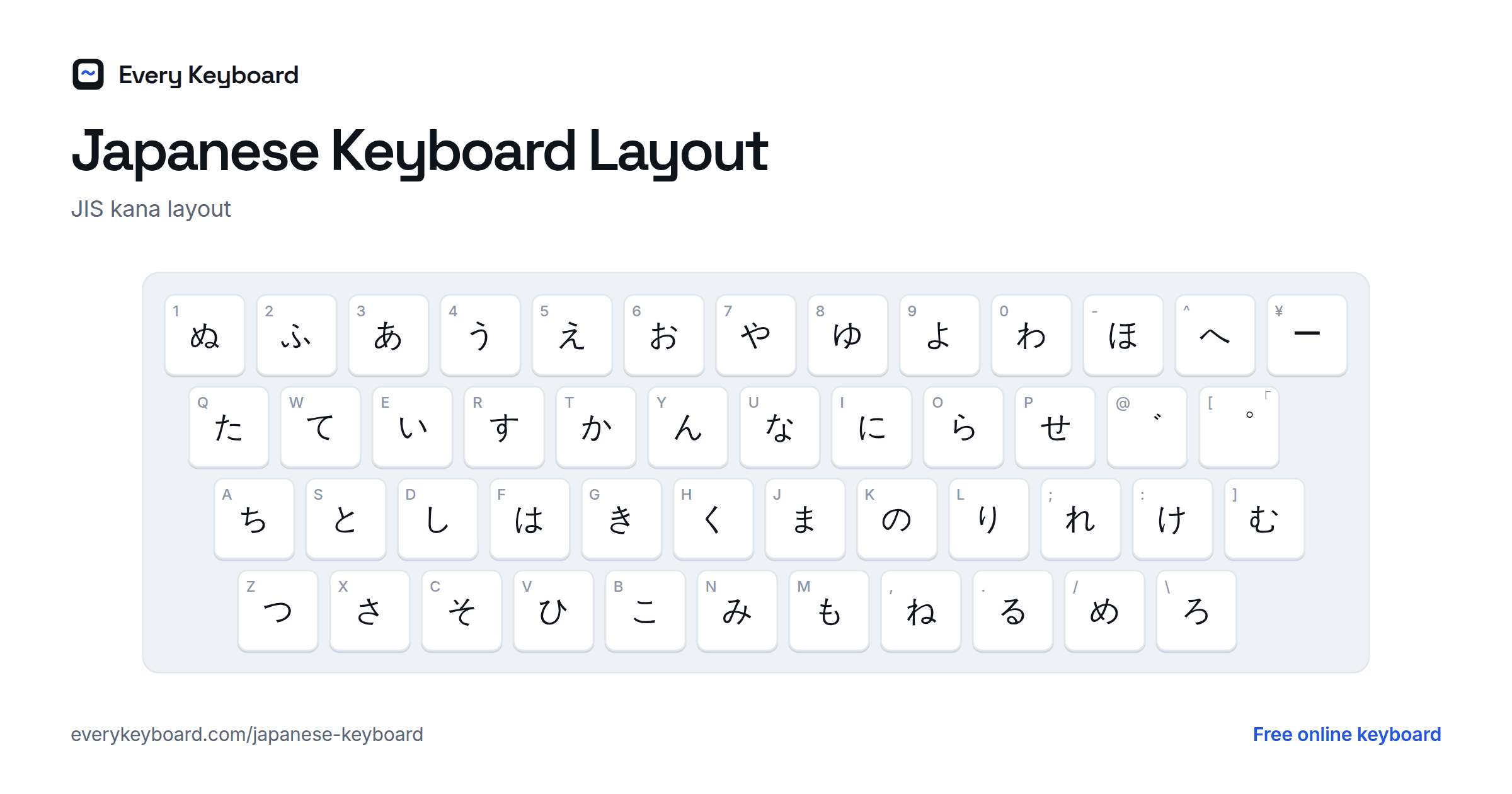
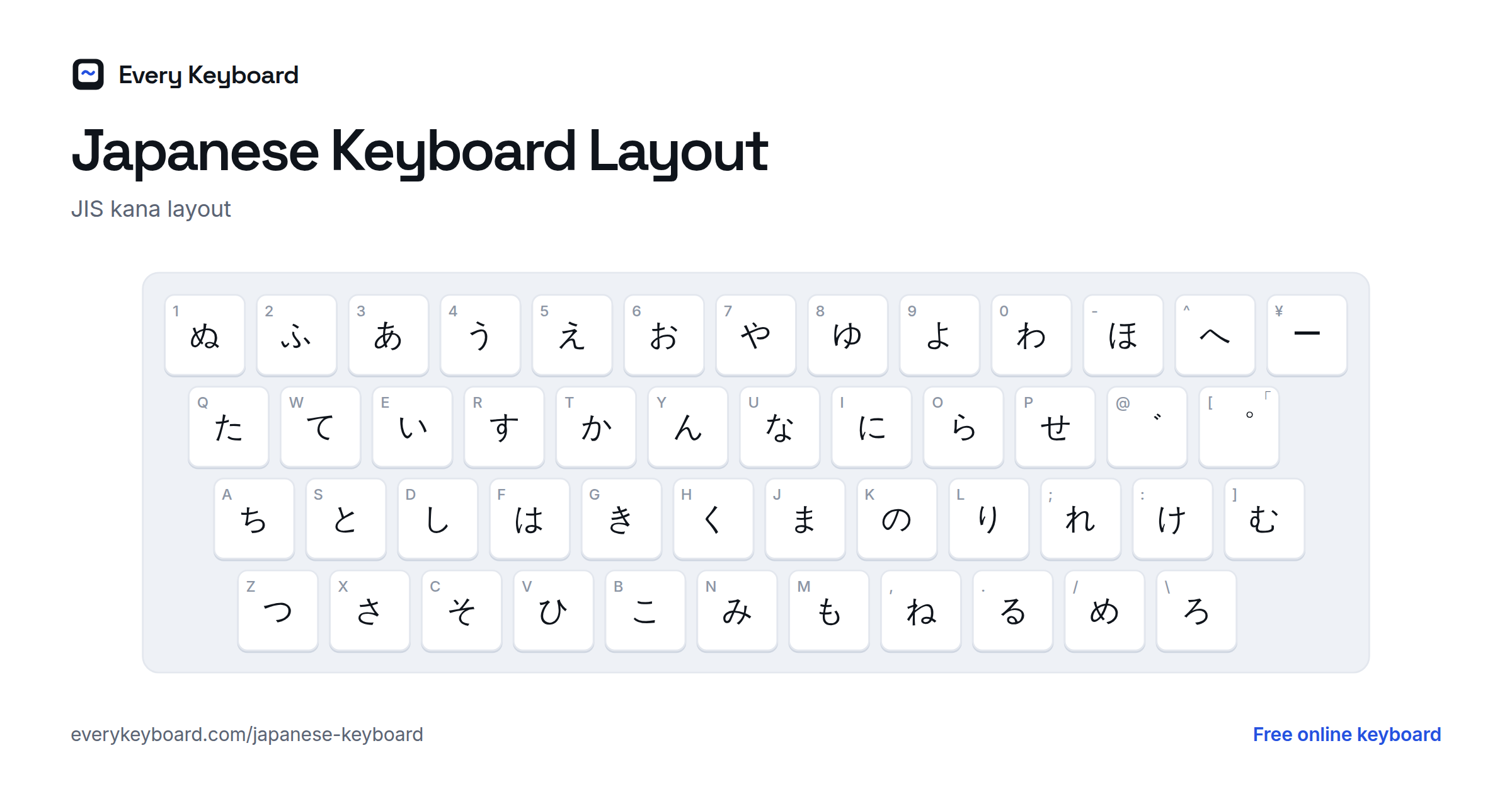
Keyboards sold in Japan follow the JIS layout. Each key carries a kana as well as a Latin letter, and kana input types that kana directly, with no romaji. Most people in Japan type with romaji input instead, but kana input is faster once learned. The small letter on each key shows the key in the same place on a US keyboard.
Hold Shift for the small kana (ぁ ぃ ぅ ぇ ぉ ゃ ゅ ょ っ), を on the 0 key, and 「 」 、 。 ・. Voiced sounds take two keys: type か, then ゛ (the @ key on a JIS keyboard, [ on a US one) to get が. The ー key (¥) and the ろ key (\) exist only on JIS keyboards; on a US keyboard, click them on screen.
How to add a Japanese keyboard to your device
Your device's built-in Japanese input method works the same way as this page: you type in romaji (or kana), and kanji suggestions appear. It also learns the words you use most.
Windows (Microsoft IME)
Settings → Time & language → Language & region → Add a language → Japanese. This installs the Microsoft IME. Switch keyboards with Windows+Space, then press Alt+` (or the 半角/全角 key on a Japanese keyboard) to switch between English letters and hiragana. Type in romaji, press Space to convert to kanji, and Enter to confirm. F7 turns what you typed into katakana.
Mac
System Settings → Keyboard → Text Input → Edit → + → Japanese, and choose Romaji as the input mode. Switch with Control+Space or the Globe key. Press Space to convert to kanji, Enter to confirm, and Control+K to turn your input into katakana.
iPhone and iPad
Settings → General → Keyboard → Keyboards → Add New Keyboard → Japanese. Pick Romaji for a QWERTY keyboard, Kana for the flick keypad used in Japan, or both. Kanji suggestions appear above the keyboard as you type.
Android (Gboard)
In Gboard, open Settings → Languages → Add keyboard → Japanese, and choose a layout: QWERTY for romaji or 12-key for flick input. Suggestions, including kanji, appear above the keys.
Chromebook
Settings → Device → Keyboard and inputs → Input settings → Add input methods → Japanese. Switch with Ctrl+Space, then type romaji and press Space to convert.
Frequently asked questions
Can I type kanji with this keyboard?
Yes. Type the word in romaji so it appears in hiragana, then press Space to convert it to kanji (にほん → 日本). Press Space again for other kanji with the same reading, or click one in the Kanji bar. Enter keeps it, Esc turns it back into kana.
How do I type the small tsu (っ)?
Double the next consonant: kitte gives きって and zasshi gives ざっし. To type a small っ on its own, type xtu or ltu, or use the Small kana buttons.
How do I type ん?
Type n. Before a consonant it stays ん (shinbun → しんぶん). Before a vowel or y it joins the next letter (na → な), so type nn or n' when you want ん there: kon'ya gives こんや, while konya gives こにゃ.
When do I use hiragana and when katakana?
Hiragana is for native Japanese words, grammar endings and particles, and for words whose kanji you don't know. Katakana is mainly for words borrowed from other languages (コーヒー, coffee), foreign names, sound effects and emphasis. Switch between the two romaji tabs to type either.
How do I make a long vowel?
In hiragana, type the vowel out: okaasan gives おかあさん, toukyou gives とうきょう. In katakana, type a hyphen for the long vowel mark: ra-men gives ラーメン.
Why is konnichiwa typed as konnichiha?
The last sound is the particle は, which is written ha but pronounced wa. Japanese keyboards follow the spelling, so type ha to get は. The same goes for wo (を) and he (へ) when they're particles.