How to type Chinese with this keyboard
Choose how you want to type with the tabs on the keyboard:
- Pinyin → Simplified: type the sound of a word in English letters and pick the characters from the list above the keyboard. nihao gives 你好, xiexie gives 谢谢. Press Space for the first choice, again for the next, a number key 1 to 9 for the candidate with that number, or click the one you want. The arrow keys show the next nine candidates. For common words, the first letter of each syllable is enough: ggqc gives 公共汽车 (bus).
- Pinyin → Traditional: the same, with the traditional characters used in Taiwan and Hong Kong: zhongguo gives 中國.
- Pinyin with tone marks: for writing pinyin itself. Type each syllable with its tone number and it gets the mark: ni3 hao3 becomes nǐ hǎo.
The buttons above the keyboard add Chinese punctuation such as , 。 、 and 《 》, and Tone marks has every pinyin vowel with its accent. When you're done, press Copy and paste your Chinese into a message, an email or a document.
What does a Chinese keyboard look like?
There is no keyboard with a key for every Chinese character. Everyday Chinese uses three to four thousand characters, and dictionaries list tens of thousands, so Chinese speakers type on normal keyboards and let software turn what they type into characters.
- In mainland China a keyboard looks exactly like an American QWERTY keyboard. People type pinyin, the official spelling of Mandarin in Latin letters, so no extra symbols are needed.
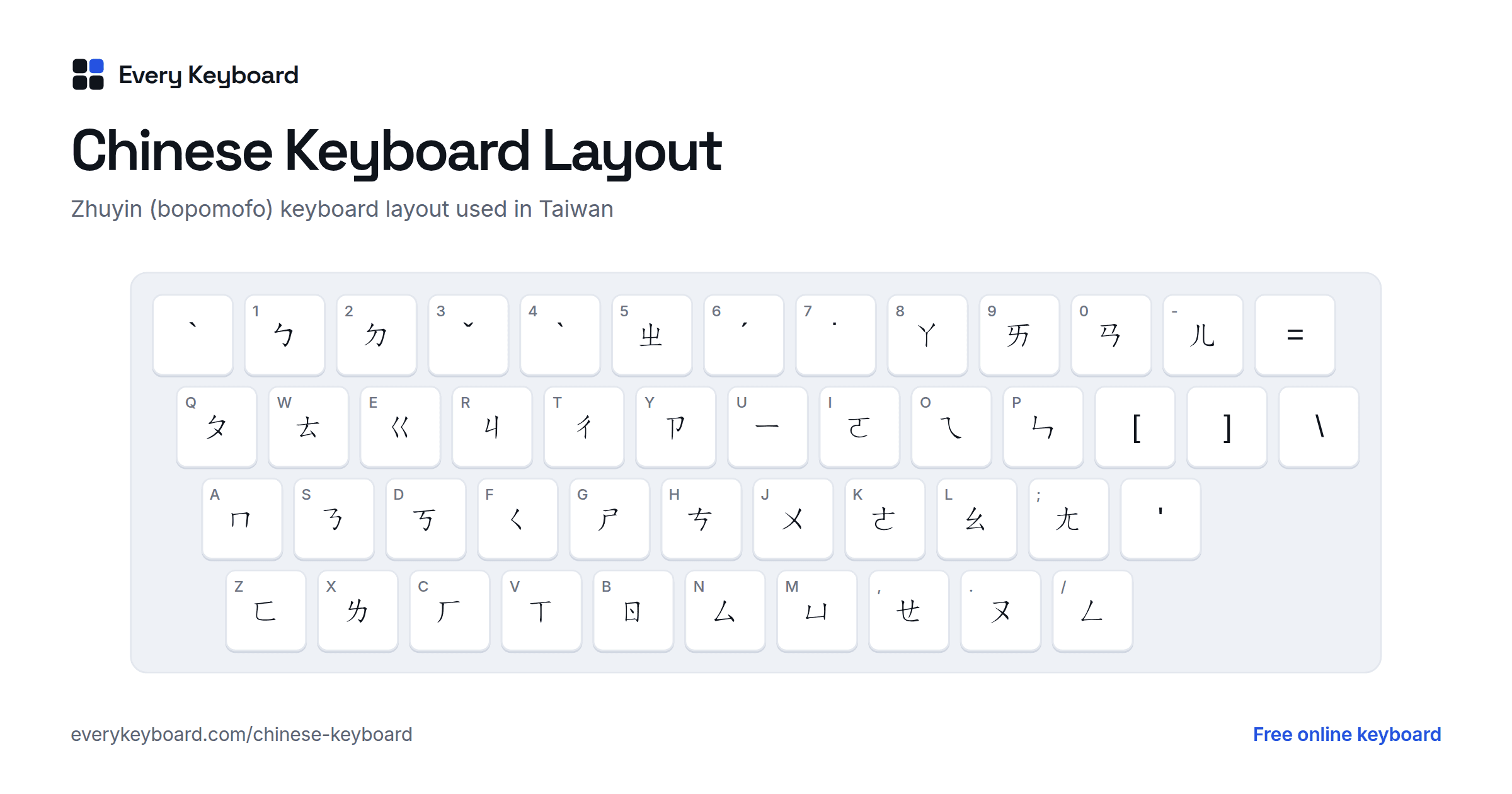
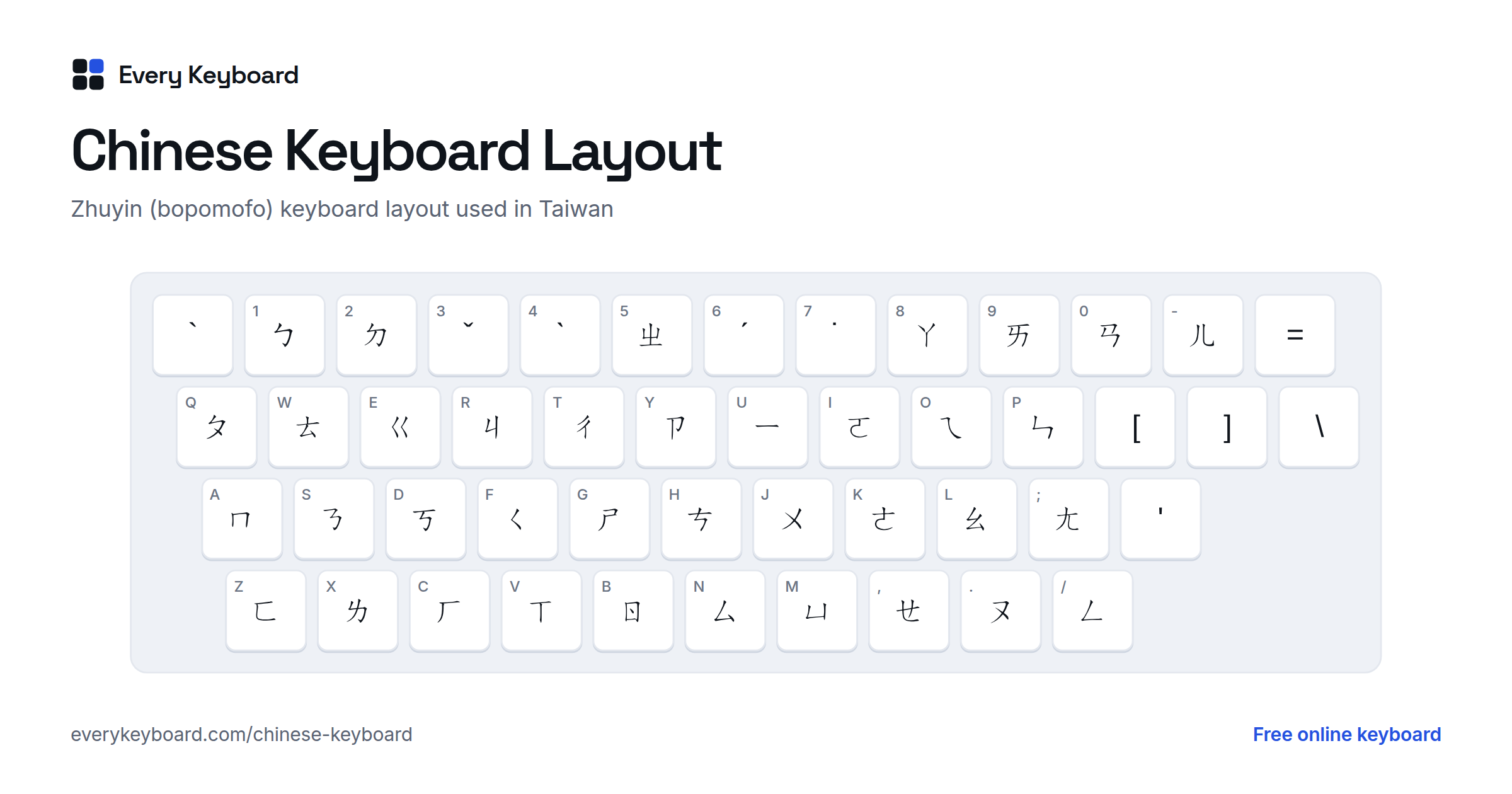
- In Taiwan each key also carries a zhuyin (bopomofo) symbol, the phonetic alphabet taught in Taiwanese schools, and many keys show Cangjie shapes as well. The standard zhuyin layout is below: the small letter on each key is the English key in the same place.
- In Hong Kong keyboards usually show Cangjie radicals, the shapes used to build characters by their parts.
On the zhuyin keyboard the first tone is the space bar, and the other tones are on 6 (ˊ), 3 (ˇ), 4 (ˋ) and 7 (˙). A syllable is typed as its sounds plus a tone: S U 3 spells ㄋㄧˇ (nǐ), then the input method offers 你.
How does a Chinese keyboard work?
Chinese is typed through an input method: you type a short code for a character, and the computer shows the characters that match it so you can pick one. Most people use one of these:
| Input method | Used in | How it works |
|---|---|---|
| Pinyin | Mainland China, Singapore, learners everywhere | Type the sound in Latin letters, then pick the character. By far the most common, and what this page uses. |
| Zhuyin (Bopomofo) | Taiwan | Type the sound with 37 phonetic symbols printed on the keys, then pick the character. |
| Cangjie and Quick | Hong Kong | Build each character from its shapes, using radicals printed on the letter keys. Fast, but takes months to learn. |
| Wubi | Mainland China (professional typists) | Also shape-based. Almost no choosing between candidates, so it's very fast once learned. |
| Handwriting and voice | Phones | Draw the character with a finger, or speak. Handy for a character you can read but can't pronounce. |
Pinyin is the easiest to start with, but it has one catch: Mandarin has only about 400 syllables, so many characters share each one. shi alone can be 是, 时, 事, 十, 市 and dozens more. That's why input methods suggest whole words. Type shijie and you get 世界 (world) straight away, because it's far more common than any other word spelled the same. The more you type at once, the better the guess.
Typing pinyin: the rules
| What you type | What you get | Example |
|---|---|---|
| Pinyin without tones | The characters, after Space or a click | nihao → 你好 |
| Several words in one go | The whole phrase | woshixuesheng → 我是学生 |
| v | ü | nv → 女, lvse → 绿色 |
| ' (apostrophe) | Splits two syllables | xi'an → 西安 (not 先) |
| Space | The first candidate, then the next one | shi → 是, 时, 使… |
| 1 to 9 | The candidate with that number | shi, then 4 → 事 |
| → or ↓, ← or ↑ | The next nine candidates, or the previous nine | shi, then → shows candidates 10 to 18 |
| The first letter of each syllable | Common words and phrases | ggqc → 公共汽车, zg → 中国, bj → 北京 |
| A tone number, with Tone numbers on | Only characters with that tone | ni3 → 你, ma1 → 妈, ni3hao3 → 你好 |
| A candidate further along | Only those characters; the rest stays pinyin | woaini → 我 + aini |
| , . ? ! : ; \ | Full-width Chinese punctuation | 你好, → 你好, |
| Esc | Undo the conversion, back to pinyin | 你好 → nihao |
The suggestions come from CC-CEDICT, the community Chinese-English dictionary by MDBG (licensed CC BY-SA 4.0, full credits), ordered by how common each word is. Rare characters are there too: keep clicking further along the list.
Common Chinese words and how to type them
Type the letters in the first column and press Space. Switch tabs for the traditional characters.
| Type | Simplified | Traditional | Pinyin | Meaning |
|---|---|---|---|---|
nihao | 你好 | 你好 | nǐ hǎo | hello |
xiexie | 谢谢 | 謝謝 | xièxie | thank you |
zaijian | 再见 | 再見 | zàijiàn | goodbye |
duibuqi | 对不起 | 對不起 | duìbuqǐ | sorry |
meiguanxi | 没关系 | 沒關係 | méi guānxi | it doesn't matter, that's OK |
woaini | 我爱你 | 我愛你 | wǒ ài nǐ | I love you |
pengyou | 朋友 | 朋友 | péngyou | friend |
laoshi | 老师 | 老師 | lǎoshī | teacher |
zhongguo | 中国 | 中國 | Zhōngguó | China |
zhongwen | 中文 | 中文 | Zhōngwén | Chinese (language) |
meiguo | 美国 | 美國 | Měiguó | the United States |
beijing | 北京 | 北京 | Běijīng | Beijing |
xinniankuaile | 新年快乐 | 新年快樂 | xīnnián kuàilè | Happy New Year |
shengrikuaile | 生日快乐 | 生日快樂 | shēngrì kuàilè | happy birthday |
duoshaoqian | 多少钱 | 多少錢 | duōshao qián | how much is it? |
Pinyin tones and tone marks
Mandarin is a tonal language: the pitch of a syllable changes its meaning. Pinyin shows the tone with a mark over the main vowel. Chinese input methods don't need the tones, but textbooks, flashcards and homework often do.
If you know the tone, it can narrow the choice of characters too. In the Pinyin → Simplified and Pinyin → Traditional tabs, switch on Tone numbers in the bar above the keyboard and type the tone after the syllable: ni3 keeps the third-tone characters, so 你 comes first, ma1 gives 妈 and ni3hao3 gives 你好. Keys 6 to 9, and any number typed after a tone number, still pick a candidate.
| Tone | Sound | Mark | Example | Meaning |
|---|---|---|---|---|
| 1st | high and level | ā | mā (妈) | mother |
| 2nd | rising, as in a question: what? | á | má (麻) | hemp |
| 3rd | low, dipping then rising | ǎ | mǎ (马) | horse |
| 4th | sharply falling, as in a command: stop! | à | mà (骂) | to scold |
| Neutral | short and light | a | ma (吗) | question particle |
In the Pinyin with tone marks tab, type the tone number after each syllable: ma3 gives mǎ, xue2 gives xué and lv4 gives lǜ. Use 5 (or 0) for the neutral tone. The mark lands on the right vowel for you: on a or e if there is one, on the o of ou, and otherwise on the last vowel (guì, liù).
Simplified and traditional Chinese
Simplified characters were introduced in mainland China in the 1950s and 1960s, with fewer strokes. Taiwan, Hong Kong and Macau still write traditional characters, and so do many Chinese communities abroad. The words and the pinyin are the same; only the written forms differ, and many characters are identical in both.
| Simplified | Traditional | Meaning |
|---|---|---|
| 中国 | 中國 | China |
| 学习 | 學習 | to study |
| 谢谢 | 謝謝 | thank you |
| 爱 | 愛 | love |
| 书 | 書 | book |
| 龙 | 龍 | dragon |
| 马 | 馬 | horse |
| 门 | 門 | door |
| 汉字 | 漢字 | Chinese characters |
Chinese punctuation
Chinese punctuation is full width: each mark takes the space of a character. On this page, , . ? ! : ; and \ typed straight after a Chinese character become , 。 ? ! : ; and 、. The rest are on the buttons above the keyboard.
| Mark | Name | Use |
|---|---|---|
| , | Comma (逗号) | Takes a full character width, unlike the English comma. |
| 。 | Full stop (句号) | A small circle, not a dot. |
| 、 | Enumeration comma (顿号) | Separates items in a list: 红、黄、蓝 (red, yellow, blue). |
| “ ” | Quotation marks | Mainland China uses “ ”; Taiwan and Hong Kong use 「 」. |
| 《 》 | Title marks (书名号) | Around the titles of books, films and songs: 《红楼梦》. |
| …… | Ellipsis | Six dots, two characters wide. |
| —— | Dash | Two characters wide. |
How to add a Chinese keyboard to your Mac, PC or phone
Mac
Open System Settings → Keyboard, then under Text Input click Edit → +. Choose Chinese, Simplified (or Chinese, Traditional) and add Pinyin – Simplified (or Pinyin – Traditional, or Zhuyin – Traditional). Switch between English and Chinese with Control+Space, the Globe key, or the input menu in the menu bar. While typing, press Shift to drop back to English letters for a moment.
Windows
Settings → Time & language → Language & region → Add a language → Chinese (Simplified, China). It comes with Microsoft Pinyin. For traditional characters choose Chinese (Traditional, Taiwan), which uses Microsoft Bopomofo; you can add Microsoft Pinyin to it as well. Switch with Windows+Space, and press Shift to toggle between Chinese and English while typing.
iPhone and iPad
Settings → General → Keyboard → Keyboards → Add New Keyboard → Chinese, Simplified (or Traditional). Turn on Pinyin – QWERTY, and Handwriting if you'd like to draw characters. Tap the globe key to switch.
Android
In Gboard, open Settings → Languages → Add keyboard → Chinese (Simplified) or Chinese (Traditional), and choose Pinyin, Handwriting or Zhuyin. Tap the globe key or hold the space bar to switch.
Chromebook
Settings → Device → Keyboard and inputs → Input settings → Add input methods → Pinyin (or Zhuyin, Cangjie or Wubi). Switch with Ctrl+Space.
Frequently asked questions
How do I type Chinese on an English keyboard?
Use pinyin. Type the sound of a word in English letters, without tone marks, and pick the characters from the list: nihao gives 你好, xiexie gives 谢谢. On this page the list appears above the keyboard; press Space for the first choice or click another. Every pinyin input method on Windows, Mac and phones works the same way.
What does a Chinese keyboard look like?
In mainland China it looks exactly like an American QWERTY keyboard, because people type pinyin with Latin letters. Keyboards sold in Taiwan add zhuyin (bopomofo) symbols to each key, and many in Hong Kong add Cangjie radicals. There's no keyboard with a key per character: Chinese has thousands of them, so the computer turns sounds or shapes into characters.
How does a Chinese keyboard work if there are thousands of characters?
Through an input method. You type a short code (the pinyin sound, a zhuyin spelling, or the shapes of the character) and the software shows the characters that match. Because many characters sound the same, it ranks them by how common they are and uses the words around them, so typing whole words or phrases (woaini rather than wo, ai, ni) usually gets the right characters first.
Do I need to type the tones?
No. Pinyin input methods don't need tones, and the list of candidates sorts out the meaning. If you know the tone, switch on Tone numbers above the keyboard and type it after the syllable to narrow the list: ni3 puts 你 first, ma1 gives 妈. If you want pinyin with tone marks instead of characters, for homework or a language course, use the Pinyin with tone marks tab: ni3 hao3 becomes nǐ hǎo.
Can I pick a character with the number keys?
Yes. The first nine candidates in the list are numbered: press 1 to 9 to pick one, as in the input methods built into Windows, Mac and phones. The arrow keys → and ↓ number the next nine, and ← and ↑ go back. When no candidates are showing, the number keys type numbers as usual.
Can I type just the first letters of a word?
Yes, for common words and phrases. Type the first letter of each syllable and the list offers the words that match: ggqc gives 公共汽车 (gōnggòng qìchē, bus), dxs gives 大学生 (university student), bj gives 北京 and nh gives 你好. For zh, ch and sh, one letter or two both work: zgr and zhgr both give 中国人.
How do I type ü?
Type v. Pinyin never uses v, so every Chinese input method uses it for ü: nv gives 女 (nǚ, woman) and lvse gives 绿色 (lǜsè, green). After j, q, x and y, ü is written as u anyway (ju, qu, xue, yu), so you only need v after n and l.
Should I use simplified or traditional characters?
Simplified for mainland China, Singapore and most textbooks; traditional for Taiwan, Hong Kong, Macau and many older Chinese communities in the US. Both use the same pinyin here, so just switch tabs.
Is my text private?
Yes. Everything runs in your browser. Your draft is kept on your own device so it survives a refresh, and it's never uploaded.