How to type in Arabic with this keyboard
Pick the input mode that suits you with the tabs above the text box:
- Phonetic (best for learners): each English key types the Arabic letter with a similar sound. B types ب, L types ل, K types ك. Shift gives the heavy (emphatic) partner: S is س and Shift+S is ص.
- Arabic 101: the layout printed on keyboards in the Arab world and used by Windows. Learn this one if you plan to type a lot of Arabic.
- Arabizi: type the chat alphabet (3, 7, 5, sh, kh) and it turns into Arabic letters as you type.
- Alphabet: all 28 letters in order, plus hamza forms and Arabic-Indic digits, to click one by one.
To add a vowel, open Harakat, type the letter and then click a mark; it attaches to the letter before it. The buttons above the keyboard give the hamza forms (ء أ إ آ ؤ ئ), ة, ى and Arabic punctuation (، ؛ ؟). Hold Alt and press a number for Arabic-Indic digits (١٢٣). Press Esc to switch between Arabic and normal English typing.
Arabic keyboard layout (Arabic 101)
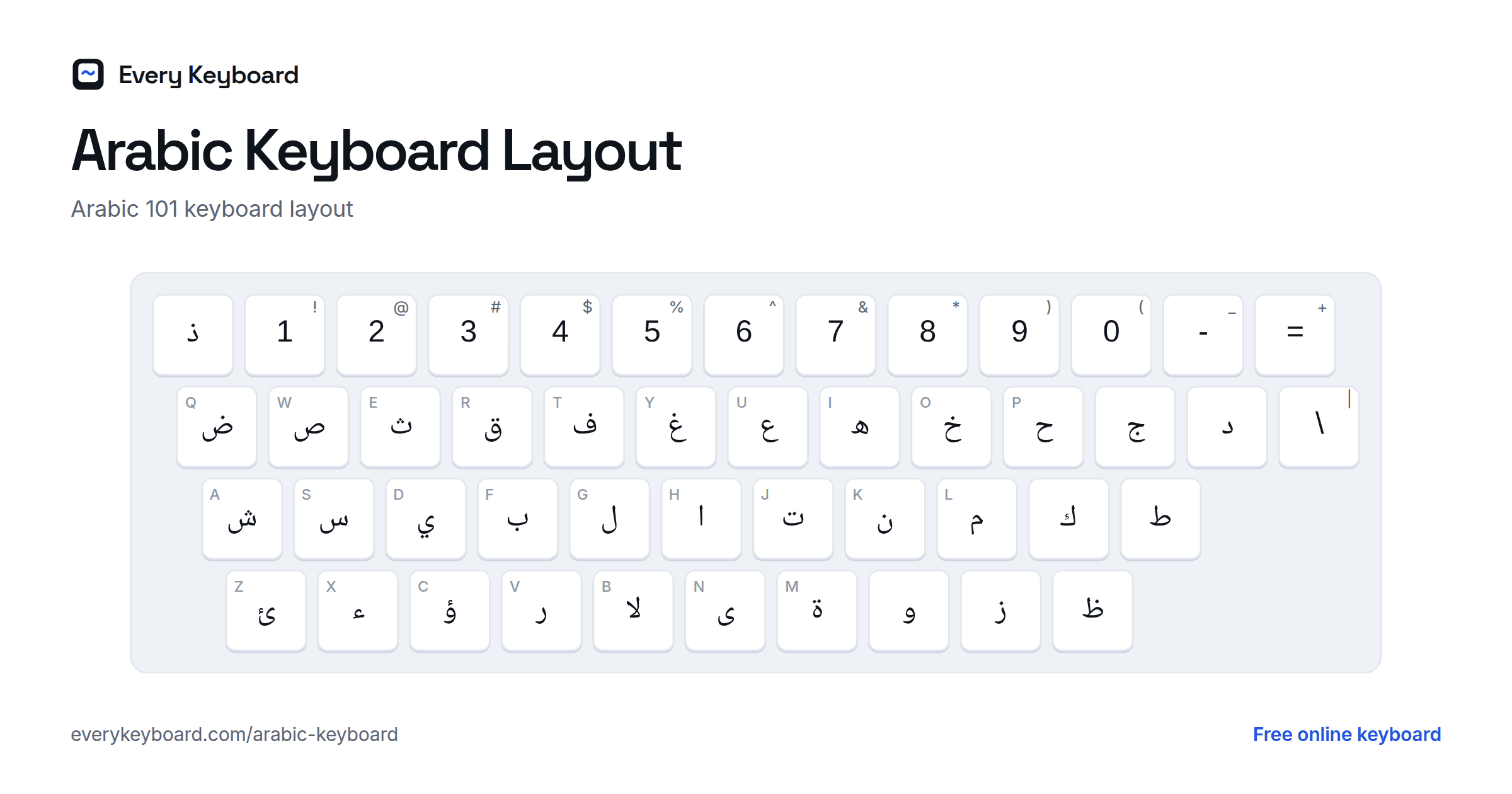
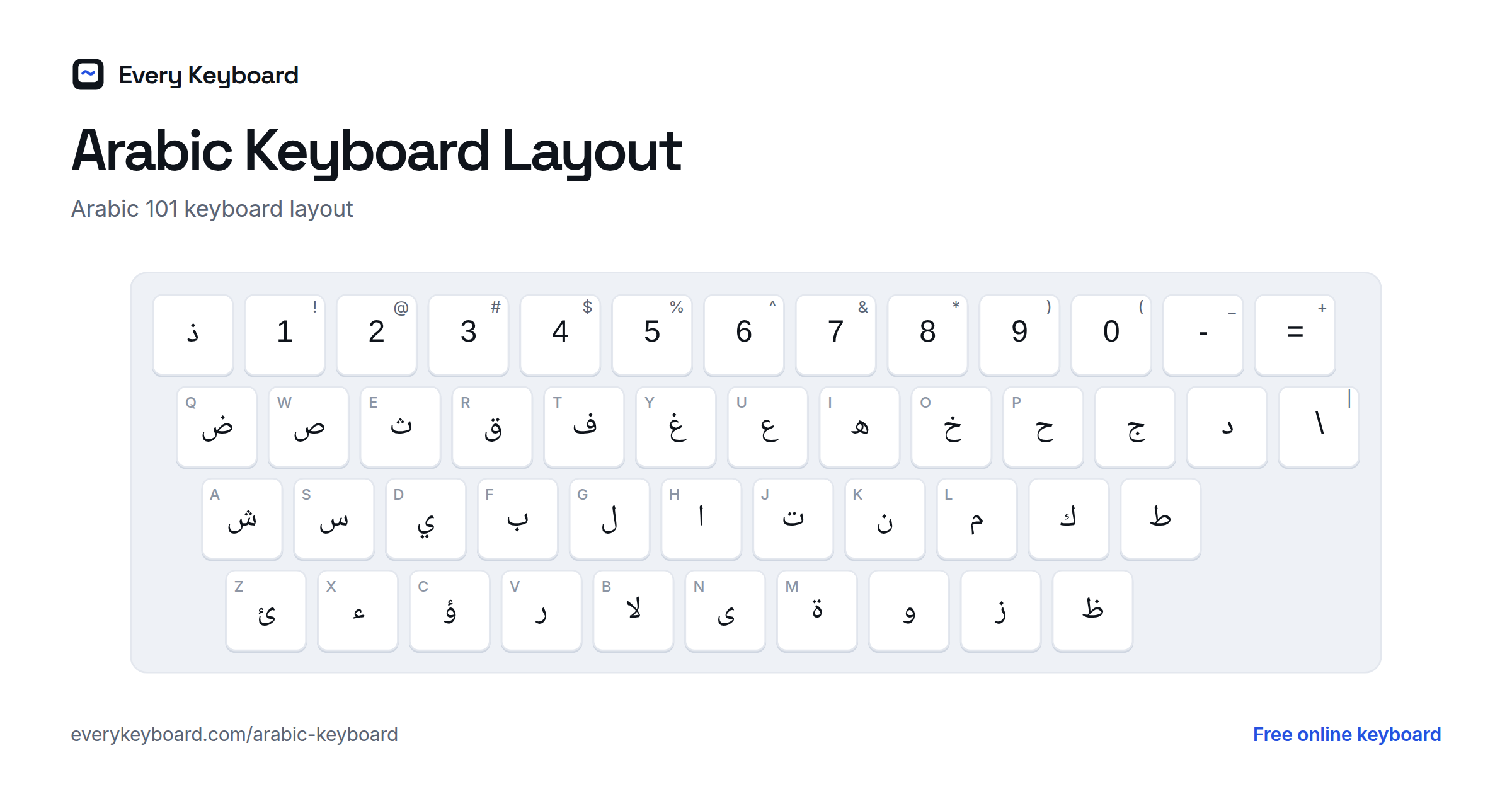
This is the Arabic 101 layout, the standard on Windows and on most Arabic keyboards. The small letter on each key is the English key it shares. Note that the ` key types ذ and the B key types لا.
With Shift held, the left side of the keyboard types the harakat, and the middle keys type the hamza forms and lam-alef combinations:
The phonetic layout on this page puts letters where English speakers expect them. Letters with no English equivalent follow the Buckwalter transliteration where it helps you remember them (X → خ, V → ث, G → غ, Q → ق), and Shift gives the heavy letter:
| Key | Types | With Shift | Why |
|---|---|---|---|
| C | ش | ش | sh (as in French chat) |
| D | د | ض | d; Shift: heavy d |
| E | ع | ع | ʿayn (Buckwalter E) |
| G | غ | غ | gh (Buckwalter g) |
| H | ه | ح | h; Shift: breathy ḥ |
| K | ك | خ | k; Shift: kh |
| P | ة | ة | taa marbuta (Buckwalter p) |
| Q | ق | ق | q |
| S | س | ص | s; Shift: heavy s |
| T | ت | ط | t; Shift: heavy t |
| V | ث | ذ | th as in think; Shift: th as in this |
| X | خ | خ | kh (Buckwalter x) |
| Z | ز | ظ | z; Shift: heavy z / ẓ |
| ` | ذ | ◌ّ | same key as on Arabic 101; Shift: shadda |
| ' | ء | ئ | hamza, the apostrophe-like sound |
The Arabic alphabet
Arabic has 28 letters, all written right to left. They are mostly consonants: the long vowels ā, ū and ī are written with ا, و and ي, and the short vowels are usually left out (see harakat below). The table shows each letter with its name, its sound, the usual Latin transliteration, and where to find it on this page.
| Letter | Name | Sound | Transliteration (Arabizi) | Phonetic key | Arabic 101 key |
|---|---|---|---|---|---|
| ا | alif | long a as in father; also carries hamza | ā, a | A | H |
| ب | bāʾ | b | b | B | F |
| ت | tāʾ | t | t | T | J |
| ث | thāʾ | th as in think | th, ṯ | V | E |
| ج | jīm | j as in jam (g as in go in Egypt) | j, g | J | [ key |
| ح | ḥāʾ | a breathy h from deep in the throat | ḥ (7) | Shift+H | P |
| خ | khāʾ | ch as in Scottish loch | kh, ḵ (5, 7') | Shift+K, X | O |
| د | dāl | d | d | D | ] key |
| ذ | dhāl | th as in this | dh, ḏ | Shift+V, ` | ` key |
| ر | rāʾ | rolled r | r | R | V |
| ز | zāy | z | z | Z | . key |
| س | sīn | s | s | S | S |
| ش | shīn | sh as in shop | sh, š (sh, ch) | C | A |
| ص | ṣād | a heavy (emphatic) s | ṣ (9 in the Gulf) | Shift+S | W |
| ض | ḍād | a heavy d | ḍ (9') | Shift+D | Q |
| ط | ṭāʾ | a heavy t | ṭ (6) | Shift+T | ' key |
| ظ | ẓāʾ | a heavy th as in this (z in many dialects) | ẓ (6') | Shift+Z | / key |
| ع | ʿayn | a voiced sound squeezed in the throat; no English equivalent | ʿ (3) | E | U |
| غ | ghayn | like a French r, gargled | gh, ġ (3', gh) | G | Y |
| ف | fāʾ | f | f | F | T |
| ق | qāf | a k made further back in the throat | q (q, 8, 9) | Q | R |
| ك | kāf | k | k | K | ; key |
| ل | lām | l | l | L | G |
| م | mīm | m | m | M | L |
| ن | nūn | n | n | N | K |
| ه | hāʾ | h as in hat, even at the end of a word | h | H | I |
| و | wāw | w, or long u as in food | w, ū | O, U, W | , key |
| ي | yāʾ | y, or long i as in machine | y, ī | I, Y | D |
Hamza and other letter forms
These are not counted among the 28 letters, but you'll need them all the time:
| Letter | Name | Use |
|---|---|---|
| ء | hamza | a glottal stop, the catch in uh-oh (Arabizi 2) |
| أ إ | alif with hamza | hamza written on an alif, above for a or u, below for i |
| آ | alif madda | a glottal stop followed by a long ā |
| ؤ ئ | hamza on waw / yāʾ | hamza written on a waw or a dotless yāʾ, depending on the vowels around it |
| ة | tāʾ marbūṭa | a final a (often feminine); read as t before a following word |
| ى | alif maqṣūra | a long ā at the end of a word, written like a dotless yāʾ |
| لا | lām-alif | lām followed by alif is always joined into this special shape |
Letter forms: isolated, initial, medial, final
Arabic is always joined up, so most letters change shape depending on where they sit in a word: alone (isolated), at the start (initial), in the middle (medial) or at the end (final). You never pick these shapes yourself. You type the basic letter and the font joins it to its neighbors, so ك + ت + ب becomes كتب. Six letters (ا د ذ ر ز و) never join to the letter after them, so they only have two shapes, and the next letter starts fresh.
| Isolated | Letter | Initial | Medial | Final |
|---|---|---|---|---|
| ب | bāʾ | بـ | ـبـ | ـب |
| ج | jīm | جـ | ـجـ | ـج |
| ع | ʿayn | عـ | ـعـ | ـع |
| ه | hāʾ | هـ | ـهـ | ـه |
| ك | kāf | كـ | ـكـ | ـك |
| ي | yāʾ | يـ | ـيـ | ـي |
| د | dāl (does not join to the left) | د | ـد | ـد |
Harakat (Arabic vowel marks)
Everyday Arabic leaves out the short vowels, and readers fill them in from context. Harakat are written in the Quran, children's books, dictionaries and textbooks, or anywhere a word could be misread. Each mark sits above or below the letter it follows:
| Example | Name | Arabic name | Sound | Arabic 101 key |
|---|---|---|---|---|
| بَ | Fatha | فَتْحة | short a | Shift+Q |
| بُ | Damma | ضَمّة | short u | Shift+E |
| بِ | Kasra | كَسْرة | short i | Shift+A |
| بْ | Sukun | سُكون | no vowel after the letter | Shift+X |
| بّ | Shadda | شَدّة | doubles the letter | Shift+` |
| بً | Tanwin fath | تَنْوين فَتْح | -an | Shift+W |
| بٌ | Tanwin damm | تَنْوين ضَمّ | -un | Shift+R |
| بٍ | Tanwin kasr | تَنْوين كَسْر | -in | Shift+S |
| بٰ | Dagger alif | ألف خنجرية | long ā (in words like هٰذا) |
Shadda can be combined with a vowel: type the letter, then shadda, then the vowel, as in بَّ. On this page, open Harakat and click the marks in that order.
Arabizi: the Arabic chat alphabet
Arabizi (also called Franco-Arabic, Arabish or 3arabizi) is the way many people text Arabic with Latin letters. Numbers stand in for sounds English lacks, chosen because they look like the Arabic letter: 3 resembles ع, 7 resembles ح. An apostrophe after a number adds the dot of the related letter. Usage varies by country, especially for 8 and 9.
| Type | Letter | Sound |
|---|---|---|
| 2 | ء | hamza (glottal stop) |
| 3 | ع | ʿayn |
| 3' | غ | ghayn (also gh) |
| 5 | خ | khaa (also kh, or 7') |
| 6 | ط | heavy t |
| 6' | ظ | heavy z / dh |
| 7 | ح | breathy h |
| 8 | ق | qaf (in some regions 9 is used instead) |
| 9 | ص | heavy s (Gulf usage) |
| 9' | ض | heavy d |
| sh / ch | ش | sh |
| th | ث | th as in think |
| dh | ذ | th as in this |
Other Latin letters map as you'd expect (b → ب, s → س, m → م). a, o/u and i/e give the long vowels ا, و and ي, so only type them where Arabic writes a letter: mr7ba → مرحبا, shkra → شكرا, 7bibi → حبيبي. Doubled vowels (aa, ee, oo) give a single letter.
Arabic numbers
Arabic uses two sets of digits. The Middle East mostly uses Arabic-Indic digits, while North Africa uses the Western digits 0 to 9. Both are written left to right, even inside Arabic text.
| Arabic-Indic | Western | On this page |
|---|---|---|
| ٠ | 0 | Alt+0 |
| ١ | 1 | Alt+1 |
| ٢ | 2 | Alt+2 |
| ٣ | 3 | Alt+3 |
| ٤ | 4 | Alt+4 |
| ٥ | 5 | Alt+5 |
| ٦ | 6 | Alt+6 |
| ٧ | 7 | Alt+7 |
| ٨ | 8 | Alt+8 |
| ٩ | 9 | Alt+9 |
Letters for g, p, v and ch (Maghrebi and dialect Arabic)
Standard Arabic has no letter for the sounds g, p, v or ch, so dialects and loanwords add dots to existing letters. Morocco, Algeria and Tunisia each have their own choices. You'll find all of them in the Alphabet tab.
| Letter | Sound | Used in |
|---|---|---|
| ڨ | g | Algeria, Tunisia |
| ڭ | g | Morocco |
| گ | g | Iraq, Gulf (and Persian) |
| پ | p | loanwords, names (and Persian, Urdu) |
| ڤ | v | Algeria, Tunisia, the Gulf |
| ڥ | v | Morocco |
| چ | ch | Iraq, Gulf, loanwords |
| ژ | zh (as in measure) | loanwords (and Persian) |
How to add an Arabic keyboard to your device
Windows
Settings → Time & language → Language & region → Add a language → Arabic (pick your country, for example Arabic (Saudi Arabia) or Arabic (Egypt)). The default keyboard is Arabic (101). Switch between keyboards with Windows+Space or Alt+Shift.
Mac
System Settings → Keyboard → Text Input → Edit → + → Arabic. In the list, the Arabic layout marked PC matches Windows (Arabic 101), and the one marked QWERTY is a phonetic layout. Switch with Control+Space or the Globe key.
iPhone and iPad
Settings → General → Keyboard → Keyboards → Add New Keyboard → Arabic. Tap the globe key to switch.
Android
In Gboard, open Settings → Languages → Add keyboard → Arabic, then pick a layout. Tap the globe key or hold the space bar to switch.
Chromebook
Settings → Device → Keyboard and inputs → Input settings → Add input methods → Arabic. Switch with Ctrl+Space.
Frequently asked questions
How do I type Arabic without an Arabic keyboard?
Use the Phonetic mode on this page: each English key types the Arabic letter that sounds like it (B → ب, M → م, S → س, Shift+S → ص). If you write in the chat alphabet, choose Arabizi and type 3, 7, 5 and so on. You can also click the on-screen keys, then press Copy.
What is Arabizi and how does it work here?
Arabizi (also called Franco-Arabic or the Arabic chat alphabet) writes Arabic with Latin letters and numbers that look like Arabic letters: 3 for ع, 7 for ح, 2 for ء, 5 for خ, 6 for ط. In Arabizi mode each letter and number is converted as you type, so 7abibi becomes حابيبي and 7bibi becomes حبيبي. Arabic doesn't write most short vowels, so leave them out for the usual spelling.
How do I add harakat (vowel marks)?
Open Harakat above the keyboard, type a letter, then click a mark: it attaches to the letter before it. In Arabic 101 mode you can also use Shift: Q is fatha, E is damma, A is kasra, X is sukun and the ` key is shadda.
Where is lam-alef (لا) on the Arabic keyboard?
On the Arabic 101 layout it's on the B key. Shift+B gives لآ, Shift+G gives لأ and Shift+T gives لإ. It types two letters, lām and alif, which fonts always join into one shape. In Phonetic mode, Shift+L types لا.
How do I type Arabic numbers like ١٢٣?
Hold Alt (Option on a Mac) and press a number key to type the Arabic-Indic digit, or pick them from the Alphabet tab. Both ١٢٣ and 123 are used in Arabic; Western digits are common in North Africa and online.
Why does my Arabic text look broken or backwards in Word or another app?
Arabic has to be marked as right to left. In Word, select the text and click the Right-to-left text direction button on the Home tab (add an Arabic language in Windows or Mac settings if you don't see it). If the letters show up separated instead of joined, the font doesn't support Arabic: switch to a font such as Arial, Times New Roman or Segoe UI. Pasting from this page keeps the correct letters and order, and only the display needs fixing.
Does Arabic text connect automatically?
Yes. You always type the basic letter, and your device picks the right joined shape (isolated, initial, medial or final) from the letters around it. The text box is set to right to left, so punctuation and the cursor behave correctly.