How to type Thai with this keyboard
Choose how you want to type with the tabs on the keyboard:
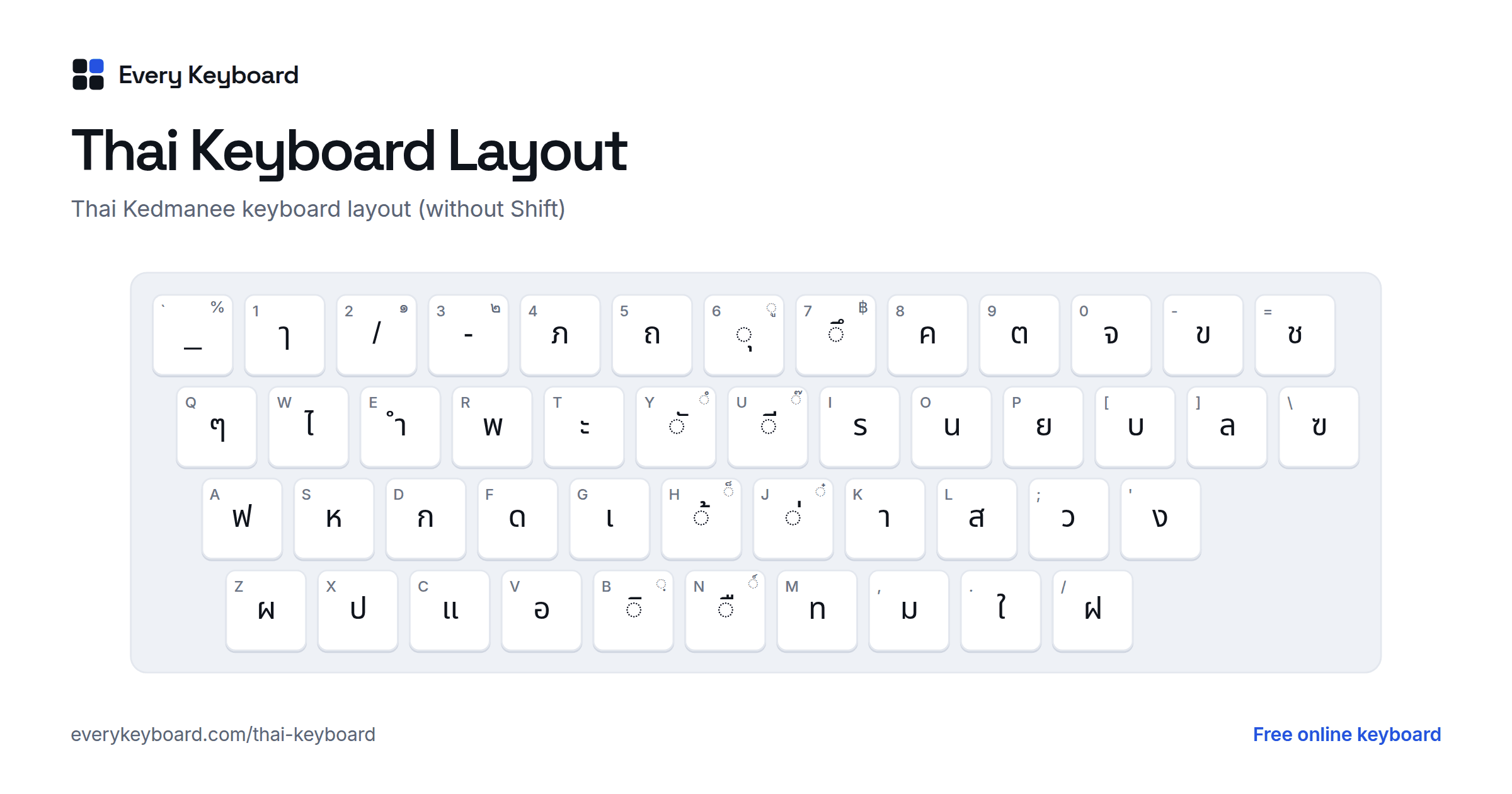
- Kedmanee (standard): the Thai layout printed on keyboards in Thailand. Each of your keys types the Thai letter in the same place: D is ก, K is า, J is the tone mark ่. Use this to learn the real layout or if you already know it.
- Pattachote: the alternative Thai layout built for speed, with the most common letters on the home row: F is ก, J is า, Y is the tone mark ่. It matches the Thai Pattachote keyboard on Windows and Mac.
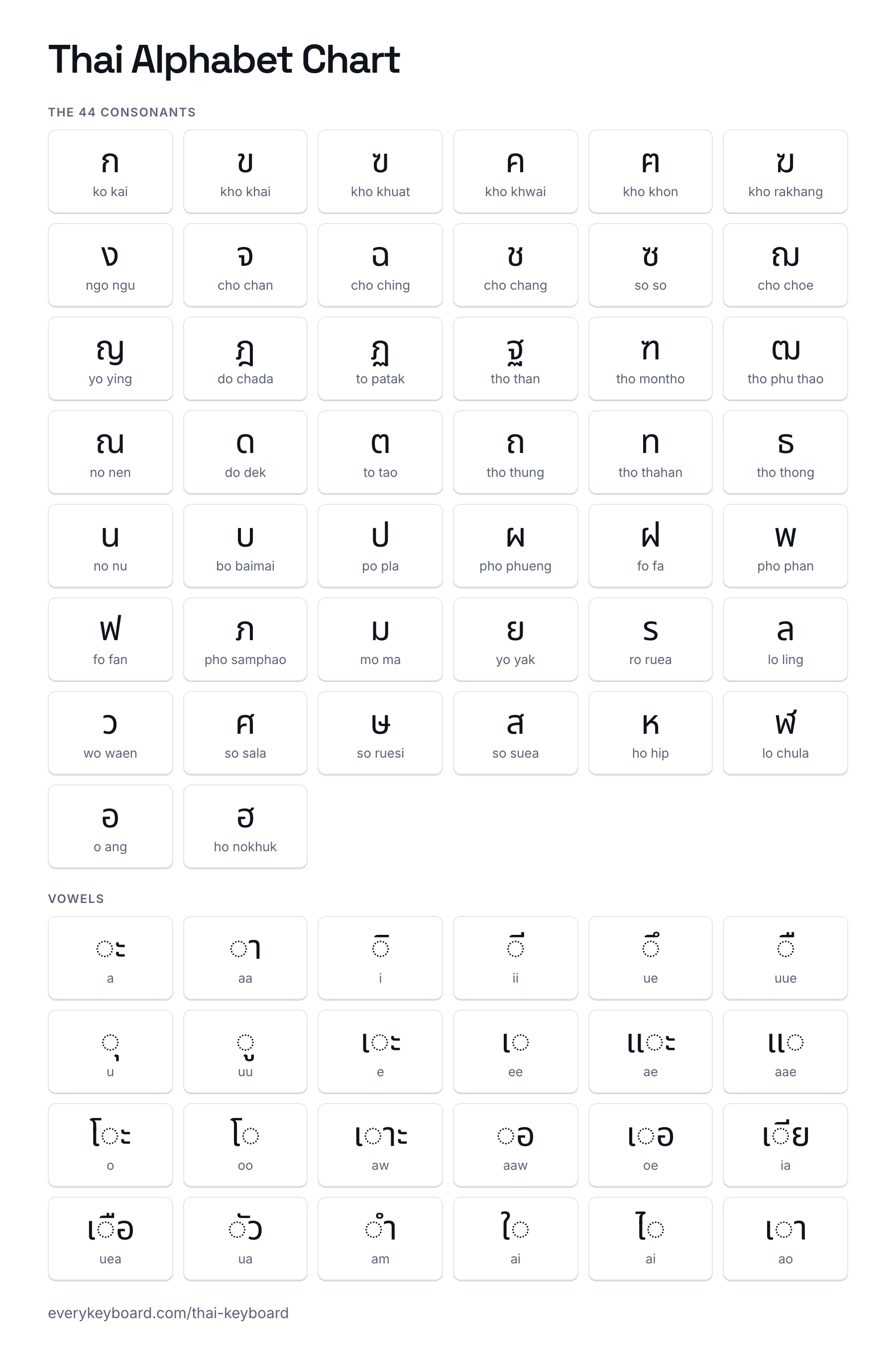
- Alphabet: the 44 consonants in alphabetical order, then the vowels and tone marks, each labelled with its sound. Click a consonant, then its vowel and tone mark.
Type a consonant first, then the vowel sign and tone mark that sit on it: ก, then ี, then ่ gives กี่. Vowels written before the consonant (เ แ โ ใ ไ) are typed first. Marks typed in any order are stored correctly: ก, ่, ี also gives กี่, ready to paste anywhere. The buttons above the keyboard add the tone marks, ๆ, ฯ and the baht sign ฿, and Thai digits has ๐ to ๙. On the Kedmanee and Pattachote tabs, press Escto switch between Thai and normal English typing. When you're done, press Copy.
Thai keyboard layout (Kedmanee)
Kedmanee is the standard Thai keyboard layout and the "Thai" keyboard on Windows, Mac, iPhone and Android. Thai has 44 consonants, more than 15 vowel signs, four tone marks and its own digits, so almost every key has two Thai characters: one without Shift and one with it. The small letter on each key is the English key in the same place.
With Shift, the keys give the less common letters, the Thai digits and some punctuation:
- The home row carries the most common letters: ฟ ห ก ด เ ้ ่ า ส ว ง. Your index fingers rest on ด and ่, and า (the long a) is under the right middle finger.
- The tone marks ่ (mai ek) and ้ (mai tho) are on J and H; the rarer ๊ and ๋ are on Shift+U and Shift+J.
- The number row types letters and vowels, not digits. Arabic digits are not on the Thai layout at all, and the Thai digits ๐ to ๙ are on Shift. People switch to English to type numbers.
- The vowels that come before a consonant each have their own key: เ on G, แ on C, โ on Shift+F, ใ on . and ไ on W.
Thai consonants and their keys
Each consonant is named after a word that contains it, the way English children learn "A for apple": ก is ko kai, "k as in chicken". Every consonant also belongs to a class (mid, high or low), which decides the tone of the syllable. Many sound different at the end of a syllable.
| Letter | Name | Class | Sound | Key |
|---|---|---|---|---|
| ก | ก ไก่ ko kai, "chicken" | mid | k; at the end k | D |
| ข | ข ไข่ kho khai, "egg" | high | kh; at the end k | - key |
| ฃ | ฃ ขวด kho khuat, "bottle" (no longer used) | high | kh; at the end k | \ key |
| ค | ค ควาย kho khwai, "buffalo" | low | kh; at the end k | 8 |
| ฅ | ฅ คน kho khon, "person" (no longer used) | low | kh; at the end k | Shift+\ key |
| ฆ | ฆ ระฆัง kho rakhang, "bell" | low | kh; at the end k | Shift+S |
| ง | ง งู ngo ngu, "snake" | low | ng; at the end ng | ' key |
| จ | จ จาน cho chan, "plate" | mid | ch; at the end t | 0 |
| ฉ | ฉ ฉิ่ง cho ching, "cymbals" | high | ch | Shift+C |
| ช | ช ช้าง cho chang, "elephant" | low | ch; at the end t | = key |
| ซ | ซ โซ่ so so, "chain" | low | s; at the end t | Shift+; key |
| ฌ | ฌ เฌอ cho choe, "tree" | low | ch | Shift+G |
| ญ | ญ หญิง yo ying, "woman" | low | y; at the end n | Shift+P |
| ฎ | ฎ ชฎา do chada, "headdress" | mid | d; at the end t | Shift+E |
| ฏ | ฏ ปฏัก to patak, "goad" | mid | t; at the end t | Shift+D |
| ฐ | ฐ ฐาน tho than, "pedestal" | high | th; at the end t | Shift+[ key |
| ฑ | ฑ มณโฑ tho montho, "Montho, a queen in the Ramakien" | low | th, d; at the end t | Shift+R |
| ฒ | ฒ ผู้เฒ่า tho phu thao, "elder" | low | th; at the end t | Shift+, key |
| ณ | ณ เณร no nen, "novice monk" | low | n; at the end n | Shift+I |
| ด | ด เด็ก do dek, "child" | mid | d; at the end t | F |
| ต | ต เต่า to tao, "turtle" | mid | t; at the end t | 9 |
| ถ | ถ ถุง tho thung, "sack" | high | th; at the end t | 5 |
| ท | ท ทหาร tho thahan, "soldier" | low | th; at the end t | M |
| ธ | ธ ธง tho thong, "flag" | low | th; at the end t | Shift+T |
| น | น หนู no nu, "mouse" | low | n; at the end n | O |
| บ | บ ใบไม้ bo baimai, "leaf" | mid | b; at the end p | [ key |
| ป | ป ปลา po pla, "fish" | mid | p; at the end p | X |
| ผ | ผ ผึ้ง pho phueng, "bee" | high | ph | Z |
| ฝ | ฝ ฝา fo fa, "lid" | high | f | / key |
| พ | พ พาน pho phan, "tray" | low | ph; at the end p | R |
| ฟ | ฟ ฟัน fo fan, "teeth" | low | f; at the end p | A |
| ภ | ภ สำเภา pho samphao, "junk (sailing ship)" | low | ph; at the end p | 4 |
| ม | ม ม้า mo ma, "horse" | low | m; at the end m | , key |
| ย | ย ยักษ์ yo yak, "giant" | low | y; at the end i | P |
| ร | ร เรือ ro ruea, "boat" | low | r; at the end n | I |
| ล | ล ลิง lo ling, "monkey" | low | l; at the end n | ] key |
| ว | ว แหวน wo waen, "ring" | low | w; at the end o | ; key |
| ศ | ศ ศาลา so sala, "pavilion" | high | s; at the end t | Shift+L |
| ษ | ษ ฤๅษี so ruesi, "hermit" | high | s; at the end t | Shift+K |
| ส | ส เสือ so suea, "tiger" | high | s; at the end t | L |
| ห | ห หีบ ho hip, "chest (box)" | high | h | S |
| ฬ | ฬ จุฬา lo chula, "kite" | low | l; at the end n | Shift+. key |
| อ | อ อ่าง o ang, "basin" | mid | (silent) | V |
| ฮ | ฮ นกฮูก ho nokhuk, "owl" | low | h | Shift+V |
Thai alphabet chart (ก ข ค)
All 44 consonants in alphabetical order with their names, and the vowels written around ◌, as a picture to print or keep on your phone.
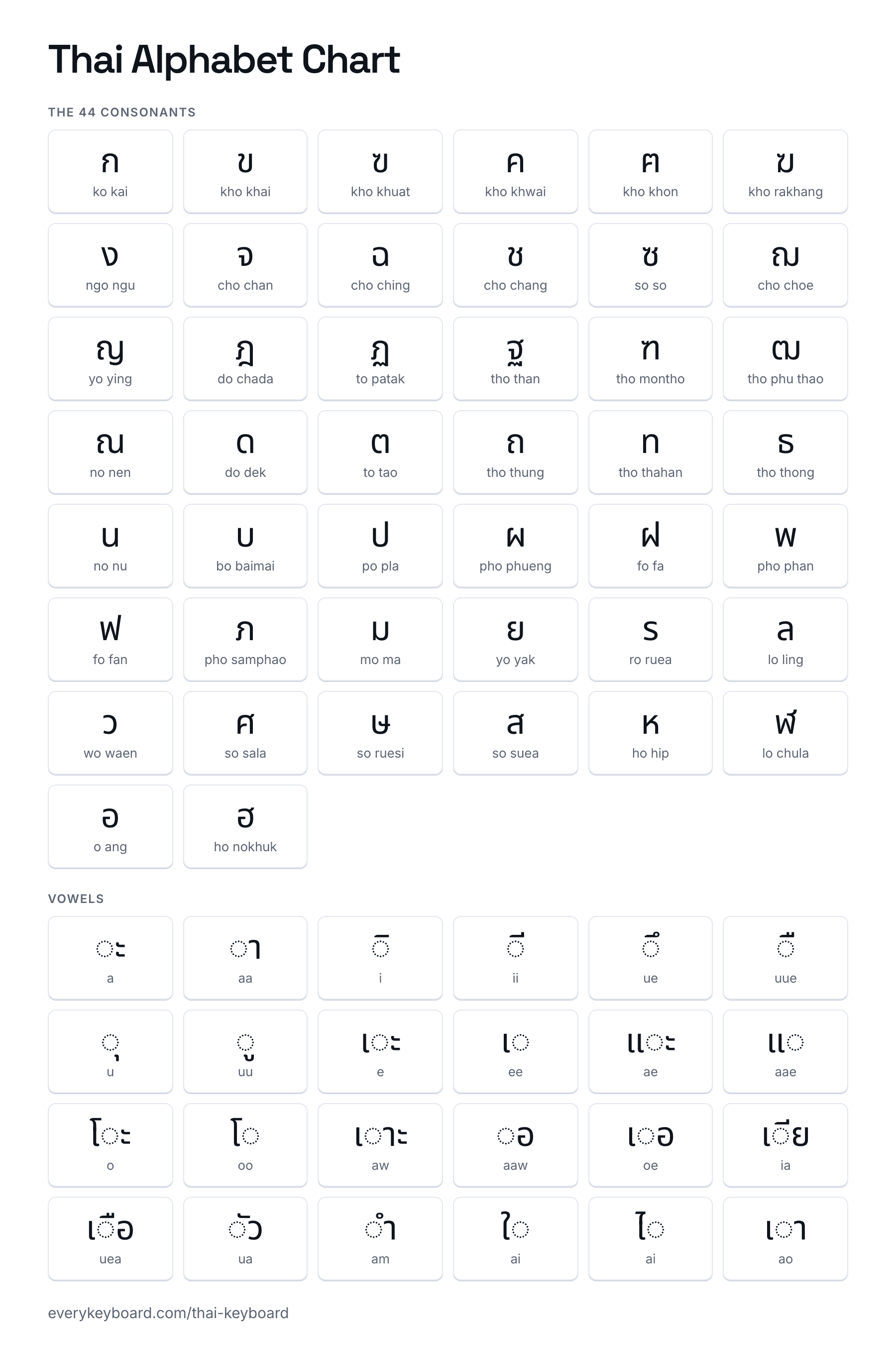
Download the Thai alphabet chart (PNG)
Thai vowels
Thai vowels are written around the consonant: before it, after it, above it or below it, and some use two or three signs at once. Here they are on ก, with how they sound. Type the signs in the order they appear, left to right, with signs above or below typed right after the consonant.
| Vowel | On ก | Sound | Length | Keys |
|---|---|---|---|---|
| ◌ะ | กะ | a | short | D T |
| ◌ั | กัน | a (inside a syllable) | short | D Y O |
| ◌า | กา | aa | long | D K |
| ◌ิ | กิ | i | short | D B |
| ◌ี | กี | ii | long | D U |
| ◌ึ | กึ | ue | short | D 7 |
| ◌ื | กือ | uue | long | D N V |
| ◌ุ | กุ | u | short | D 6 |
| ◌ู | กู | uu | long | D Shift+6 |
| เ◌ะ | เกะ | e | short | G D T |
| เ◌ | เก | ee | long | G D |
| แ◌ะ | แกะ | ae | short | C D T |
| แ◌ | แก | aae | long | C D |
| โ◌ะ | โกะ | o | short | Shift+F D T |
| โ◌ | โก | oo | long | Shift+F D |
| เ◌าะ | เกาะ | o (as in hot) | short | G D K T |
| ◌อ | กอ | o (as in law) | long | D V |
| เ◌อ | เกอ | oe | long | G D V |
| เ◌ีย | เกีย | ia | long | G D U P |
| เ◌ือ | เกือ | uea | long | G D N V |
| ◌ัว | กัว | ua | long | D Y ; |
| ◌ำ | กำ | am | short | D E |
| ใ◌ | ใก | ai | short | . D |
| ไ◌ | ไก | ai | short | W D |
| เ◌า | เกา | ao | short | G D K |
Tone marks and other signs
Thai has five tones: mid, low, falling, high and rising. A syllable's tone comes from the class of its first consonant, the vowel length, the final sound and the tone mark, if any. The marks sit above the consonant (above the vowel sign, if there is one). Type a mark right after its consonant and any vowel sign above or below it, before a vowel that follows like า or ะ: ค่ะ is ค, then ่, then ะ.
| Mark | Name | Use | Key |
|---|---|---|---|
| ก่ | mai ek ไม้เอก | Tone mark 1: low or falling tone, depending on the consonant class | J |
| ก้ | mai tho ไม้โท | Tone mark 2: falling or high tone, depending on the consonant class | H |
| ก๊ | mai tri ไม้ตรี | Tone mark 3: high tone (mid-class consonants only) | Shift+U |
| ก๋ | mai chattawa ไม้จัตวา | Tone mark 4: rising tone (mid-class consonants only) | Shift+J |
| ก็ | mai taikhu ไม้ไต่คู้ | Shortens the vowel: เป็น (pen, to be) | Shift+H |
| ก์ | thanthakhat (karan) ทัณฑฆาต | Silences the letter under it: เบอร์ (boe, number) | Shift+N |
| กั | mai han-akat ไม้หันอากาศ | Short a inside a syllable: กัน (kan) | Y |
| กํ | nikkhahit นิคหิต | Rare; part of ◌ำ (am) and Pali and Sanskrit words | Shift+Y |
The tone each mark gives. "No mark" is for a syllable with a long vowel or one ending in m, n, ng, w or y:
| Consonant class | No mark | With ่ | With ้ (and ๊ ๋) |
|---|---|---|---|
| Mid (ก จ ด ต บ ป อ…) | mid | low | falling, high (๊), rising (๋) |
| High (ข ฉ ถ ผ ฝ ส ห…) | rising | low | falling |
| Low (ค ง ช น พ ม ร ล…) | mid | falling | high |
Common Thai words and how to type them
Each word with the keys to press in Kedmanee mode, in order. Thai doesn't put spaces between words, so ไม่เป็นไร is typed in one go.
| Thai | Say it | Meaning | Keys |
|---|---|---|---|
| สวัสดี | sawatdi | hello, goodbye | L ; Y L F U |
| ขอบคุณ | khop khun | thank you | - V [ 8 6 Shift+I |
| ครับ | khrap | polite ending (said by men) | 8 I Y [ |
| ค่ะ | kha | polite ending (said by women) | 8 J T |
| ใช่ | chai | yes, that's right | . = J |
| ไม่ | mai | no, not | W , J |
| ไม่เป็นไร | mai pen rai | never mind, you're welcome | W , J G X Shift+H O W I |
| สบายดีไหม | sabai di mai | how are you? | L [ K P F U W S , |
| อร่อย | aroi | delicious | V I J V P |
| รัก | rak | love | I Y D |
| ภาษาไทย | phasa thai | the Thai language | 4 K Shift+K K W M P |
| ประเทศไทย | prathet thai | Thailand | X I T G M Shift+L W M P |
| กรุงเทพ | krung thep | Bangkok | D I 6 ' G M R |
Thai digits and the baht sign
Thailand has its own digits, used on official documents, banknotes, temple signs and some price tags. Everyday writing mostly uses 0 to 9. Open Thai digits above the keyboard, or press Shift with the keys shown on the layout. The baht sign ฿ is on Shift+7.
| Thai | Digit | Key |
|---|---|---|
| ๐ | 0 | Shift+Q |
| ๑ | 1 | Shift+2 |
| ๒ | 2 | Shift+3 |
| ๓ | 3 | Shift+4 |
| ๔ | 4 | Shift+5 |
| ๕ | 5 | Shift+8 |
| ๖ | 6 | Shift+9 |
| ๗ | 7 | Shift+0 |
| ๘ | 8 | Shift+- key |
| ๙ | 9 | Shift+= key |
How to add a Thai keyboard to your device
Windows
Settings → Time & language → Language & region → Add a language → Thai. It comes with the Thai Kedmanee keyboard; Thai Pattachote is under the language options. Switch with Windows+Space. On many computers in Thailand the key left of 1 (`) is set to switch between Thai and English.
Mac
System Settings → Keyboard → Text Input → Edit → + → Thai, then choose Thai (Kedmanee) or Thai - Pattachote. Switch with Control+Space or the Globe key.
iPhone and iPad
Settings → General → Keyboard → Keyboards → Add New Keyboard → Thai. Tap the globe key to switch.
Android
In Gboard, open Settings → Languages → Add keyboard → Thai. Tap the globe key or hold the space bar to switch.
Chromebook
Settings → Device → Keyboard and inputs → Input settings → Add input methods → Thai (Kedmanee). Switch with Ctrl+Space.
Frequently asked questions
How do I type Thai on an English keyboard?
Use the Kedmanee tab on this page: each key on your keyboard types the Thai letter printed on the same key in Thailand, so D gives ก and K gives า. The layout and a key chart for every letter are below. If you don't know where the letters are yet, use the Alphabet tab and click them. Then press Copy and paste your Thai anywhere.
In what order do I type Thai letters?
In the order they are written, left to right, with marks after the letter they sit on. Type a consonant, then the vowel sign above or below it, then the tone mark: ก + ี + ่ gives กี่. Vowels written before the consonant (เ แ โ ใ ไ) are typed first, because they come first on the line: เ + ก gives เก. If you type the tone mark before the vowel sign, this keyboard puts them in the right order for you, so ก + ่ + ี also gives กี่.
Why does Thai have no spaces between words?
Thai is written with words run together, and a space marks the end of a phrase or sentence instead, where English would use a comma or full stop. Readers find the word breaks from the spelling. So type Thai words without spaces and add one where a sentence or clause ends.
What is the Kedmanee layout?
Kedmanee is the standard Thai keyboard layout (Thai Industrial Standard TIS 820-2538), which grew out of the Thai typewriters of the 1920s. It is the Thai keyboard on Windows, Mac, iPhone and Android and on every keyboard sold in Thailand. An alternative, Pattachote, puts the most common letters on the home row for faster typing and is also built into Windows and Mac. You can try it in the Pattachote tab above.
How do Thai tone marks work?
Thai has five tones and four tone marks. The tone of a syllable depends on the class of its first consonant (mid, high or low), whether the syllable ends in a stop, and the tone mark. The same mark gives different tones on different consonants: ่ (mai ek) is a low tone on ก but a falling tone on ค. The table above shows the common cases.
Is my text private?
Yes. Everything runs in your browser. Your draft is kept on your own device so it survives a refresh, and it's never uploaded.