How to type Polish letters with this keyboard
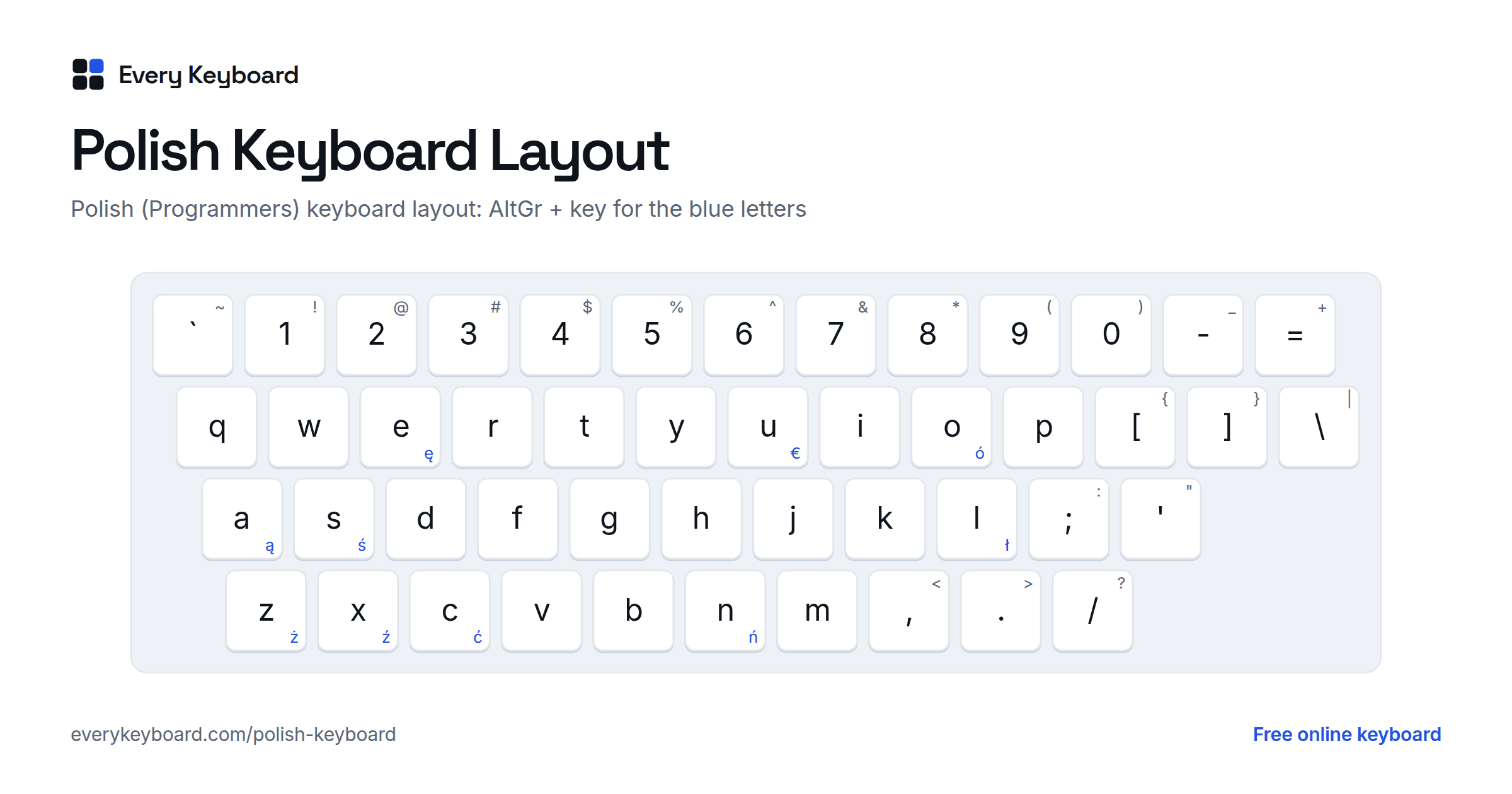
Polish keyboards look exactly like US ones: Poland uses the Polish (Programmers) layout, where the right Alt key (AltGr) plus a letter gives the Polish letter. This page works the same way, so your own keys type as usual and there's nothing to switch. There are four ways to type the Polish letters:
- Alt + letter, as on a Polish keyboard: hold Alt (Option on a Mac) and press A C E L N O S Z for ą ć ę ł ń ó ś ż, and X for ź. Add Shift for capitals: Alt+Shift+L gives Ł. Either Alt key works here. Alt+, and Alt+. type the Polish quotes „ and ”, and Alt+U types €.
- Click or tap the buttons above the keyboard. Hold Shift while clicking (or press Shift or Caps on the on-screen keyboard first) for capitals.
- AltGr on the keyboard: click AltGr on the on-screen keyboard, and the keys show the Polish letters in blue. Tap a key to type it. This is the quickest way on a phone or tablet.
- Quick codes: switch on quick codes and type the letter followed by
=:a=→ ą,l=→ ł,z=→ ż, andz==→ ź. They're off by default so that an ordinary = sign stays as typed.
A handy test sentence that uses all nine Polish letters is Zażółć gęślą jaźń, a nonsense phrase that Poles use to test fonts and keyboards the way English speakers use "The quick brown fox".
Polish letters and how to pronounce them
The Polish alphabet has 32 letters: the 23 Latin letters it shares with English (Q, V and X appear only in foreign words) plus nine with diacritics. Each has its own place in alphabetical order, right after its base letter, so ć comes after c and ł after l.
| Letter | Name | Sound | Example | Polish keyboard |
|---|---|---|---|---|
| ą Ą | a ogonek | a nasal o, like the on in French bon | są (they are), mąka (flour) | AltGr + A |
| ć Ć | c acute | a soft ch, with the tongue further back than in cheese | być (to be), ćma (moth) | AltGr + C |
| ę Ę | e ogonek | a nasal e, like the in in French vin; at the end of a word, often a plain e | ręka (hand), idę (I go) | AltGr + E |
| ł Ł | l with stroke | w as in water | ładny (pretty), Łódź | AltGr + L |
| ń Ń | n acute | ny as in canyon, like Spanish ñ | koń (horse), dzień (day) | AltGr + N |
| ó Ó | o acute (o kreskowane) | oo as in boot, the same sound as u | góra (mountain), król (king) | AltGr + O |
| ś Ś | s acute | a soft sh, with the tongue further back than in sheep | śnieg (snow), ślub (wedding) | AltGr + S |
| ź Ź | z acute | a soft zh, the voiced partner of ś | źle (badly), źródło (source) | AltGr + X |
| ż Ż | z with dot (z kropką) | s as in measure, the same sound as rz | żaba (frog), może (maybe) | AltGr + Z |
Three marks are used. The ogonek ("little tail") under ą and ę makes a nasal vowel. The kreska (acute accent) on ć ń ś ź marks a soft consonant, and on ó a vowel that now sounds like u. The dot on ż and the stroke through ł make them separate letters with their own sounds.
Other Polish spellings to know
Several sounds are written with two letters, and some letters are read differently from English:
| Spelling | Sound | Example |
|---|---|---|
| c | ts as in cats | noc (night) |
| cz | ch as in church | czas (time) |
| sz | sh as in shop | szkoła (school) |
| rz | s as in measure, like ż | rzeka (river) |
| ch, h | a breathy h, like ch in Scottish loch | chleb (bread) |
| w | v | woda (water) |
| j | y as in yes | jak (how) |
| ci, si, zi, ni | the same sounds as ć, ś, ź, ń before a vowel | ciocia (aunt), siano (hay) |
| dz | ds as in adds | dzwon (bell) |
| dź, dzi | a soft j, the voiced partner of ć | dźwięk (sound) |
| dż | j as in jam | dżem (jam) |
Leaving the marks off can change the word:
| Without | With |
|---|---|
| sad (orchard) | sąd (court) |
| laska (walking stick) | łaska (grace, favor) |
| moc (power) | móc (to be able) |
| zle ((not a word)) | źle (badly) |
The Polish (Programmers) keyboard layout
Nearly every computer in Poland uses Polish (Programmers), in Polish klawiatura polska programisty. The keys are the same as on a US keyboard, and the Polish letters are on the AltGr layer, shown in blue below. Only the right Alt key works as AltGr in Windows; the left Alt key opens menus instead. On a keyboard without AltGr, Ctrl+Alt does the same job.
- AltGr + A C E L N O S give ą ć ę ł ń ó ś, the letter each one is based on.
- AltGr + Z gives ż and AltGr + X gives ź, since both are based on z.
- AltGr + U gives the euro sign €.
- Add Shift for capitals: AltGr + Shift + S gives Ś.
Windows also has a Polish (214) layout, a QWERTZ layout copied from old Polish typewriters: Z and Y are swapped, and the Polish letters have their own keys where US keyboards have punctuation. Few people use it on purpose, which is why this page doesn't offer it. It's mostly met by accident, when a stray shortcut switches Windows to it (see the FAQ).
Polish characters and Alt codes
For Windows Alt codes, hold Alt and type the number on the number pad, with Num Lock on. Only ó and Ó work on every PC. The other codes depend on Windows' language settings: they give the Polish letters on a PC set up for Polish, and other characters on an English PC. The Unicode code works everywhere in Word: type it, then press Alt+X.
| Character | Alt code (Windows) | Unicode (Word: Alt+X) |
|---|---|---|
| ą Ą | Alt+0185 · Alt+0165 (Polish PC) | 0105 · 0104 |
| ć Ć | Alt+0230 · Alt+0198 (Polish PC) | 0107 · 0106 |
| ę Ę | Alt+0234 · Alt+0202 (Polish PC) | 0119 · 0118 |
| ł Ł | Alt+0179 · Alt+0163 (Polish PC) | 0142 · 0141 |
| ń Ń | Alt+0241 · Alt+0209 (Polish PC) | 0144 · 0143 |
| ó Ó | Alt+0243 · Alt+0211 | 00F3 · 00D3 |
| ś Ś | Alt+0156 · Alt+0140 (Polish PC) | 015B · 015A |
| ź Ź | Alt+0159 · Alt+0143 (Polish PC) | 017A · 0179 |
| ż Ż | Alt+0191 · Alt+0175 (Polish PC) | 017C · 017B |
Polish quotation marks open low and close high: „Dzień dobry”. A quote inside a quote uses guillemets: „On powiedział «nie»”. Dialogue in books usually starts with a dash instead of quotes. Like most of Europe, Polish uses a decimal comma (3,5) and writes the currency after the amount (20 zł).
How to add a Polish keyboard to your computer or phone
Windows
- Go to Settings → Time & language → Language & region → Add a language, and choose Polski. Its default keyboard is Polish (Programmers).
- Switch keyboards with Windows+Space. Then hold the right Alt key and press a letter: AltGr+A for ą, AltGr+L for ł.
- If your Windows display language should stay English, you can add the Polish keyboard to the English language instead: ⋯ next to English → Language options → Add a keyboard → Polish (Programmers).
Mac
Go to System Settings → Keyboard → Text Input → Edit → + → Polish, and choose Polish Pro. It works like the Windows Programmers layout, with Option as AltGr: Option+A for ą, Option+L for ł. Switch with the input menu in the menu bar or Control+Space.
Microsoft Word
Type the Unicode code from the table above and press Alt+X: 0105 → ą, 0142 → ł, 017C → ż. Set the proofing language to Polish (Review → Language) for spell checking.
iPhone and iPad
Go to Settings → General → Keyboard → Keyboards → Add New Keyboard → Polish. Tap the globe key to switch. On the Polish keyboard, press and hold a letter (a, c, e, l, n, o, s, z) and slide to the Polish version.
Android
In Gboard, open Settings → Languages → Add keyboard → Polski. Press and hold a letter to get its Polish version. Tap the globe key or hold the space bar to switch languages.
Chromebook
Go to Settings → Device → Keyboard and inputs → Input settings → Add input methods → Polish keyboard. Switch with Ctrl+Space, then use the right Alt key with a letter, as on Windows.
Frequently asked questions
How do I type Polish letters on an English keyboard?
On this page, click the buttons above the keyboard, or hold Alt (Option on a Mac) and press A, C, E, L, N, O, S, Z or X for ą ć ę ł ń ó ś ż ź. Add Shift for capitals. In Windows, add the Polish (Programmers) keyboard and use the right Alt key (AltGr) the same way.
What is the Polish (Programmers) keyboard?
It is the standard keyboard layout in Poland. Physically it's an ordinary US QWERTY keyboard; the Polish letters come from AltGr (right Alt) plus the base letter, with X used for ź because Z is taken by ż. Keyboards sold in Poland are simply US keyboards, and this is the layout Windows picks when you add Polish.
Why did Z and Y swap places on my keyboard?
Windows switched you to the Polish (214) layout, a QWERTZ typewriter layout, usually after an accidental Left Alt+Shift or Ctrl+Shift. Press the same shortcut, or Windows+Space, to switch back to Polish (Programmers). To stop it happening, remove Polish (214) in Settings → Time & language → Language & region → Polski → Language options.
What is the difference between ż and ź?
Ż (z with a dot) sounds like the s in measure and is spelled rz in many words. Ź (z with an accent) is softer, with the tongue further back, and is written zi before a vowel. On the Polish (Programmers) keyboard, ż is AltGr+Z and ź is AltGr+X.
Are ó and u pronounced the same?
Yes. In modern Polish, ó and u are the same sound, like the oo in boot. The spelling comes from history, so it has to be learned word by word: góra (mountain) but kura (hen). The same goes for ż and rz, and for h and ch.
Can I leave out the Polish accents?
People often do in quick messages, and Poles will usually understand from context, but it's considered careless in anything formal and it can change the meaning: sad is an orchard, sąd is a court. Names in particular should keep their letters: Łódź, Wałęsa, Kraków.