How to type Spanish accents with this keyboard
There are three ways to type Spanish characters here. Use whichever feels quickest:
- Click or tap the blue accent buttons above the keyboard. Hold Shift while clicking (or press Shift on the on-screen keyboard first) for capitals such as Á or Ñ.
- Alt shortcuts: hold Alt (Option on a Mac) and press the letter. Alt+A gives á, Alt+N gives ñ, and pressing Alt+U twice gives ü. Alt+? types ¿ and Alt+! types ¡.
- Quick codes: switch on quick codes and type a letter followed by a symbol: a' → á, u" → ü, n~ → ñ, ?? → ¿, !! → ¡. Handy if you type fast and don't want to reach for the mouse.
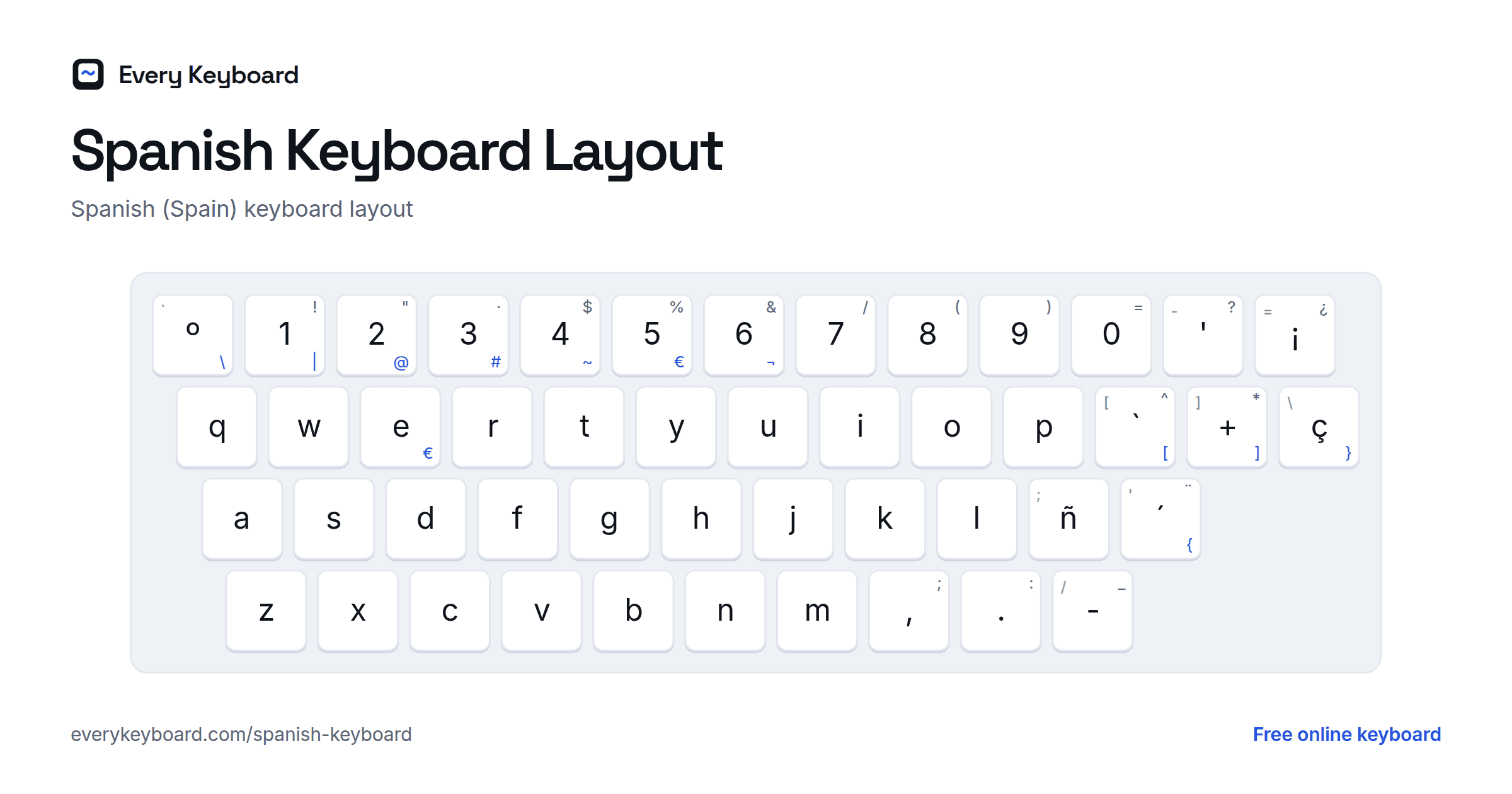
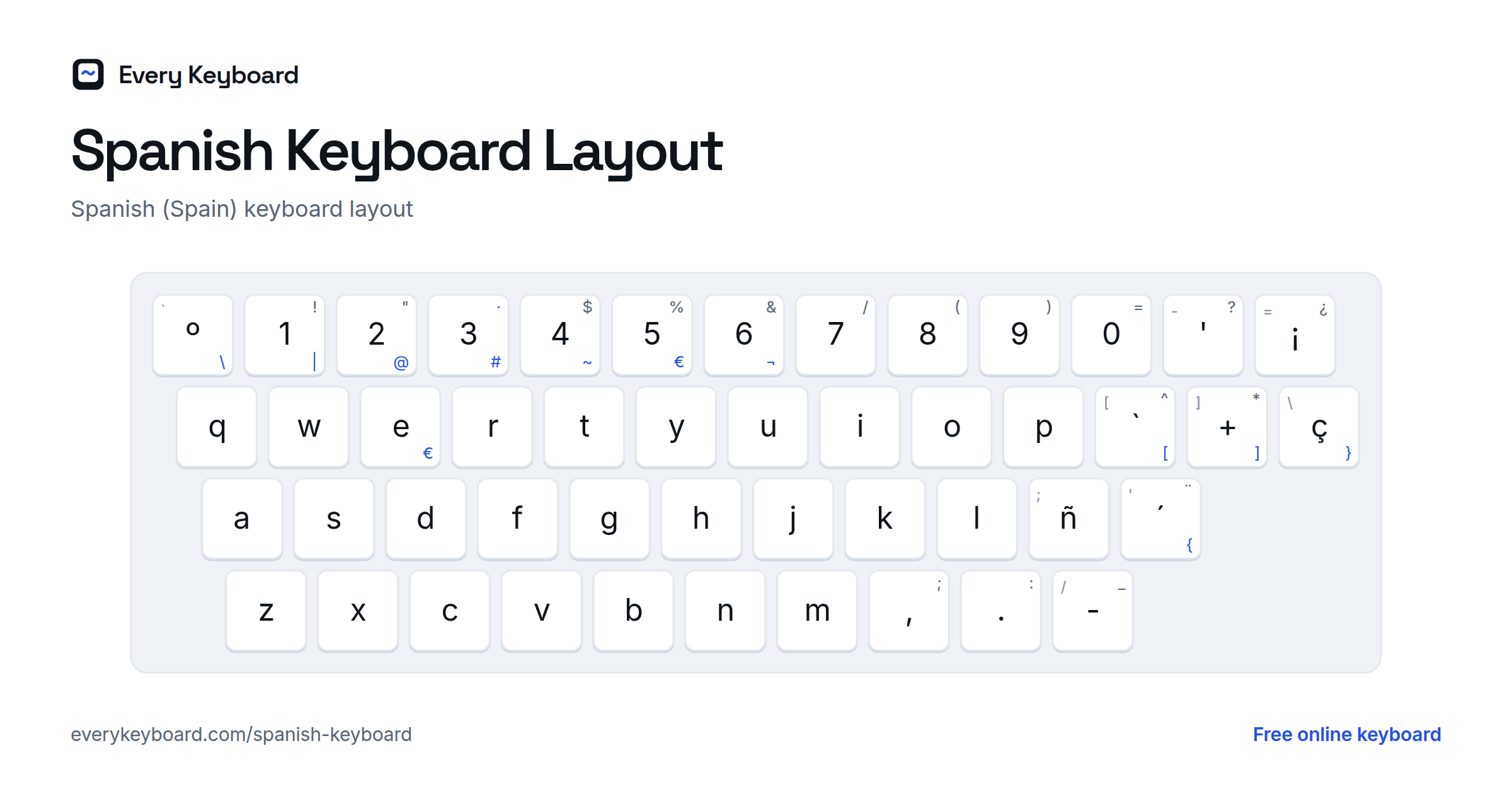
Prefer a real Spanish layout? Choose Spain layout above the text box. Your keyboard then types like one bought in Spain: ñ sits next to L, and the ´ key adds an accent to the next vowel.
Spanish keyboard layout (Spain)
Keyboards sold in Spain put ñ right of L and have two accent keys: ´ (with ¨ on Shift) next to ñ, and ` (with ^ on Shift) right of P. Press the accent key, then the vowel: ´ then a gives á. The small letter on each key is the US key in the same place. Latin American keyboards are similar, with ñ in the same spot but some symbols moved.
Spanish accents and special characters
Spanish uses only a handful of special characters. Here is each one, with an example and the codes to type it elsewhere.
| Character | Name | Example | Alt code (Windows) | HTML |
|---|---|---|---|---|
| á Á | a with acute accent | está, mamá | Alt+0225 · Alt+0193 | á |
| é É | e with acute accent | café, él | Alt+0233 · Alt+0201 | é |
| í Í | i with acute accent | sí, día | Alt+0237 · Alt+0205 | í |
| ó Ó | o with acute accent | canción, cómo | Alt+0243 · Alt+0211 | ó |
| ú Ú | u with acute accent | tú, música | Alt+0250 · Alt+0218 | ú |
| ü Ü | u with diaeresis (diéresis) | pingüino, vergüenza | Alt+0252 · Alt+0220 | ü |
| ñ Ñ | eñe | año, España | Alt+0241 · Alt+0209 | ñ |
| ¿ | inverted question mark | ¿Qué hora es? | Alt+0191 | ¿ |
| ¡ | inverted exclamation mark | ¡Hola! | Alt+0161 | ¡ |
When do Spanish words take an accent?
- Stress that breaks the usual rule. Words ending in a vowel, n or s are normally stressed on the second-to-last syllable; words ending in other consonants on the last. An accent marks the exceptions: canción, café, árbol, música.
- Words that would otherwise look the same: sí (yes) vs si (if), tú (you) vs tu (your), él (he) vs el (the), más (more) vs mas (but).
- Question words: qué, cómo, dónde, cuándo, quién, cuál, por qué.
- ü is only used in güe and güi, to show the u is pronounced: pingüino, vergüenza.
- ñ is its own letter, not an n with decoration: año (year) and ano mean very different things.
- ¿ and ¡ open every question and exclamation: ¿Cómo estás? ¡Qué bien!
How to type Spanish accents on your own computer or phone
Mac
- Option+E, then the vowel: á é í ó ú
- Option+N, then N: ñ
- Option+U, then U: ü
- Option+Shift+?: ¿ and Option+1: ¡
- Or press and hold a letter key to pick an accent from the pop-up.
Windows
- Hold Alt and type the code on the number pad (see the table above), e.g. Alt+0241 for ñ.
- No number pad? Add the United States-International keyboard (Settings → Time & language → Language & region → ⋯ next to your language → Language options → Add a keyboard). Then type ' followed by a vowel for á, ~ then n for ñ, " then u for ü, and Right Alt+? for ¿.
Microsoft Word
- Ctrl+', then the vowel: á é í ó ú
- Ctrl+Shift+~, then n: ñ
- Ctrl+Shift+:, then u: ü
- Alt+Ctrl+Shift+?: ¿ and Alt+Ctrl+Shift+!: ¡
Google Docs
Use Insert → Special characters and search for the letter, or type the text here and paste it in.
Chromebook
Add the US International keyboard in Settings → Device → Keyboard and inputs → Input settings, then switch to it with Ctrl+Space. You can also type any character with Ctrl+Shift+U, its Unicode code (e.g. f1 for ñ), then Space.
iPhone and Android
Press and hold a letter on your phone's keyboard and slide to the accented version: hold a for á, n for ñ, ? for ¿. You can also add a Spanish keyboard in your phone's language settings.
Frequently asked questions
How do I type Spanish accents without a Spanish keyboard?
Use the accent buttons above the keyboard on this page, or hold Alt (Option on a Mac) and press the letter: Alt+A gives á, Alt+N gives ñ, and Alt+U twice gives ü. When you're done, press Copy and paste the text wherever you need it.
How do I type ñ?
Click the ñ button, press Alt+N (Option+N on a Mac) on this page, or turn on quick codes and type n~. In other apps: on a Mac press Option+N then n; on Windows hold Alt and type 0241 on the number pad; on a phone, press and hold n.
How do I type the upside-down question mark ¿?
Click the ¿ button or press Alt+? on this page. On a Mac press Option+Shift+?; on Windows hold Alt and type 0191 on the number pad. With quick codes on, type ?? and it turns into ¿.
How do I type capital accented letters like Á or Ñ?
Hold Shift while clicking an accent button, or press Shift or Caps on the on-screen keyboard first. With the Alt shortcuts, add Shift: Alt+Shift+A gives Á.
Does this Spanish keyboard work on my phone?
Yes. The page works in any mobile browser: tap the accent buttons or the on-screen keys, then tap Copy. Your phone's own keyboard can also type accents if you press and hold a letter.
Is my text saved or sent anywhere?
No. Everything happens in your browser. Your draft is kept on your own device so it's still there if you refresh, and it's never uploaded.