How to type Portuguese accents with this keyboard
There are three ways to type Portuguese characters here. Use whichever feels quickest:
- Click or tap the accent buttons above the keyboard. Hold Shift while clicking (or press Shift on the on-screen keyboard first) for capitals such as à or Ç. More symbols shows º ª, ü and R$.
- Alt shortcuts: hold Alt (Option on a Mac) and press the letter. Press it again to cycle through the accents: Alt+A gives á, then â, ã and à; Alt+E gives é, then ê; Alt+O gives ó, then ô and õ. Alt+C types ç. Add Shift for capitals.
- Quick codes: switch on quick codes and type a letter followed by the accent: a' → á, e^ → ê, a~ → ã, o~ → õ, a` → à, c' → ç. << and >> give « and ».
Used to a keyboard from Brazil or Portugal? Choose Brazil ABNT2 or Portugal above the text box. Your keyboard then types like one bought there, with real dead keys: press ~ and then a for ã. Press Esc to switch back to normal typing.
Portuguese accents
Portuguese uses five marks. Most words have none, but the ones that do are very common: não, é, você, também.
- Acento agudo (´): á é í ó ú. Marks the stressed syllable when it breaks the usual rule. On a, e and o it also means an open sound: café, avó, está, fácil, útil.
- Acento circunflexo (^): â ê ô. Also marks stress, but on a closed vowel: você, avô, três, câmara. Compare avó (grandmother) with avô (grandfather).
- Til (~): ã õ. Makes the vowel nasal: não, mãe, irmã, lições, põe. It usually falls on the stressed syllable, but not always: órfã, órgão.
- Crase (`): à. Only ever on a, and it doesn't mark stress. It shows that the preposition a has merged with the article a or with aquele, aquela, aquilo: vou à praia, àquela hora.
- Cedilha (¸): ç. Gives c an s sound before a, o and u: coração, açúcar, almoço. It never comes before e or i (ce and ci already sound like s), and no Portuguese word starts with ç.
Brazil and Portugal spell some words differently
The 1990 spelling agreement (Acordo Ortográfico), adopted from 2009 and mandatory in both countries by 2016, brought the two spellings closer, but some accents still differ because the vowels are pronounced differently. Brazil writes econômico, Antônio, bebê, gênero; Portugal writes económico, António, bebé, género. Both are correct in their own country.
What happened to ü?
Brazil used the trema until the spelling agreement took effect in 2009: lingüiça, freqüente, tranqüilo are now written linguiça, frequente, tranquilo. Portugal had dropped it back in 1945. Today ü only appears in foreign names and the words formed from them, like Müller and mülleriano. That's why ü is tucked away under More symbols on this keyboard.
Portuguese accent codes (Windows Alt codes and HTML)
To type these characters in other apps on Windows, hold Alt and type the code on the number pad with Num Lock on. For Mac shortcuts, see below.
| Character | Name | Example | Alt code (Windows) | HTML |
|---|---|---|---|---|
| á Á | a with acute (agudo) | já, água | Alt+0225 · Alt+0193 | á |
| â Â | a with circumflex (circunflexo) | câmera, lâmpada | Alt+0226 · Alt+0194 | â |
| ã Ã | a with tilde (til) | não, mãe | Alt+0227 · Alt+0195 | ã |
| à À | a with grave (crase) | à noite, àquele | Alt+0224 · Alt+0192 | à |
| é É | e with acute | é, café | Alt+0233 · Alt+0201 | é |
| ê Ê | e with circumflex | você, três | Alt+0234 · Alt+0202 | ê |
| í Í | i with acute | aí, país | Alt+0237 · Alt+0205 | í |
| ó Ó | o with acute | avó, só | Alt+0243 · Alt+0211 | ó |
| ô Ô | o with circumflex | avô, ônibus | Alt+0244 · Alt+0212 | ô |
| õ Õ | o with tilde | lições, põe | Alt+0245 · Alt+0213 | õ |
| ú Ú | u with acute | útil, baú | Alt+0250 · Alt+0218 | ú |
| ç Ç | c with cedilla (cedilha) | coração, açúcar | Alt+0231 · Alt+0199 | ç |
| º ª | ordinal indicators | 1º, 2ª, nº | Alt+0186 · Alt+0170 | º ª |
| ü Ü | u with diaeresis (trema) | Müller (names only) | Alt+0252 · Alt+0220 | ü |
Portuguese keyboard layouts: ABNT2 and Portugal
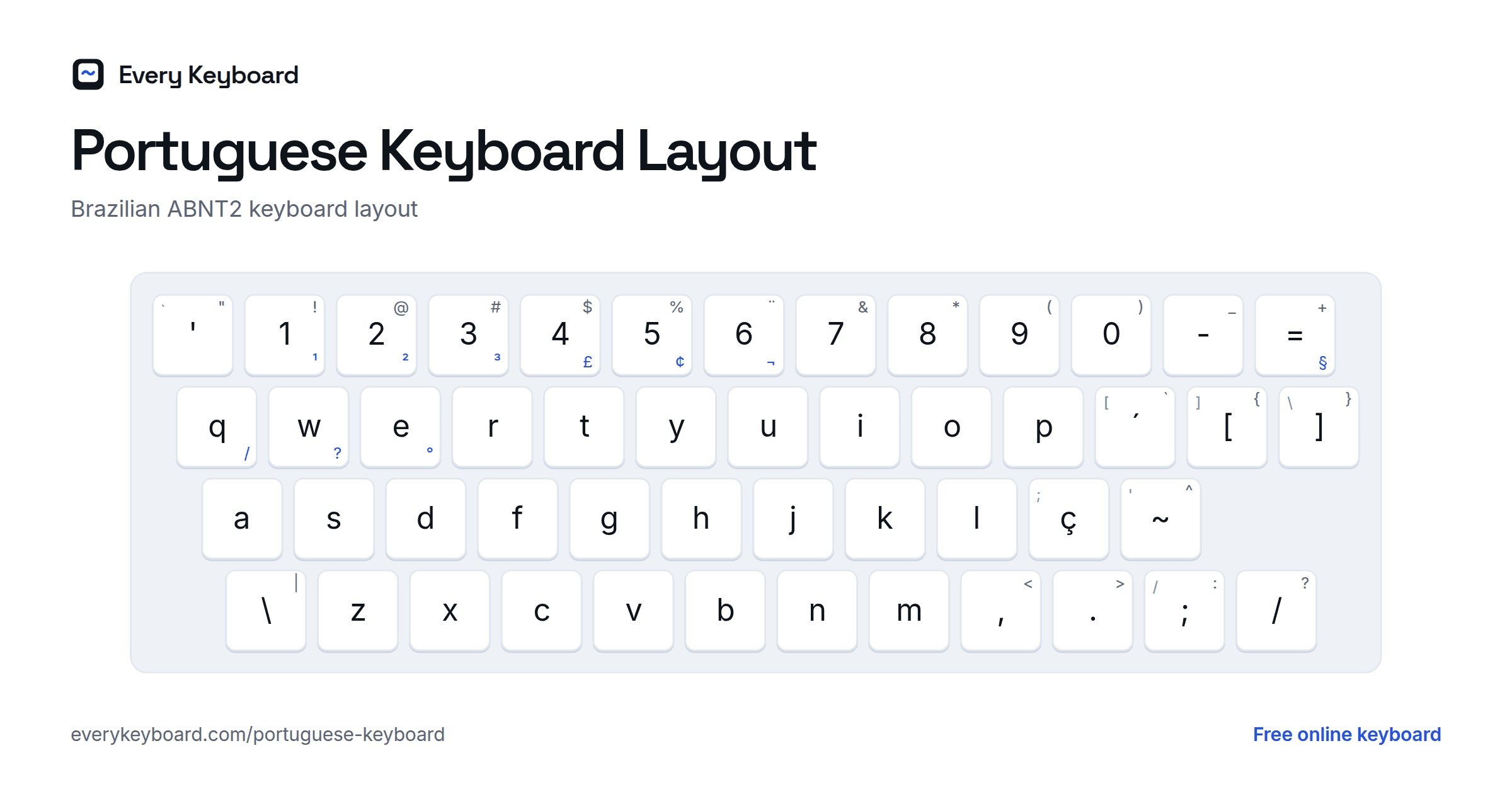
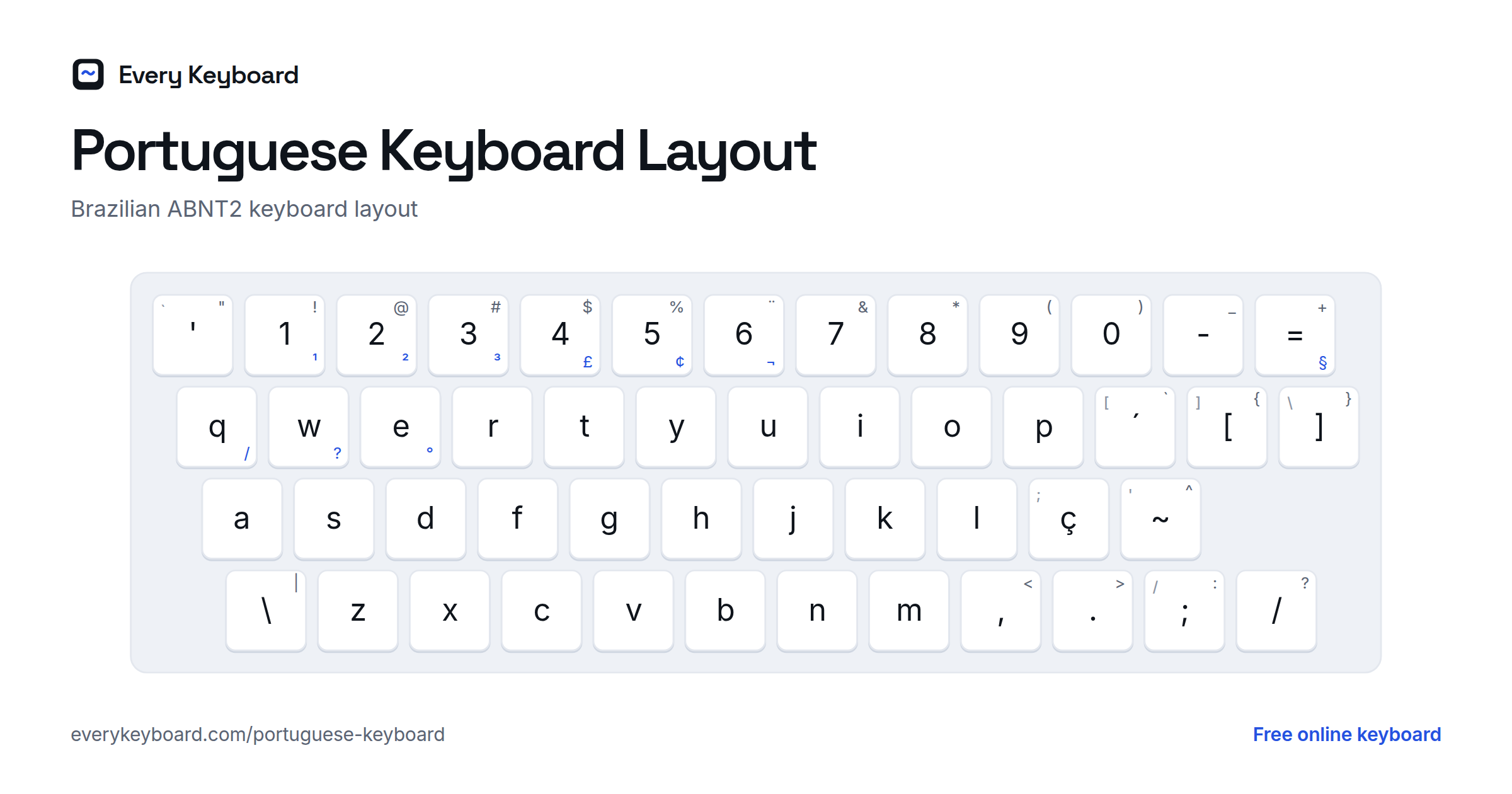
Brazil and Portugal each have their own keyboard layout. Both are QWERTY with ç right of L and dead keys for accents: press the accent key, then the letter. The small letter on each key below is the US key in the same place.
Brazil (ABNT2)
- ´ ` are right of P: press ´ then a vowel for á é í ó ú, Shift + ´ then a for à.
- ~ ^ are right of Ç: press ~ then a or o for ã õ, Shift + ~ then a vowel for â ê ô.
- ¨ is Shift + 6, for ü in foreign names.
- ABNT2 has two keys a US keyboard doesn't: \ | left of Z and / ? left of the right Shift. On keyboards without that key, AltGr+Q and AltGr+W type / and ?. AltGr+[ and AltGr+] type ª and º.
Portugal
- ´ ` are right of +: press ´ then a vowel for á é í ó ú, Shift + ´ then a for à.
- ~ ^ are on the key left of Enter: press ~ then a or o for ã õ, Shift + ~ then a vowel for â ê ô.
- º ª are right of Ç, « » right of the ' key, and < > left of Z. AltGr+2 types @ and AltGr+E types €.
How to type Portuguese accents on your own computer or phone
Windows
Settings → Time & language → Language & region → Add a language → Portuguese (Brazil) or Portuguese (Portugal). For Brazil, you can pick Portuguese (Brazil ABNT2) under the language options (⋯ next to the language → Language options → Add a keyboard). Switch with Windows+Space.
If your physical keyboard has a US layout, add the United States-International keyboard (⋯ next to your language → Language options → Add a keyboard). Then type ' then a vowel for á, ^ for â, ~ for ã, ` for à, and ' then c for ç.
Mac
- Option+E, then the vowel: á é í ó ú
- Option+I, then the vowel: â ê ô
- Option+N, then a or o: ã õ
- Option+`, then a: à
- Option+C: ç, and Option+0 / Option+9: º ª
- Or press and hold a letter key to pick an accent from the pop-up.
To add a Portuguese layout: System Settings → Keyboard → Text Input → Edit → + → Portuguese, then pick a Brazilian or Portuguese layout. Switch with Control+Space.
Microsoft Word
- Ctrl+', then the vowel: á é í ó ú
- Ctrl+Shift+^, then the vowel: â ê ô
- Ctrl+Shift+~, then a or o: ã õ
- Ctrl+`, then a: à
- Ctrl+,, then c: ç
iPhone and iPad
Press and hold a letter and slide to the accent you need: hold a for á â ã à, c for ç. To add a Portuguese keyboard: Settings → General → Keyboard → Keyboards → Add New Keyboard → Portuguese (Brazil) or Portuguese (Portugal). Tap the globe key to switch.
Android
In Gboard, press and hold a letter for its accents. To add Portuguese: Gboard Settings → Languages → Add keyboard → Portuguese (Brazil) or Portuguese (Portugal). Tap the globe key or hold the space bar to switch.
Chromebook
Settings → Device → Keyboard and inputs → Input settings → Add input methods → Portuguese (Brazil) or Portuguese (Portugal). Switch with Ctrl+Space. You can also type any character with Ctrl+Shift+U, its Unicode code (e.g. e3 for ã), then Space.
Frequently asked questions
How do I type Portuguese accents without a Portuguese keyboard?
Click the accent buttons above the keyboard on this page, or hold Alt (Option on a Mac) and press the letter. Press it again to cycle: Alt+A gives á, then â, ã and à. Alt+C gives ç. Then press Copy and paste the text wherever you need it.
How do I type ç?
Click the ç button, press Alt+C on this page, or turn on quick codes and type c'. On the Brazilian and Portuguese layouts ç has its own key, right of L. On a Mac press Option+C; on Windows hold Alt and type 0231 on the number pad; on a phone, press and hold c.
How do I type ã and õ?
On this page, press Alt+A three times for ã or Alt+O three times for õ, or use the buttons. On a Brazilian or Portuguese keyboard, press the ~ key and then the vowel. On a Mac, press Option+N and then a or o.
What is the difference between ABNT2 and the Portugal layout?
Both are QWERTY layouts with ç right of L and dead keys for the accents, but the other keys differ. ABNT2 (Brazil) has ´ ` right of P, ~ ^ right of Ç, and ¨ on Shift+6. The Portugal layout has + and ´ ` right of P, º ª right of Ç, ~ ^ next to Enter, and « » right of 0.
Is ü still used in Portuguese?
No, not in Portuguese words. The 2009 spelling agreement dropped the trema in Brazil, so lingüiça became linguiça and freqüente became frequente. Portugal had already dropped it in 1945. It survives only in foreign names and words formed from them, such as Müller and mülleriano.
Is my text saved or sent anywhere?
No. Everything happens in your browser. Your draft is kept on your own device so it's still there if you refresh, and it's never uploaded.