How to type in Persian (Farsi) with this keyboard
Choose a layout with the tabs on the keyboard:
- Persian (standard): the Persian (Standard) layout that comes with Windows, based on the Iranian national standard ISIRI 9147. Your keys type Persian right away. Use it if you already know the layout or want to learn it.
- Phonetic: each English key types the Persian letter that sounds like it, so you can type Farsi without learning a new layout. B types ب, S types س and Shift+S types ش.
- Finglish: type whole Persian words in English letters, the way people write Persian in chat, and they turn into Persian script as you type.
- Alphabet: all 32 letters in order with a Latin label, plus the half-space, vowel marks and Persian digits, to click one by one.
Try Finglish: type salam and you get سلام, merci gives مرسی and khoobi gives خوبی. In every tab, Shift+Space types the half-space. The buttons on the keyboard add the Persian letters, the half-space and Persian punctuation; open Vowel marks for zebar, zir, pish and tashdid. On the standard and phonetic tabs, press Esc to switch between Persian and normal English typing.
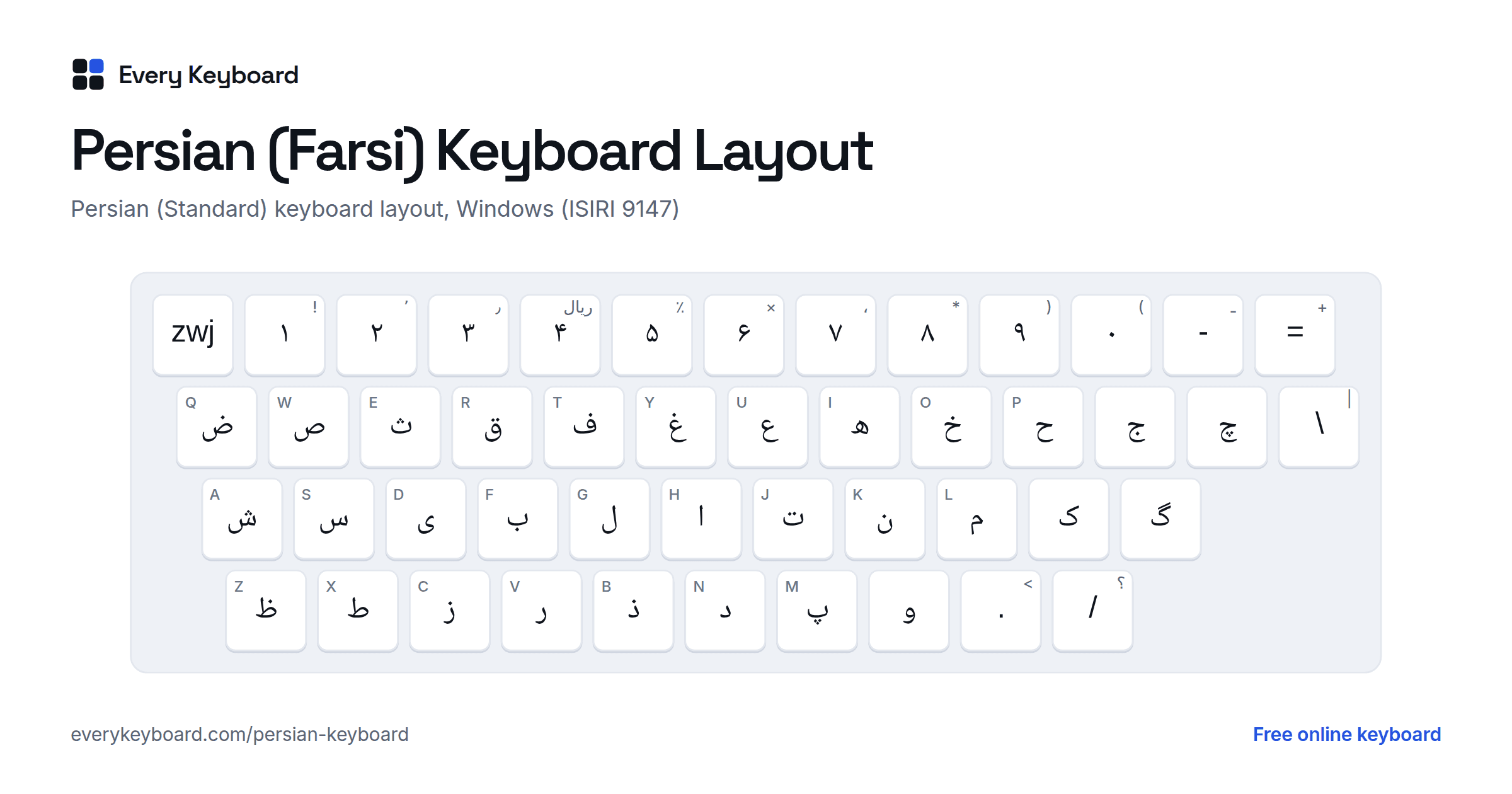
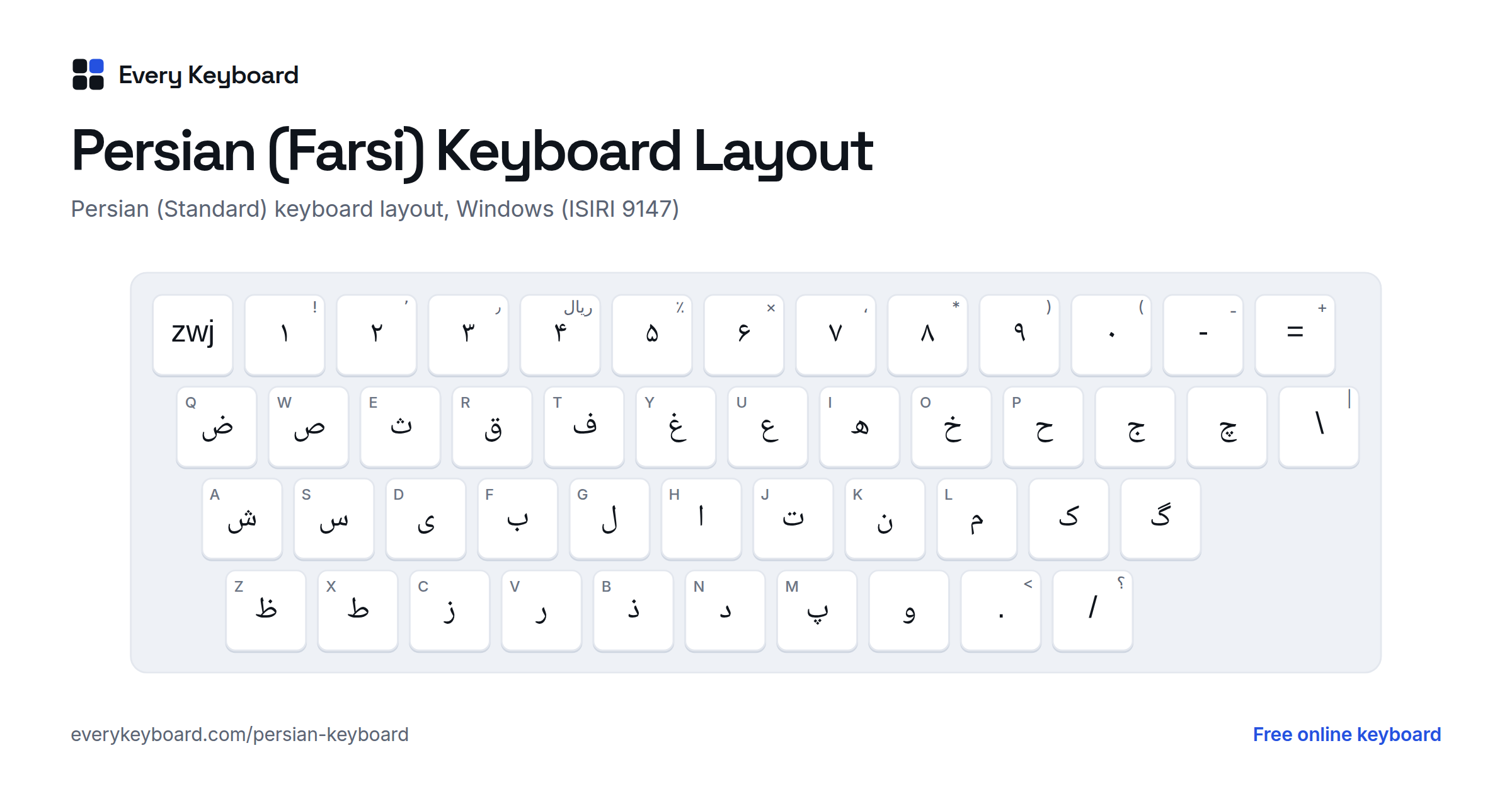
Standard Persian keyboard layout (ISIRI 9147)
This is the Persian (Standard) layout from Windows, Microsoft's version of the Iranian national standard. The small letter on each key is the English key it shares. The number row types Persian digits, and the key left of 1 types an invisible zero width joiner (ZWJ).
With Shift held you get the vowel marks on the top row, آ, ژ, ء, the hamza forms, the Persian guillemets « » and the half-space on B. Shift+4 types the word ریال (rial), as Windows does.Shift+D and Shift+Z type the Arabic letters ي and ك, which you should not use in Persian words.
Persian (Standard) or the older Persian layout?
Windows has two Persian keyboards. Persian is the older one, from before the national standard; Persian (Standard) follows ISIRI 9147 and is the one on this page. The letter keys are the same, but these keys differ:
| Key | Persian (older) | Persian (Standard) |
|---|---|---|
| Number row | Western digits 1 2 3 | Persian digits ۱ ۲ ۳ |
| پ | the \ key (above Enter on a US keyboard) | M |
| M key | ئ | پ |
| Half-space (ZWNJ) | Ctrl+Shift+2 only | Shift+Space, Shift+B (and Ctrl+Shift+2) |
| Vowel marks | Shift+A S D F (َ ُ ِ ّ), Shift+Q W E (ً ٌ ٍ) | Shift+U Y T I (َ ِ ُ ّ), Shift+Q W E R (ْ ٌ ٍ ً) |
| Shift+X | Arabic ي | ط (same as X) |
| Key left of 1 | ÷ (Shift: ×) | zero width joiner |
If پ comes out as ئ on your computer, or your digits come out as 1 2 3 instead of ۱ ۲ ۳, you are on the older layout. The steps below show how to switch.
The half-space (نیمفاصله) and why Persian needs it
Persian letters join to the next letter inside a word. Some words are made of parts that belong together but should not join, such as the verb prefix می, the plural ending ها and the comparative ending تر. A normal space would split them into two words, so Persian uses a half-space (نیمفاصله, nim-fāsele): an invisible character that stops the joining without adding a gap. Its technical name is the zero width non-joiner (ZWNJ, U+200C).
| Word | Say | Why the half-space |
|---|---|---|
| میخواهم | mi-khāham | I want: the prefix می stays attached to the verb but does not join it |
| کتابها | ketāb-hā | books: the plural ending ها after a letter that would join |
| خانهها | khāne-hā | houses: without the half-space, ه and ها run together |
| نمیدانم | nemi-dānam | I don't know |
| بزرگتر | bozorg-tar | bigger: the comparative ending تر |
Ways to type it:
- On this page: Shift+Space in any tab, Shift+B on the standard and phonetic tabs, or the zwnj button above the keyboard.
- Windows, Persian (Standard): Shift+Space or Shift+B. On both Windows Persian layouts, Ctrl+Shift+2 also works.
- In Finglish, the common words with a half-space, such as mikham → میخوام and nemidoonam → نمیدونم, get it automatically.
Without it, people either type a space (the parts can end up on two lines, and search tools see two words) or nothing (the letters join into one long shape). Both are common in informal writing, but careful Persian text uses the half-space.
Persian phonetic keyboard layout
This phonetic layout is for typing Farsi on an English (QWERTY) keyboard without learning the standard layout. Letters go on the English key with the same sound, and Shift gives another letter with the same or a related sound. The Persian letters have their own keys: P → پ, C → چ, G → گ and Shift+J → ژ. Persian has several letters for s (س ص ث), z (ز ذ ض ظ), t (ت ط) and h (ه ح), because of Arabic loanwords. The plain one is on the key; the others are on Shift (Shift+C → ث, Shift+Z → ذ, Shift+D → ض, Shift+X → ظ, Shift+T → ط, Shift+H → ح) or on the bracket keys: [ → ص, ] → ط, with Shift ض and ظ. Shift+S is ش. The number row types Persian digits, and Shift plus a number types a Western digit.
Vowels: A is ا (Shift: آ), I and Y are ی, and U, O, V and W are و, since و is both the v sound and the vowels u and o. E is ع and Shift+E is ء. Q is ق and X is خ, as in many Finglish spellings.
Finglish: type Persian in English letters
Finglish (also Pinglish) is Persian written in Latin letters, as many people type it in messages. In the Finglish tab, each word turns into Persian script as you type. Persian leaves the short vowels a, e and o unwritten inside a word, so the converter does too: dast gives دست. A long a is written, so type it as aa: kaar gives کار. Over 150 common words (salam, merci, chetori, mamnoon, khodahafez, kheili, lotfan and so on) have their usual spelling built in, because the Latin spelling alone can't show which vowels are long.
| Type | Persian | Example |
|---|---|---|
| b p t j d r z s f k g l m n | ب پ ت ج د ر ز س ف ک گ ل م ن | one letter each |
| ch, sh, zh | چ ش ژ | chai, shab, mozhe |
| kh or x | خ | khoob |
| gh | غ | gham (for ق, type q) |
| q | ق | qand |
| v or w | و | vazn |
| h | ه | ham |
| y | ی | yek |
| ' (apostrophe) | ع | ma'lum |
| aa (a at the end) | ا (آ at the start) | kaar, shoma, aab |
| a, e, o inside a word | not written | dast → دست |
| e at the end | ه | khoone |
| i or ee | ی | khoobi |
| u, oo or ou | و | doost |
| , ? ; | ، ؟ ؛ | Persian punctuation |
Finglish has no fixed spelling, so read the result before you copy it. Backspace removes the last Latin letter of the word you are typing, so you can fix a word without starting again. Commas and question marks become ، and ؟, and digits become Persian digits.
The Persian alphabet: 32 letters
Persian is written right to left in the Arabic script, usually in the Naskh style for print and on screens (Nastaliq is used for calligraphy and poetry). The alphabet has 32 letters: the 28 letters of Arabic plus four for sounds Arabic doesn't have, marked Persian below. Most letters join to the next letter; seven never do (ا د ذ ر ز ژ و), which is why Persian words often look broken into pieces.
| Letter | Name | Sound | Latin | Standard key | Phonetic key |
|---|---|---|---|---|---|
| ا | alef الف | a as in father (ā); at the start of a word it carries a short vowel: a, e or o | ā, a, e, o | H | A |
| ب | be به | b | b | F | B |
| پ | pe په (Persian) | p | p | M | P |
| ت | te ته | t | t | J | T |
| ث | se ثه | s (in Arabic loanwords) | s | E | Shift+C |
| ج | jim جیم | j as in jam | j | [ | J |
| چ | che چه (Persian) | ch as in chair | ch | ] | C |
| ح | he (jimi) حه | h (in Arabic loanwords) | h | P | Shift+H |
| خ | khe خه | ch as in Scottish loch | kh | O | Shift+K |
| د | dāl دال | d | d | N | D |
| ذ | zāl ذال | z (in Arabic loanwords) | z | B | Shift+Z |
| ر | re ره | tapped r | r | V | R |
| ز | ze زه | z | z | C | Z |
| ژ | zhe ژه (Persian) | s as in measure | zh | Shift+C | Shift+J |
| س | sin سین | s | s | S | S |
| ش | shin شین | sh as in shop | sh | A | Shift+S |
| ص | sād صاد | s (in Arabic loanwords) | s | W | [ |
| ض | zād ضاد | z (in Arabic loanwords) | z | Q | Shift+[ |
| ط | tā طا | t (in Arabic loanwords) | t | X | Shift+T |
| ظ | zā ظا | z (in Arabic loanwords) | z | Z | Shift+] |
| ع | eyn عین | a glottal stop, or just lengthens the vowel before it | ʿ | U | E |
| غ | gheyn غین | a throaty gh, like a French r; the same sound as ق in Iran | gh | Y | Shift+Q |
| ف | fe فه | f | f | T | F |
| ق | qāf قاف | the same gh sound as غ in Iran; a deep q in Afghanistan | q, gh | R | Q |
| ک | kāf کاف | k | k | ; | K |
| گ | gāf گاف (Persian) | g as in go | g | ' | G |
| ل | lām لام | l | l | G | L |
| م | mim میم | m | m | L | M |
| ن | nun نون | n | n | K | N |
| و | vāv واو | v in Iran (w in Dari), or the vowels u and o | v, u, o | , | W |
| ه | he (do-cheshm) هه | h; at the end of a word, often the vowel e | h, e | I | H |
| ی | ye یه | y, or the vowel i (also ey) | y, i | D | Y |
Several letters share one sound in Persian: s is written س, ص or ث, z is ز, ذ, ض or ظ, t is ت or ط, and h is ه or ح. The extra letters come from Arabic loanwords, so you need to learn each word's spelling. Alef with madde (آ) is a long ā at the start of a word, as in آب (āb, water).
How Persian differs from Arabic
Persian uses the Arabic script, but a Persian keyboard is not an Arabic keyboard with a few extras. The differences matter, because letters that look alike are different characters to a computer.
- Four extra letters: پ (p), چ (ch), ژ (zh) and گ (g). Arabic has none of these sounds as letters.
- Persian ی and ک: Persian writes ye as ی (U+06CC), with no dots at the end of a word, and kāf as ک (U+06A9), without the small mark Arabic ك (U+0643) has in its final form. Arabic ي (U+064A) always has two dots. Text typed with the Arabic letters looks almost right but breaks search, sorting and spell checking. This keyboard always types the Persian letters.
- Persian digits: ۰ ۱ ۲ ۳ ۴ ۵ ۶ ۷ ۸ ۹ (U+06F0 to U+06F9). Four, five and six are shaped differently from the Arabic-Indic digits ٤ ٥ ٦, and they are separate characters.
- Fewer Arabic-only forms: ة (tā marbuta) and the hamza on alef (أ إ) appear only in some Arabic loanwords, and the vowel marks have Persian names: zebar, zir and pish.
- The half-space is part of normal Persian spelling, while Arabic rarely needs it.
For Arabic itself, use the Arabic keyboard. Pashto, the other main language of Afghanistan, has its own letters on the Pashto keyboard.
Vowel marks (harakat)
Everyday Persian leaves short vowels unwritten. The marks appear in children's books, dictionaries, poetry and wherever a word could be misread. Type the letter first, then the mark. All of them are under Vowel marks on the keyboard.
| Example | Name | Use | Standard key | Phonetic key |
|---|---|---|---|---|
| بَ | Fathe (zebar) | short a | Shift+U | ` (left of 1) |
| بِ | Kasre (zir) | short e, also the ezafe -e | Shift+Y | Shift+I |
| بُ | Zamme (pish) | short o | Shift+T | Shift+U |
| بّ | Tashdid | doubles the consonant | Shift+I | Shift+W |
| بْ | Sokun | no vowel after the letter | Shift+Q | |
| بً | Tanvin | -an, in Arabic words like لطفاً | Shift+R | Shift+` |
| هٔ | Hamze above | the ezafe after ه, as in خانهٔ | Shift+N | |
| بٰ | Dagger alef | long ā in a few Arabic words | Shift+V |
Persian numbers ۰ to ۹
Persian text in Iran and Afghanistan uses Persian digits. Numbers are written left to right, even inside right-to-left text. The decimal separator is ٫ and the thousands separator is ٬ (Shift+3 and Shift+2 on the standard layout).
| Digit | Value | Word | Say |
|---|---|---|---|
| ۰ | 0 | صفر | sefr |
| ۱ | 1 | یک | yek |
| ۲ | 2 | دو | do |
| ۳ | 3 | سه | se |
| ۴ | 4 | چهار | chahār |
| ۵ | 5 | پنج | panj |
| ۶ | 6 | شش | shesh |
| ۷ | 7 | هفت | haft |
| ۸ | 8 | هشت | hasht |
| ۹ | 9 | نه | noh |
| ۱۰ | 10 | ده | dah |
Persian punctuation: the comma is ،, the question mark ؟, the semicolon ؛, and quotes are written « ». The full stop is a normal period.
Farsi, Dari and Persian
Persian is the English name of the language. Farsi (فارسی) is what it is called in Persian, and it is the usual name in Iran. In Afghanistan the official name is Dari (دری). In Tajikistan the language is called Tajik and is written in the Cyrillic alphabet.
Iranian Persian and Dari are one language with differences in pronunciation and vocabulary, much like British and American English. Dari keeps some older sounds: و is often w rather than v, and ق and غ stay two different sounds, where Iranian Persian merges them. Both are written with the same 32 letters, the same half-space and the same digits, so a Farsi keyboard is also a Dari keyboard.
How to add a Persian keyboard to your device
Windows
Settings → Time & language → Language & region → Add a language, then search for Persian (Farsi). Windows may add the older Persian keyboard. For the standard layout shown above, click the three dots next to Persian → Language options → Keyboards → Add a keyboard → Persian (Standard), and remove the older one if you like. Switch with Windows+Space or Alt+Shift.
Mac
System Settings → Keyboard → Text Input → Edit → +, then search for Persian. Apple offers more than one Persian layout, and they don't all match the Windows layout key for key, so check the keyboard viewer after you add one. Switch with Control+Space or the Globe key.
iPhone and iPad
Settings → General → Keyboard → Keyboards → Add New Keyboard → Persian. Tap the globe key to switch.
Android (Gboard)
Open the Gboard app (or Settings → System → Languages & input → On-screen keyboard → Gboard), then Languages → Add keyboard → Persian. Tap the globe key or hold the space bar to switch languages.
Chromebook
Settings → Device → Keyboard and inputs → Input settings → Add input methods, then search for Persian. You can also type on this page and copy the text.
Frequently asked questions
How do I type Farsi on an English keyboard?
Use the Phonetic tab: each English key types the Persian letter that sounds like it (B → ب, P → پ, K → ک, G → گ) and Shift gives a related letter (S → ش, J → ژ). Or use Finglish and type whole words as you would in chat: salam → سلام. Then press Copy and paste your text anywhere.
How do I type the half-space (نیمفاصله)?
On this page, press Shift+Space in any tab, or click the zwnj (half-space) button. On the Windows Persian (Standard) layout it is Shift+Space or Shift+B, and Ctrl+Shift+2 works on both Windows Persian layouts. It is an invisible character called the zero width non-joiner (ZWNJ, U+200C).
Why does search not find my Persian text?
The text was probably typed with an Arabic keyboard. Arabic ي and ك look almost the same as Persian ی and ک but are different characters, so a search for one does not find the other. This keyboard types the Persian ی (U+06CC) and ک (U+06A9) everywhere. On the standard layout, only Shift+D and Shift+Z type the Arabic forms.
Where are پ چ ژ گ on the Persian keyboard?
On the Persian (Standard) layout, پ is on M, چ is on ], ژ is Shift+C and گ is on the ' key. ک is on ; and ی is on D. On the Phonetic tab they are on P, C, Shift+J and G.
Is a Farsi keyboard the same as a Persian or Dari keyboard?
Yes. Farsi is the Persian word for Persian, and Dari is the name used in Afghanistan. All three use the same 32 letters, so the same keyboard works for Iran and Afghanistan. Tajik Persian is written in Cyrillic.
Is my text private?
Yes. Everything runs in your browser and your draft is kept on your own device so it survives a refresh. Nothing is uploaded.