How to type Hawaiian with this keyboard
Hawaiian (US + kahakō) works like the Hawaiian keyboard on Windows and Mac: your keys type as usual, and the two Hawaiian marks are one shortcut away. There are four ways to type them:
- Click or tap the buttons above the keyboard. Hold Shift while clicking (or press Shift on the on-screen keyboard first) for Ā Ē Ī Ō Ū.
- Alt shortcuts: hold Alt (Option on a Mac) and press a vowel for ā ē ī ō ū. Add Shift for capitals. Alt+' types the ʻokina; press it again right away to swap it for a plain apostrophe.
- Apostrophe as ʻokina: tick The ' key types the ʻokina in the tips on the keyboard, and every ' you type becomes ʻ, as on the Hawaiian keyboards. Type Hawai'i and you get Hawaiʻi.
- Quick codes: switch on quick codes and type a vowel then = for the kahakō (
a=ā,e=ē,i=ī,o=ō,u=ū), and&for the ʻokina. They're off by default so that = and & stay as typed.
On a phone or tablet, the Hawaiian letters tab shows only the letters Hawaiian uses, with the kahakō vowels next to the plain ones, so you can tap out words without hunting for accents.
The ʻokina: which character is it?
The ʻokina is a consonant: a glottal stop, the short catch in the middle of "uh-oh". It is written as a small mark that curls like an opening quote: ʻ. It's a full letter of the alphabet, so leaving it out misspells the word: Hawaiʻi, Oʻahu, Kauaʻi.
In Unicode, the ʻokina is U+02BB, modifier letter turned comma. This keyboard always types that character. Several lookalikes are often used by mistake:
| Character | Unicode name | Code | For the ʻokina |
|---|---|---|---|
| ʻ | modifier letter turned comma | U+02BB | The correct ʻokina. Counts as a letter. |
| ‘ | left single quotation mark | U+2018 | Looks almost the same. A common fallback, but it's punctuation. |
| ’ | right single quotation mark | U+2019 | Wrong: it curls the other way. Smart quotes often turn ' into this. |
| ' | apostrophe (straight) | U+0027 | Wrong, though common in quick typing and old signs. |
| ` | grave accent (backtick) | U+0060 | Wrong. |
Why it matters: because U+02BB is a letter and not punctuation, Hawaiʻi stays one word. Double-clicking selects the whole word, search and spell checkers treat it correctly, and smart quotes don't flip it the wrong way. Most modern fonts include it. If one doesn't, the left single quote ‘ (U+2018) is the accepted fallback, since it looks the same.
The kahakō: long vowels
The kahakō is the line over a vowel, called a macron in English: ā ē ī ō ū. It marks a long vowel, held a little longer than a short one and usually stressed. Like the ʻokina, it changes meaning:
| Word | Meaning |
|---|---|
| kau | to place; season |
| kaʻu | my, mine |
| kāu | your, yours |
| moa | chicken |
| moʻa | cooked |
| mai | toward the speaker |
| maʻi | sick, sickness |
| lānai | porch, veranda |
| Lānaʻi | the island |
Older texts, many English-language publications and a lot of signs leave both marks out. Modern Hawaiian spelling, as taught in schools and used in the standard dictionaries, writes them.
The Hawaiian alphabet and pronunciation
The Hawaiian alphabet, the pīʻāpā, has 13 letters: the five vowels a e i o u, the seven consonants h k l m n p w, and the ʻokina. Every syllable ends in a vowel, and each vowel is pronounced, so Oʻahu is oh-AH-hoo. Stress usually falls on the next-to-last syllable, and on long vowels.
| Letter | Sounds like | Examples |
|---|---|---|
| a · ā | a: a in "about" · ā: a in "father", held longer | aloha, mahalo · ʻāina (land) |
| e · ē | e: e in "bet" · ē: ay in "hey", held longer | hele (go) · nēnē (Hawaiian goose) |
| i · ī | ee in "see"; ī is held longer | iki (small) · Waikīkī |
| o · ō | o in "sole"; ō is held longer | ola (life) · ʻōlelo (language) |
| u · ū | oo in "moon"; ū is held longer | nui (big) · kūpuna (elders) |
| h k l m n p | as in English | hale (house), kai (sea), lani (sky) |
| w | w or v: usually v after i and e, w after o and u, either at the start of a word or after a | ʻewa (crooked), wai (fresh water), Hawaiʻi |
| ʻ | a glottal stop: the catch in the middle of "uh-oh" | Oʻahu, Kauaʻi, ʻohana |
The islands, spelled in full: Hawaiʻi, Maui, Oʻahu, Kauaʻi, Molokaʻi, Lānaʻi, Niʻihau and Kahoʻolawe.
Hawaiian characters and codes
Windows has no standard Alt codes (Alt + a number) for the ʻokina or the kahakō vowels, because they aren't in the old Western character set those codes come from. In Microsoft Word, type the code from the table and press Alt+X to turn it into the character. In web pages, use the HTML entity.
| Character | Name | Unicode | Word: code, then Alt+X | HTML |
|---|---|---|---|---|
| ʻ | ʻokina (modifier letter turned comma) | U+02BB | 02bb | ʻ |
| ā Ā | a with kahakō (macron) | U+0101 · U+0100 | 0101 · 0100 | ā Ā |
| ē Ē | e with kahakō | U+0113 · U+0112 | 0113 · 0112 | ē Ē |
| ī Ī | i with kahakō | U+012B · U+012A | 012b · 012a | ī Ī |
| ō Ō | o with kahakō | U+014D · U+014C | 014d · 014c | ō Ō |
| ū Ū | u with kahakō | U+016B · U+016A | 016b · 016a | ū Ū |
The Hawaiian keyboard layout
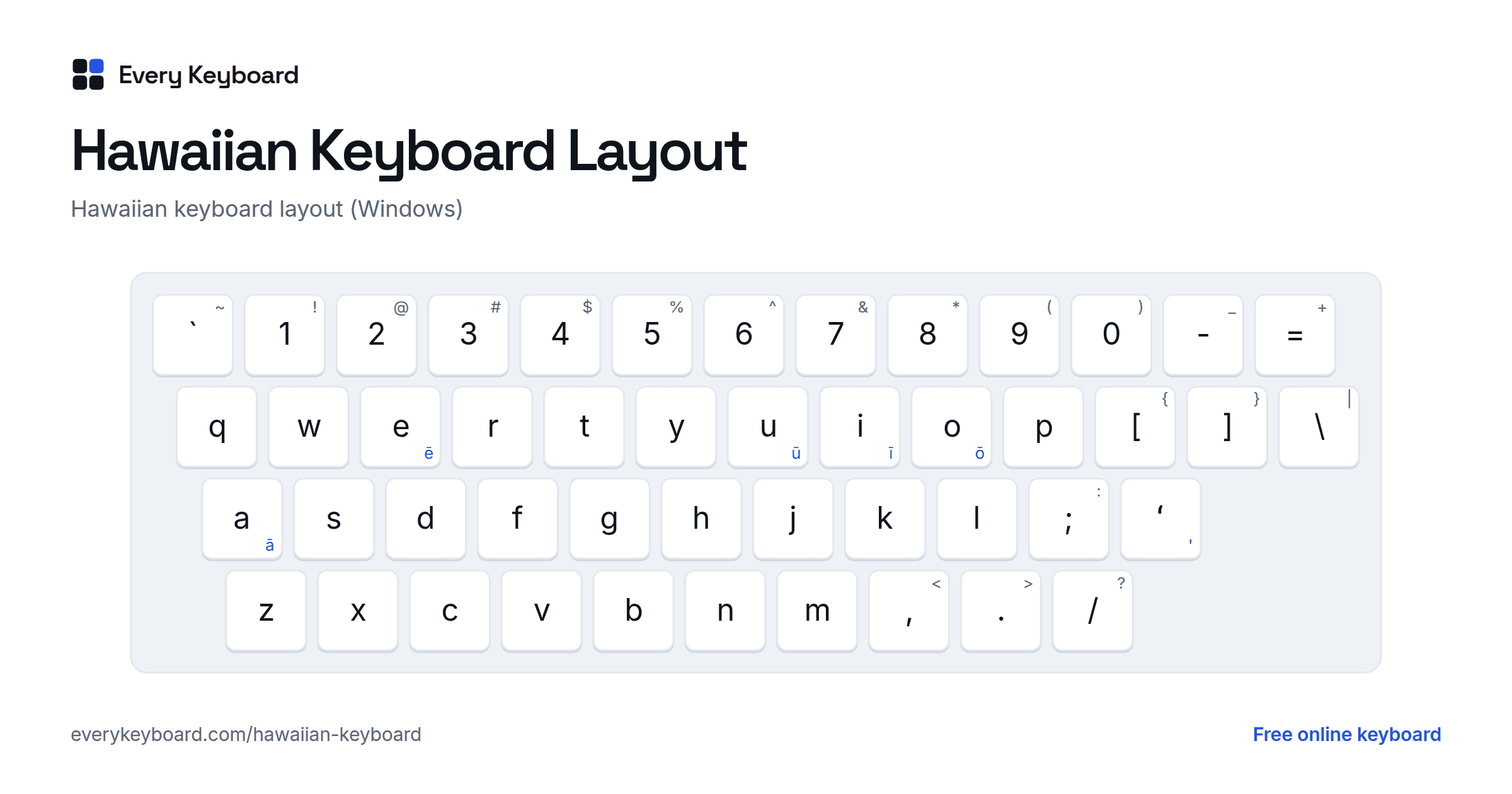
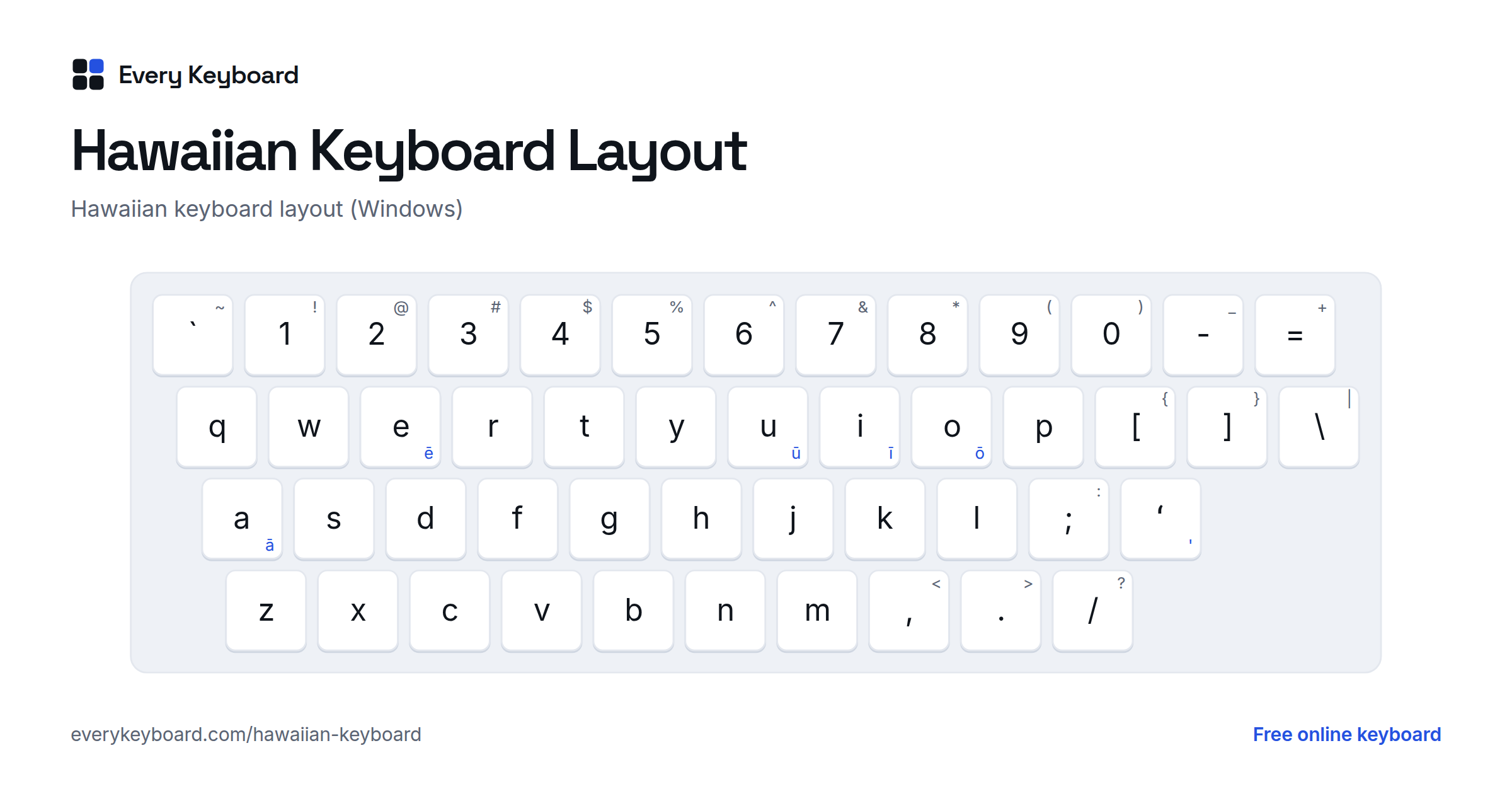
The Hawaiian keyboard on Windows is the US QWERTY layout with three changes: the ' key types the ʻokina, the vowels get their kahakō forms with Right Alt (AltGr), and the plain apostrophe moves to Right Alt+'. The Mac Hawaiian input source works the same way, with Option for the kahakō. The blue characters need Right Alt; add Shift for Ā Ē Ī Ō Ū.
On this page you don't need to install anything: Alt (or Option) + a vowel types the kahakō with any keyboard, and the switch on the keyboard makes the ' key type the ʻokina.
How to add the Hawaiian keyboard on Windows, Mac and phones
Windows, macOS, iPhone and Android can all type the ʻokina and the kahakō once you add the Hawaiian keyboard. It's free and built in, and it keeps the normal English QWERTY letters.
Windows 10 and 11
- Open Settings → Time & language → Language & region (on Windows 10: Time & Language → Language).
- Click Add a language, search for Hawaiian, select it and click Next, then Install.
- Switch to it with Windows+Space. The taskbar shows HAW.
With the Hawaiian keyboard on:
- ' types the ʻokina (ʻ).
- Right Alt+' types a normal apostrophe.
- Right Alt+ a vowel types ā ē ī ō ū, and Right Alt+Shift+ a vowel types Ā Ē Ī Ō Ū.
Use the right Alt key. The left one doesn't work for these; Ctrl+Alt does the same job as Right Alt.
Mac
- Open System Settings → Keyboard, and under Text Input click Edit (on older macOS: System Preferences → Keyboard → Input Sources).
- Click +, search for Hawaiian, select it and click Add.
- Switch to it from the input menu in the menu bar.
With the Hawaiian input source on:
- ' types the ʻokina (ʻ).
- Option+ a vowel types ā ē ī ō ū, and Option+Shift+ a vowel types Ā Ē Ī Ō Ū.
Some people have reported that Hawaiian is missing from the list on recent versions of macOS. If you can't find it, add ABC Extended instead: Option+A, then a vowel, types the kahakō. For the ʻokina, use this page or the Character Viewer (Ctrl+Cmd+Space, then search for "turned comma").
Microsoft Word
- Type a code from the table above and press Alt+X:
02bbgives ʻ,0101gives ā. - Watch out for smart quotes: Word turns a typed ' into ’, which faces the wrong way. With the Hawaiian keyboard, the ' key types the real ʻokina, so this doesn't happen.
iPhone and iPad
Go to Settings → General → Keyboard → Keyboards → Add New Keyboard → Hawaiian. Tap the globe key to switch. Even on the English keyboard, you can press and hold a vowel and slide to its kahakō form.
Android
In Gboard, open Settings → Languages → Add keyboard and search for Hawaiian. Press and hold a vowel for the kahakō. Tap the globe key or hold the space bar to switch keyboards.
Chromebook
The easiest way on a Chromebook is this page: type with the Alt shortcuts or the buttons, then click Copy and paste your text where you need it.
Frequently asked questions
How do I type the ʻokina?
On this page, click the ʻ button or press Alt+' (Option+' on a Mac). You can also tick "The ' key types the ʻokina" so your apostrophe key types it, as on the Windows and Mac Hawaiian keyboards. With the Hawaiian keyboard installed on Windows or a Mac, the ' key types the ʻokina in every app.
Can I just use an apostrophe for the ʻokina?
It's common in quick typing, but it's not correct. The ʻokina is a letter, Unicode U+02BB, and it curls like an opening quote (ʻ), not like an apostrophe (’). Word processors also tend to turn a typed apostrophe into ’, which faces the wrong way. If a font or system can't show U+02BB, the left single quote ‘ (U+2018) is the usual fallback because it looks the same.
How do I add the Hawaiian keyboard on Windows?
Settings → Time & language → Language & region → Add a language → search for Hawaiian → Next → Install. Then press Windows+Space to switch to it (the taskbar shows HAW). The ' key types the ʻokina, Right Alt + a vowel types ā ē ī ō ū, Right Alt + Shift + a vowel types the capitals, and Right Alt + ' types a normal apostrophe.
How do I add the Hawaiian keyboard on a Mac?
System Settings → Keyboard → Text Input → Edit → + → Hawaiian → Add. Switch to it from the input menu in the menu bar. The ' key types the ʻokina, Option + a vowel types ā ē ī ō ū, and Option + Shift + a vowel types the capitals.
What is the kahakō?
The kahakō is the line over a vowel (a macron). It marks a long vowel, held a little longer and usually stressed. It changes meaning: kau means season or to place, kāu means yours. Words like Waikīkī and Lānaʻi are only spelled correctly with it.
Is my text saved or sent anywhere?
No. Everything happens in your browser. Your draft is kept on your own device so it's still there if you refresh, and it's never uploaded.