How to type Czech letters with this keyboard
Pick a layout with the tabs on the keyboard. Czech QWERTZ shows the layout of a keyboard bought in the Czech Republic. US keyboard + accents shows a plain US keyboard. In both, there are four ways to type Czech letters:
- Click or tap the buttons above the keyboard, or the keys on the keyboard. Hold Shift while clicking (or press Shift or Caps on the on-screen keyboard first) for capitals.
- Alt shortcuts: hold Alt (Option on a Mac) and press the base letter: A á, C č, D ď, E é, I í, N ň, O ó, R ř, S š, T ť, U ú, Y ý, Z ž. Press Alt+E twice for ě and Alt+U twice for ů. Add Shift for capitals. Alt+, and Alt+. type the Czech quotes „ and “.
- Quick codes: switch on quick codes and type a letter followed by
=:c=→ č,r=→ ř,a=→ á. A second=gives the other accent:e==→ ě,u==→ ů. They're off by default so that an ordinary = sign stays as typed. - Type as on a Czech keyboard: click Type as if on a Czech keyboard under the keyboard, and your own keys type like a Czech QWERTZ keyboard: the number row gives ě š č ř ž ý á í é, and Z and Y swap. The key left of Backspace is the ´ dead key (Shift: ˇ): press it, then a letter. Press Esc to go back to normal typing.
A good test sentence is Příliš žluťoučký kůň úpěl ďábelské ódy ("A far too yellow horse moaned devilish odes"), which uses every Czech accented letter. Czechs use it to check fonts and keyboards.
Czech letters and how to pronounce them
Czech has 42 letters: the 26 English ones, 15 letters with accents, and ch, which counts as a single letter and comes after h in the dictionary. Three marks are used:
- The čárka (acute accent) on á é í ó ú ý makes a vowel long. Length matters in Czech: it can be the only difference between two words.
- The háček (caron, "little hook") on č ď ě ň ř š ť ž softens a consonant or turns it into a different sound. On lowercase ď and ť it's printed as a small apostrophe.
- The kroužek (ring) appears only on ů.
| Letter | Sound | Example |
|---|---|---|
| á Á | long a, as in father | máma (mom) |
| č Č | ch as in church | čas (time) |
| ď Ď | soft d, like the d in British duty | loď (ship), Ďáblice |
| é É | long e, as in bed held longer | mléko (milk) |
| ě Ě | ye after b, p, v, f (běh: byeh); softens d, t, n (dě = ďe); mě is said mnye | město (town), děti (children) |
| í Í | long ee, as in see | bílý (white) |
| ň Ň | ny as in canyon, like Spanish ñ | kůň (horse) |
| ó Ó | long o, mostly in loanwords | móda (fashion) |
| ř Ř | a rolled r and the s in measure at the same time; unique to Czech | řeka (river), Dvořák |
| š Š | sh as in shoe | škola (school) |
| ť Ť | soft t, like the t in British tune | chuť (taste) |
| ú Ú | long oo, as in food | úterý (Tuesday) |
| ů Ů | long oo, the same sound as ú | dům (house) |
| ý Ý | long ee, the same sound as í | dobrý (good) |
| ž Ž | s as in measure | žena (woman) |
Other letters to know: c is always ts (cesta, road), ch is the ch of Scottish loch (chléb, bread), j is y as in yes, and w, q and x appear only in foreign words. The stress is always on the first syllable, whether or not the vowel is long.
Leaving the accents off can change the word:
| Without | With |
|---|---|
| byt (apartment) | být (to be) |
| pas (passport) | pás (belt) |
| rada (advice) | ráda (glad (said by a woman)) |
Ú or ů?
Both are the same long oo sound. The rule is about position: ú at the start of a word or after a prefix (úkol, úterý, neúspěch), and ů inside or at the end of a word (dům, domů, kůň). The ring comes from history: ů was once written as uo, and the o shrank to a small circle.
The Czech QWERTZ keyboard layout
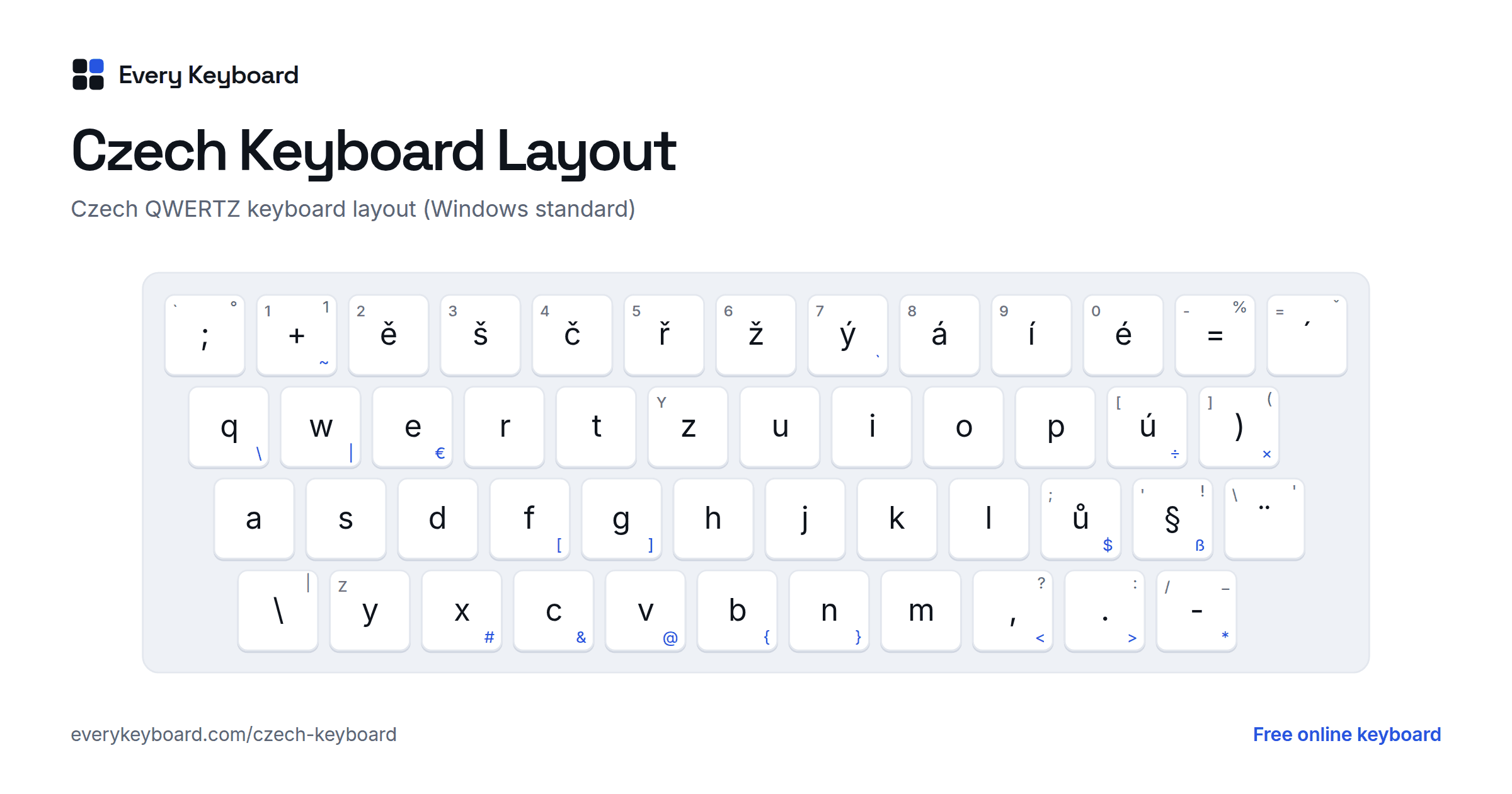
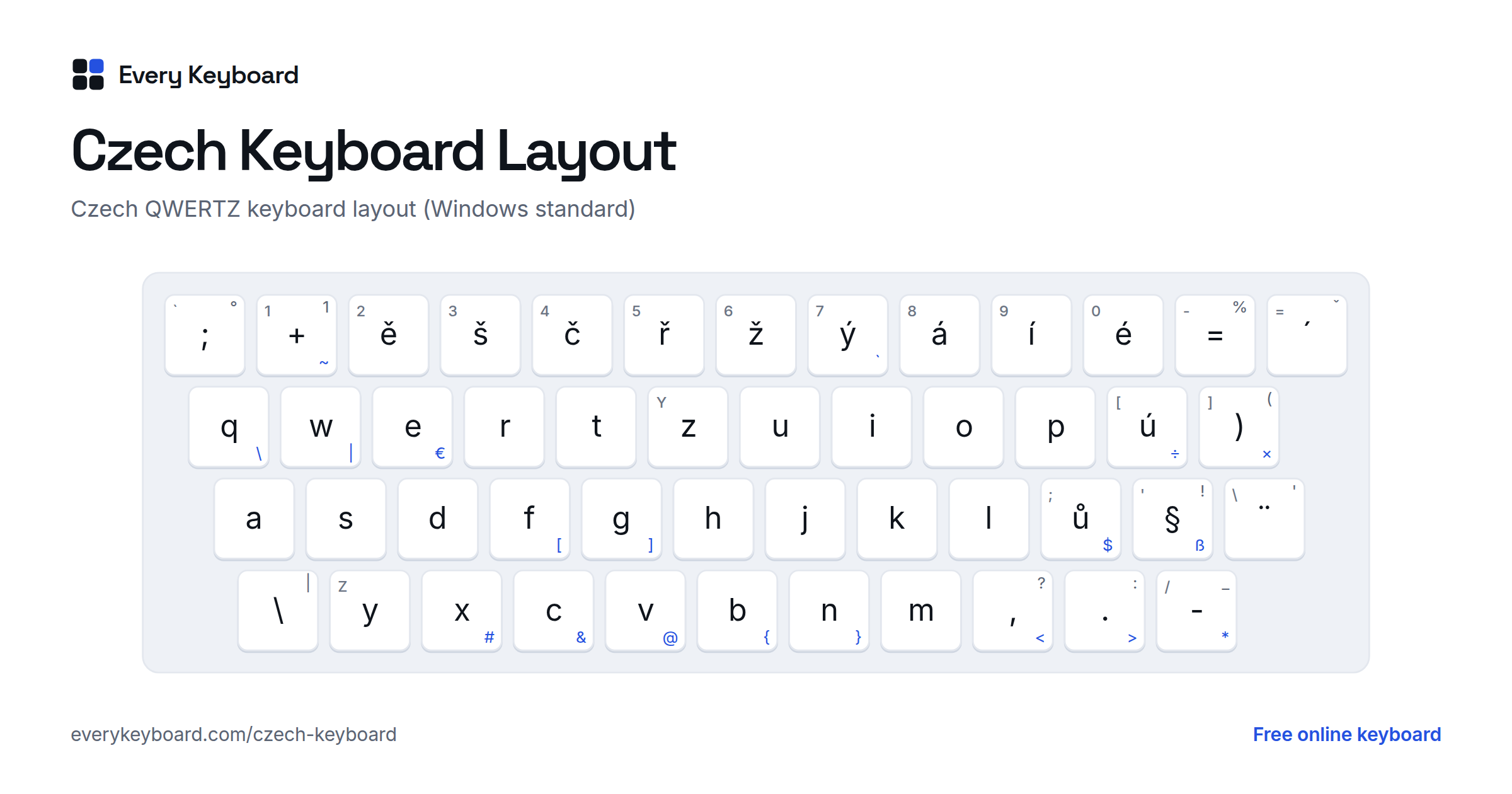
Czech keyboards use QWERTZ, with the accented letters on the number row. This is the standard Windows layout, called just "Czech". The small letter on each key is the US key in the same place, and the blue characters need AltGr (the right Alt key).
- ě š č ř ž ý á í é are on the number row, where US keyboards have 2 to 0. The digits need Shift, and the key left of ě types +.
- ú is right of P, and ů right of L, with ) and § next to them.
- Z and Y are swapped compared with English keyboards.
- Dead keys: the key left of Backspace is ´ (press it, then a vowel for á é í ó ú ý), and with Shift it's ˇ (then a letter for č ď ě ň ř š ť ž). The key left of Enter is ¨ for ä ö ü. Press a dead key and then Space to type the mark on its own.
- There's an extra key between left Shift and Y for \ and |.
Punctuation and symbols move compared with a US keyboard:
| Character | Czech QWERTZ keys |
|---|---|
| 1 2 3 … 0 | Shift + the number row (or the number pad) |
| + | The key left of ě (where US keyboards have 1) |
| = % | The key right of é, and Shift + that key |
| / ( | Shift + ú, Shift + ) |
| " ! | Shift + ů, Shift + § |
| ' (apostrophe) | Shift + the ¨ key left of Enter |
| ? : _ | Shift + comma, period, hyphen |
| @ | AltGr + V |
| € | AltGr + E |
| # & $ | AltGr + X, AltGr + C, AltGr + ů |
| [ ] | AltGr + F, AltGr + G |
| { } | AltGr + B, AltGr + N |
| \ | | AltGr + Q, AltGr + W |
| < > * | AltGr + comma, period, hyphen |
| ~ ` | AltGr + +, AltGr + ý |
Windows also has Czech (QWERTY), the same layout with Z and Y in the English places, and a Czech Programmers layout for people who mostly write code. Mac keyboards have Czech and Czech QWERTY input sources with the letters in the same places and some symbols elsewhere.
Czech characters and Alt codes
For Windows Alt codes, hold Alt and type the number on the number pad, with Num Lock on. The codes for á é í ó ú ý š ž work on any Windows PC. The codes marked "Czech PC" depend on Windows' language settings: they give the Czech letter on a PC set up for Czech, and a different character on an English PC. The Unicode code works everywhere in Word: type it, then press Alt+X.
| Character | Alt code (Windows) | Unicode (Word: Alt+X) |
|---|---|---|
| á Á | Alt+0225 · Alt+0193 | 00E1 · 00C1 |
| č Č | Alt+0232 · Alt+0200 (Czech PC) | 010D · 010C |
| ď Ď | Alt+0239 · Alt+0207 (Czech PC) | 010F · 010E |
| é É | Alt+0233 · Alt+0201 | 00E9 · 00C9 |
| ě Ě | Alt+0236 · Alt+0204 (Czech PC) | 011B · 011A |
| í Í | Alt+0237 · Alt+0205 | 00ED · 00CD |
| ň Ň | Alt+0242 · Alt+0210 (Czech PC) | 0148 · 0147 |
| ó Ó | Alt+0243 · Alt+0211 | 00F3 · 00D3 |
| ř Ř | Alt+0248 · Alt+0216 (Czech PC) | 0159 · 0158 |
| š Š | Alt+0154 · Alt+0138 | 0161 · 0160 |
| ť Ť | Alt+0157 · Alt+0141 (Czech PC) | 0165 · 0164 |
| ú Ú | Alt+0250 · Alt+0218 | 00FA · 00DA |
| ů Ů | Alt+0249 · Alt+0217 (Czech PC) | 016F · 016E |
| ý Ý | Alt+0253 · Alt+0221 | 00FD · 00DD |
| ž Ž | Alt+0158 · Alt+0142 | 017E · 017D |
Czech quotation marks open low and close high: „Dobrý den“, with ‚single‘ quotes inside. A spaced en dash is used as a dash (pomlčka). Czech uses a decimal comma (3,5) and writes the currency after the amount (100 Kč).
How to add a Czech keyboard to your computer or phone
Windows
- Go to Settings → Time & language → Language & region → Add a language, and choose Čeština. Its default keyboard is Czech (QWERTZ). For Czech (QWERTY) or Czech Programmers, click ⋯ next to Čeština → Language options → Add a keyboard.
- Switch keyboards with Windows+Space, or from the language button on the taskbar.
Mac
- Go to System Settings → Keyboard → Text Input → Edit → + → Czech, and choose Czech (QWERTZ) or Czech QWERTY. Switch with the input menu in the menu bar or Control+Space.
- On a US keyboard: Option+E then a vowel types á é í ó ú ý. For the háček and ů, add the ABC Extended input source: Option+V then a letter gives č ř š ž and the rest, and Option+K then u gives ů.
Microsoft Word
- Ctrl+', then a vowel: á é í ó ú ý
- For the háček letters and ů, type the Unicode code from the table above and press Alt+X:
0159→ ř,010D→ č,016F→ ů.
iPhone and iPad
Go to Settings → General → Keyboard → Keyboards → Add New Keyboard → Czech, and choose QWERTZ or QWERTY. Tap the globe key to switch. Press and hold a letter, such as r, e or u, and slide to the accented version.
Android
In Gboard, open Settings → Languages → Add keyboard → Čeština, then choose QWERTZ or QWERTY. Press and hold a letter to get its accented versions. Tap the globe key or hold the space bar to switch languages.
Chromebook
Go to Settings → Device → Keyboard and inputs → Input settings → Add input methods, and choose the Czech keyboard or Czech QWERTY keyboard. Switch with Ctrl+Space.
Frequently asked questions
How do I type Czech letters on an English keyboard?
On this page, click the buttons above the keyboard, or hold Alt (Option on a Mac) and press the base letter: Alt+R for ř, Alt+S for š, Alt+C for č. Press Alt+E twice for ě and Alt+U twice for ů. Add Shift for capitals. With quick codes on, type r= for ř or e== for ě. Then press Copy and paste the text anywhere.
How do I type ř on a Czech keyboard?
On the Czech QWERTZ keyboard, ř is on the 5 key (unshifted). For the capital Ř, press Shift and the key left of Backspace (the ˇ dead key), then Shift+R. On this page you can also press Alt+R, or Alt+Shift+R for Ř.
When do I write ú and when ů?
Both are the same long oo sound. Write ú at the start of a word (úkol, úterý) and after a prefix (neúspěch, zúčastnit), and ů everywhere else (dům, domů, kůň). A few loanwords break the rule, such as túra and skútr.
How do I type numbers on a Czech keyboard?
The number row types the accented letters, so digits need Shift: Shift+ě gives 2, Shift+š gives 3. Most people use the number pad instead, and many Czech programmers simply switch to an English (US) layout while coding.
Should I use Czech QWERTZ or Czech QWERTY?
Czech QWERTZ is the standard: it's what Czech keyboards are printed with and what schools teach, with Z where English keyboards have Y. Czech (QWERTY) keeps the accented letters on the number row but puts Z and Y in the English places. If you're used to an English keyboard, QWERTY is easier to switch to.
How do I type capital Č, Š or Ř on a Czech keyboard?
Press Shift and the key left of Backspace to get the ˇ dead key, then Shift and the letter. For á é í ó ú ý capitals, press the ´ key (the same key, without Shift), then Shift and the vowel. On this page, the Shift and Caps keys on the on-screen keyboard also turn the letter buttons into capitals.