How to type French accents with this keyboard
Pick a mode above the text box. US keyboard + accents keeps your keyboard as it is and adds the French letters. French AZERTY makes your keyboard type like one bought in France. In the first mode, there are three ways to add accents:
- Click or tap the blue accent buttons above the keyboard. Hold Shift while clicking (or press Shift on the on-screen keyboard first) for capitals such as É or Ç.
- Alt shortcuts: hold Alt (Option on a Mac) and press the letter. Press it again to cycle through the accents on that letter: Alt+E gives é, then è, ê and ë. Alt+A gives à, â, æ. Alt+O gives ô, then œ. Alt+C is ç, Alt+, and Alt+. are « and », Alt+4 is €. Add Shift for capitals.
- Quick codes: switch on quick codes and type a letter followed by a symbol that looks like the accent: e' → é, e` → è, a` → à, e^ → ê, i" → ï, and c,a → ça (c, followed by a, o or u). << and >> give « and ». They're off by default because an apostrophe after e is normal in English.
In French AZERTY mode, the ^ key (right of P) is a dead key, just like on a real French keyboard: press it, then a vowel, to get â ê î ô û. Shift + ^ gives the tréma: ë ï ü ÿ. Press Esc to switch back to normal typing at any time.
French accents explained
French uses five accent marks plus two ligatures. They change pronunciation, and some tell apart words that would otherwise look the same.
- Accent aigu (é) is only used on e. It marks a closed "ay" sound, as in café, été, étudiant. Many words that start with é once started with s: école (school), étudiant (student).
- Accent grave (è à ù) on e marks an open "eh" sound: mère, très, problème. On a and u it doesn't change the sound but tells words apart: à (to) vs a (has), là (there) vs la (the), où (where) vs ou (or). The word où is the only one with ù.
- Accent circonflexe (â ê î ô û) often marks an s that disappeared from older spelling, which is why many of these words have English cousins with an s: forêt (forest), hôpital (hospital), château (castle). It also separates pairs like sur (on) and sûr (sure), du and dû. Since the 1990 spelling reform, the circumflex on i and u is optional in most words (connaître or connaitre), except where it changes meaning.
- Tréma (ë ï ü ÿ) means the vowel is pronounced on its own, not merged with the one before it: Noël, naïf, maïs (corn) vs mais (but). ÿ only appears in a few place names and surnames.
- Cédille (ç) goes under c before a, o or u to give it a soft s sound: ça, garçon, reçu, français. Before e and i, c already sounds like s, so no cedilla is needed.
- Ligatures œ and æ join two letters. œ is common: cœur, sœur, œuf, œuvre. æ is rare and mostly appears in Latin expressions such as ex æquo.
French characters and Alt codes
Here is every French special character with an example and the codes to type it elsewhere. For Windows Alt codes, hold Alt and type the number on the number pad, with Num Lock on.
| Character | Name | Example | Alt code (Windows) | HTML |
|---|---|---|---|---|
| é É | e with accent aigu | café, été | Alt+0233 · Alt+0201 | é |
| è È | e with accent grave | mère, très | Alt+0232 · Alt+0200 | è |
| ê Ê | e with circonflexe | forêt, être | Alt+0234 · Alt+0202 | ê |
| ë Ë | e with tréma | Noël | Alt+0235 · Alt+0203 | ë |
| à À | a with accent grave | à Paris, voilà | Alt+0224 · Alt+0192 | à |
| â Â | a with circonflexe | château, pâte | Alt+0226 · Alt+0194 | â |
| æ Æ | a-e ligature | ex æquo | Alt+0230 · Alt+0198 | æ |
| ç Ç | c with cédille | ça, garçon | Alt+0231 · Alt+0199 | ç |
| î Î | i with circonflexe | île, dîner | Alt+0238 · Alt+0206 | î |
| ï Ï | i with tréma | naïf, maïs | Alt+0239 · Alt+0207 | ï |
| ô Ô | o with circonflexe | hôtel, côte | Alt+0244 · Alt+0212 | ô |
| œ Œ | o-e ligature | cœur, sœur | Alt+0156 · Alt+0140 | œ |
| ù Ù | u with accent grave | où | Alt+0249 · Alt+0217 | ù |
| û Û | u with circonflexe | sûr, dû | Alt+0251 · Alt+0219 | û |
| ü Ü | u with tréma | capharnaüm | Alt+0252 · Alt+0220 | ü |
| ÿ Ÿ | y with tréma | L'Haÿ-les-Roses | Alt+0255 · Alt+0159 | ÿ |
| « | opening guillemet | « Bonjour » | Alt+0171 | « |
| » | closing guillemet | « Bonjour » | Alt+0187 | » |
| € | euro sign | 20 € | Alt+0128 | € |
You may also see shorter codes without the 0, such as Alt+130 for é, Alt+138 for è, Alt+133 for à, Alt+135 for ç and Alt+151 for ù. They come from the old DOS character set, so capitals like É and À can differ from one computer to another. The codes starting with 0 in the table always give the same character.
The French AZERTY keyboard layout
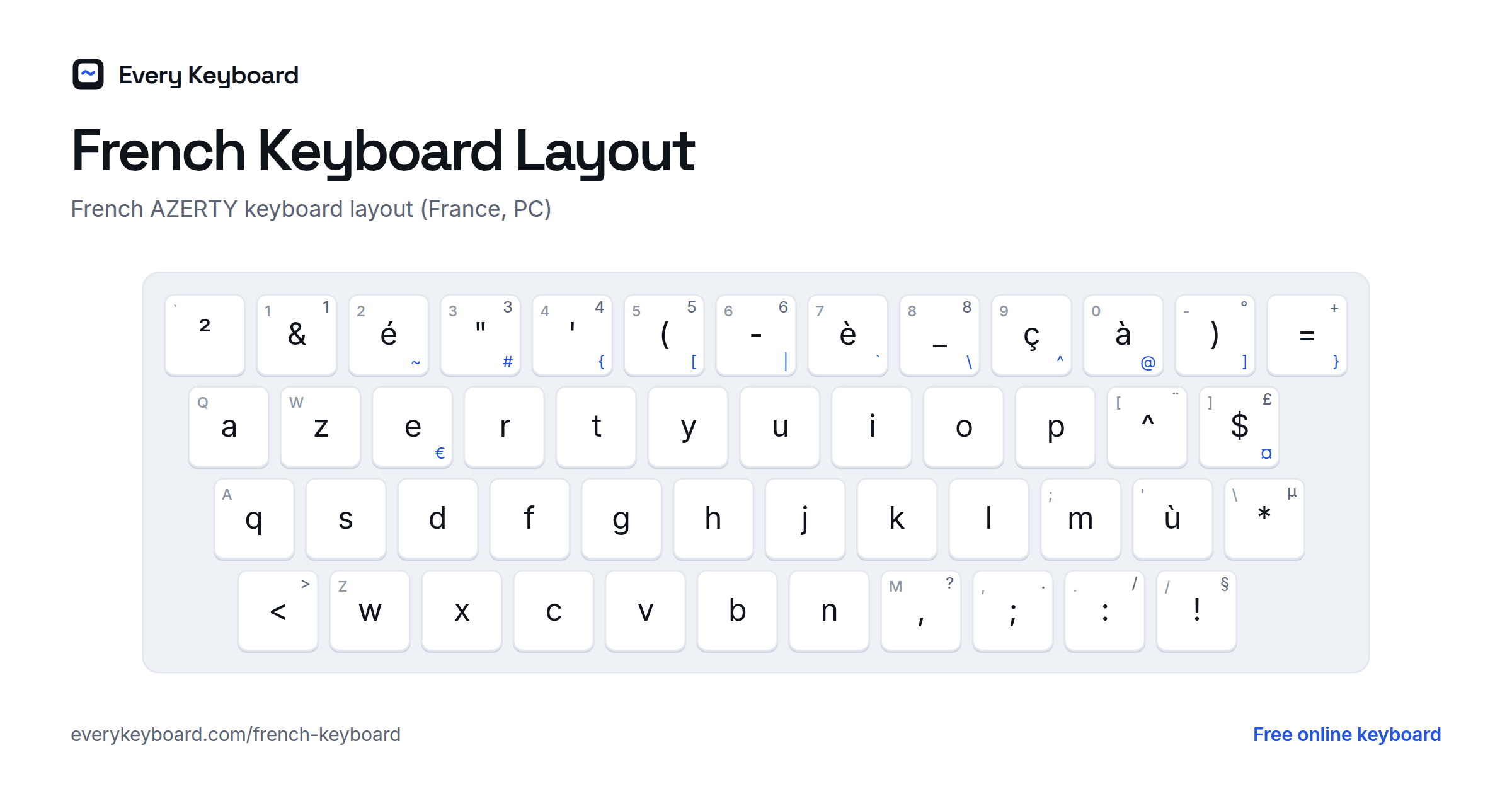
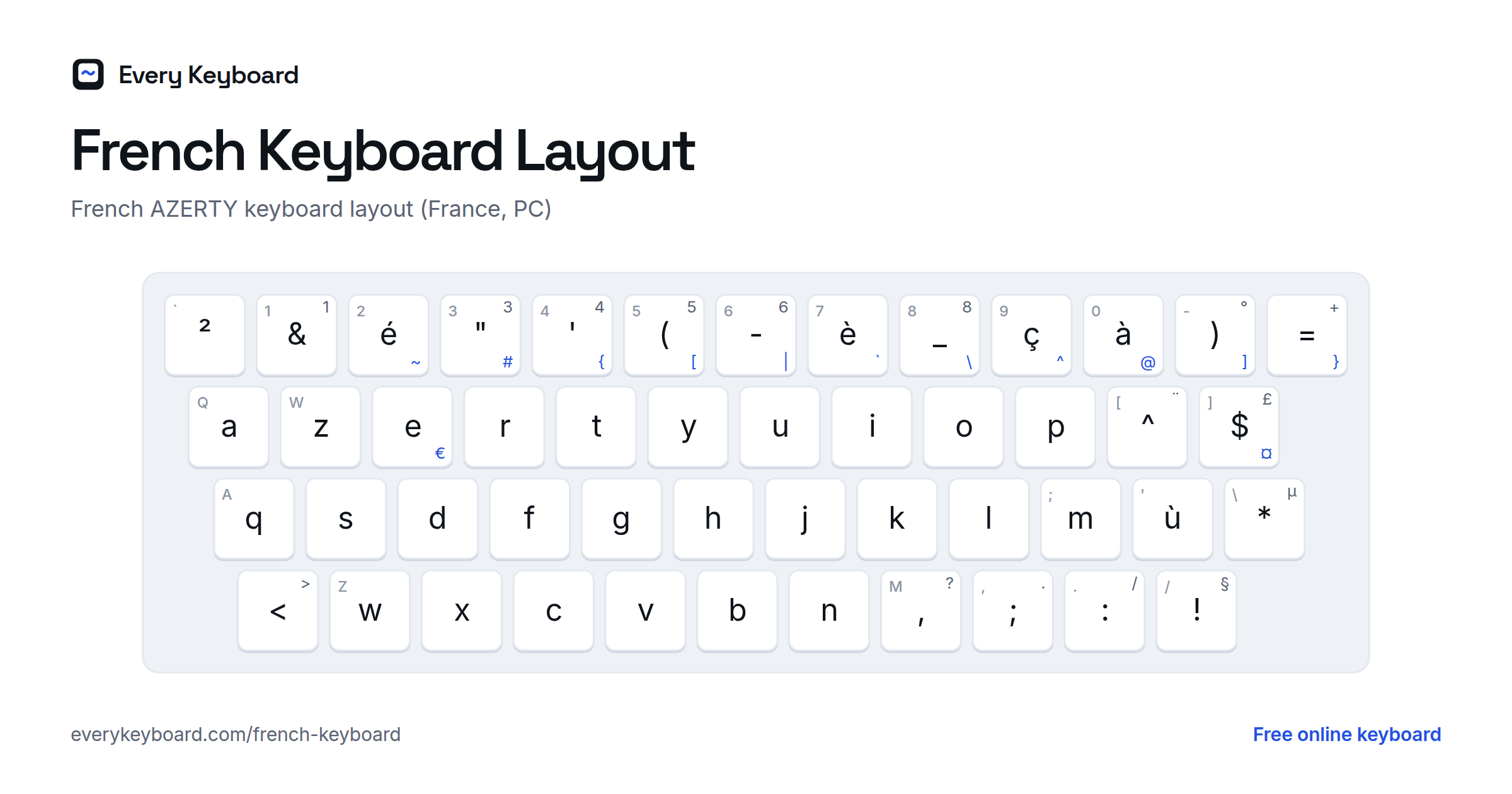
Keyboards sold in France and Belgium use AZERTY, named after the first six letters of the top row. This is the France layout as Windows and most PCs have it. The small letter on each key is the US key in the same place.
The Mac version of French AZERTY has the same letters but moves several symbols around, and Belgian AZERTY differs in its number row and symbol keys. On the France PC layout, these characters need AltGr (the right Alt key) or Shift:
| Character | AZERTY keys |
|---|---|
| @ | AltGr + à (0) |
| # | AltGr + " (3) |
| € | AltGr + E |
| { } | AltGr + ' (4) and AltGr + = |
| [ ] | AltGr + ( (5) and AltGr + ) |
| | | AltGr + - (6) |
| \ | AltGr + _ (8) |
| ~ | AltGr + é (2), then Space |
| ` | AltGr + è (7), then Space |
| ? | Shift + , |
| . | Shift + ; |
| ! | The key right of : |
AZERTY vs QWERTY
If you learned to type on a French keyboard and now use an English one (a clavier anglais or clavier américain), or the other way round, these are the differences that trip people up:
| Key | US QWERTY | French AZERTY |
|---|---|---|
| A and Q | A is top left, Q is on the home row | Swapped: A on the home row, Q top left |
| Z and W | Z is bottom left, W is on the top row | Swapped: Z on the top row, W bottom left |
| M | Bottom row, right of N | Home row, right of L |
| Numbers 1 to 0 | Press the key | Hold Shift (the keys type & é " ' ( - è _ ç à) |
| é è ç à ù | No keys; use shortcuts | On the number row and next to M |
| â ê î ô û, ë ï ü | No keys; use shortcuts | Press the ^ key (or Shift + ^ for ¨), then the vowel |
| Comma and period | , and . right of M | , right of N; . is Shift + ; |
| @ | Shift + 2 | AltGr + à (the 0 key) |
| € | Not on the keyboard | AltGr + E |
French speakers on a QWERTY keyboard can use the US keyboard + accents mode here, or set up one of the options below. English speakers who are handed an AZERTY keyboard can switch it to QWERTY in the same settings.
French typography: spaces and guillemets
- Space before double punctuation. In France, put a space before
:;!?: Vraiment ? Oui ! Voici la liste : pain, lait. Printers use a non-breaking space (a thin one before ; ! ?) so the mark never wraps onto a new line. In Quebec, the usual practice is a space before the colon only. - Guillemets « » for quotes, with a space inside each one: « Bonjour », dit-elle. Curly quotes “ ” are used for a quote inside a quote.
- No space before . or ,, just as in English.
- Numbers: a comma for decimals and a space between thousands: 1 234,50 €. The euro sign goes after the number.
- Lowercase days, months and languages: lundi 3 mars, le français. Nationalities as nouns take a capital: les Français.
On Windows, a non-breaking space is Alt+0160; in Word it's Ctrl+Shift+Space. On a Mac, press Option+Space. On this page, switch on French spacing above the text box: the space you type before ; : ! ? and », or after «, becomes a thin non-breaking space automatically.
How to type French accents on your computer or phone
Mac (US keyboard)
- Option+E, then E: é
- Option+`, then the vowel: à è ù
- Option+I, then the vowel: â ê î ô û
- Option+U, then the vowel: ë ï ü ÿ
- Option+C: ç, Option+Q: œ, Option+': æ
- Option+\: « and Option+Shift+\: », and Option+Shift+2: €
- Or press and hold a letter key to pick an accent from the pop-up.
Windows
- Hold Alt and type the code on the number pad (see the table above), e.g. Alt+0233 for é.
- No number pad? Add the United States-International keyboard (Settings → Time & language → Language & region → ⋯ next to your language → Language options → Add a keyboard). Then type ' then e for é, ` then a vowel for à è ù, ^ then a vowel for â ê î ô û, " then a vowel for ë ï ü, and ' then c for ç. Right Alt+[ and ] type « and ». This layout has no œ.
- To type on a real AZERTY layout, add the French (France) language in the same settings page, and pick its French AZERTY keyboard under Language options. Newer Windows versions list the classic layout as French (Legacy, AZERTY), next to French (Standard, AZERTY), the 2019 layout that makes accented capitals, œ and « » easier to reach. Switch keyboards with Windows+Space.
Microsoft Word
- Ctrl+', then e: é
- Ctrl+`, then the vowel: à è ù
- Ctrl+Shift+^, then the vowel: â ê î ô û
- Ctrl+Shift+:, then the vowel: ë ï ü
- Ctrl+,, then c: ç
- Ctrl+Shift+&, then o or a: œ or æ
iPhone and iPad
Press and hold a letter to pick an accent: hold e for é è ê ë, c for ç, o for œ. To add a French keyboard, go to Settings → General → Keyboard → Keyboards → Add New Keyboard → French, where you can choose AZERTY or QWERTY. Tap the globe key to switch.
Android
Press and hold a letter to pick an accent. To add French in Gboard, open Settings → Languages → Add keyboard → Français (France), then choose AZERTY or QWERTY. Tap the globe key or hold the space bar to switch.
Chromebook
Settings → Device → Keyboard and inputs → Input settings → Add input methods → French keyboard for AZERTY, or US International for QWERTY with accents. Switch with Ctrl+Space.
Frequently asked questions
How do I type French accents on an English (QWERTY) keyboard?
On this page, click the accent buttons or hold Alt (Option on a Mac) and press the letter: Alt+E gives é, press it again for è, ê and ë. Alt+C gives ç, Alt+A gives à. In other apps, use the Mac Option shortcuts, the Windows Alt codes or the US-International keyboard described above.
My keyboard switched from AZERTY to QWERTY (or the other way). How do I fix it?
Windows lets you install several keyboards, and Alt+Shift or Windows+Space switches between them, which is easy to press by accident. Press Windows+Space and pick the layout you want, or remove the extra keyboard in Settings → Time & language → Language & region. On a Mac, check the input menu in the menu bar.
How do I type a capital É or À on an AZERTY keyboard?
The classic French AZERTY keyboard has no key for accented capitals. On Windows, hold Alt and type 0201 on the number pad for É or 0192 for À. On a Mac AZERTY keyboard, turn on Caps Lock and press the é key. On this page, hold Shift and click the É button.
How do I type œ?
Click the œ button or press Alt+O twice on this page. On a Mac press Option+Q. On Windows use Alt+0156 (Alt+0140 for Œ). Words like cœur, sœur, œuf and œuvre should use the ligature, not a separate o and e.
Do French capital letters need accents?
Yes. The Académie française recommends keeping accents on capitals: ÉCOLE, À bientôt, Ça va. Leaving them off is common in handwriting and on old typewriters, but in print the accents are correct and can change meaning.
Is my text saved or sent anywhere?
No. Everything happens in your browser. Your draft is kept on your own device so it's still there if you refresh, and it's never uploaded.