How to type Russian with this keyboard
Choose how you want to type with the tabs above the text box:
- Phonetic: each English key types the Russian letter that sounds like it, so D gives д and M gives м. Letters with no English match sit on nearby keys: W is ш, Q is я, Y is ы, H is ч.
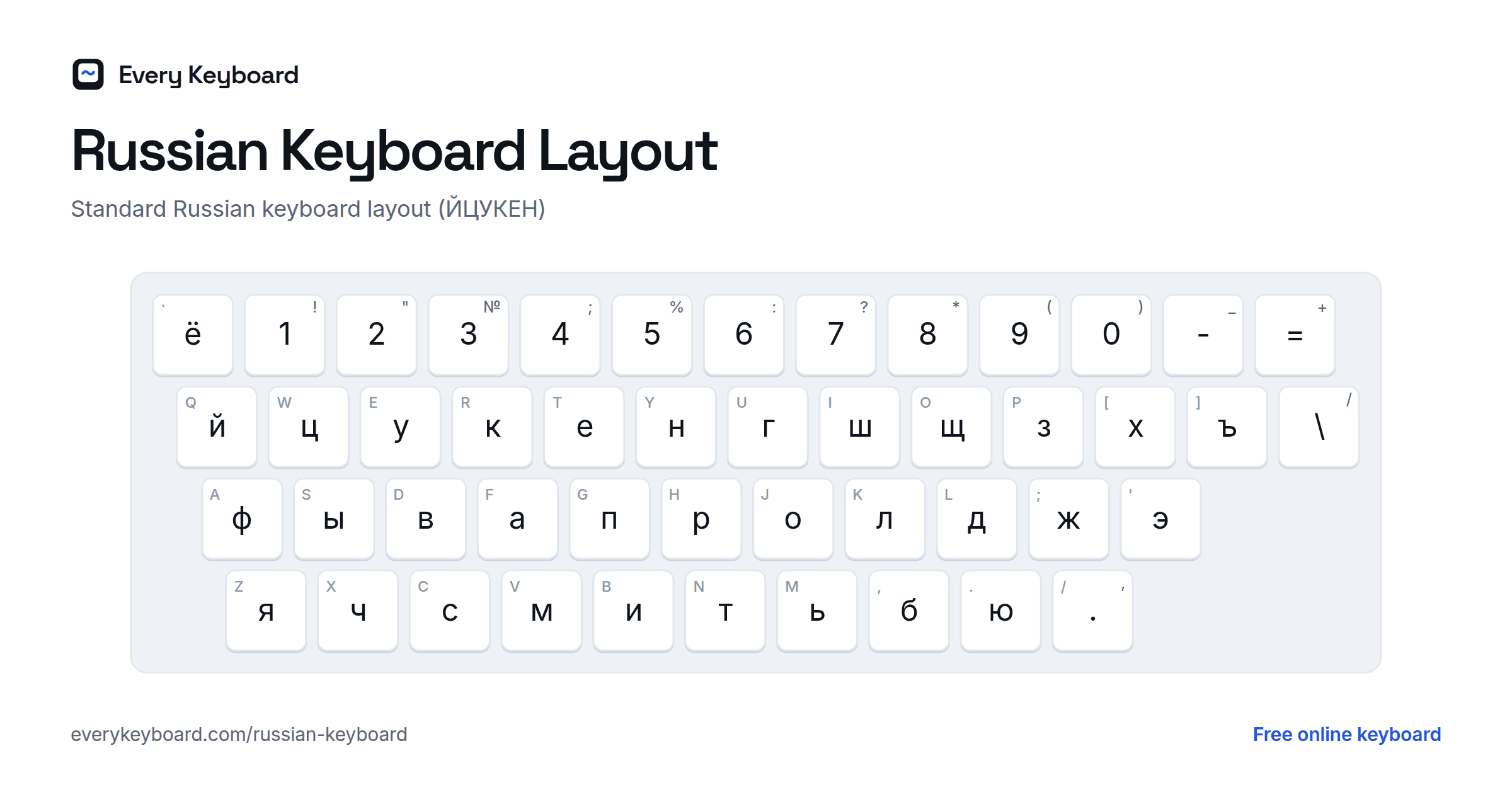
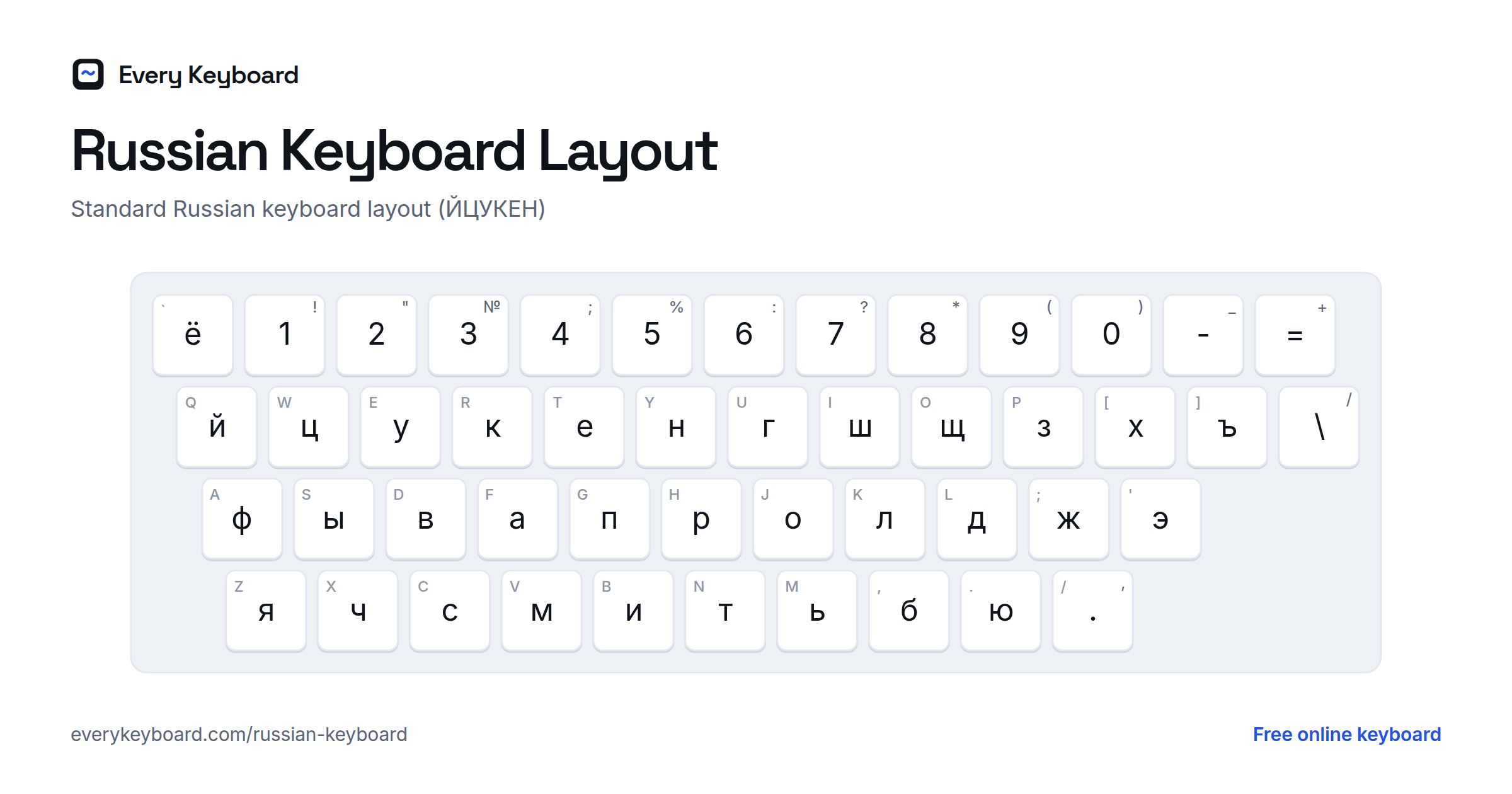
- Standard ЙЦУКЕН: the real Russian layout, the one printed on keyboards in Russia.
- Translit: type Russian words in Latin letters and watch them turn into Cyrillic. privet becomes привет, spasibo becomes спасибо.
Press Esc to switch between Russian and normal English typing. Use the buttons above the keyboard for « » quotes, the № sign, the ruble sign ₽ and stress marks.
Russian keyboard layout
The standard Russian layout is called ЙЦУКЕН, after the first six letters of its top row. The small letter on each key is the English key in the same place.
The phonetic layout on this page puts each letter on the English key that sounds most like it:
The Russian alphabet
Russian has 33 letters. Here is each one with its name, sound and the usual Latin spelling.
| Letter | Name | Sound | Latin |
|---|---|---|---|
| А а | a | a as in father | a |
| Б б | be | b | b |
| В в | ve | v | v |
| Г г | ge | g as in go | g |
| Д д | de | d | d |
| Е е | ye | ye as in yes | e, ye |
| Ё ё | yo | yo as in yonder (always stressed) | yo, ë |
| Ж ж | zhe | s as in pleasure | zh |
| З з | ze | z | z |
| И и | i | ee as in meet | i |
| Й й | i kratkoye (short i) | y as in boy | y, j |
| К к | ka | k | k |
| Л л | el | l | l |
| М м | em | m | m |
| Н н | en | n | n |
| О о | o | o as in more (a when unstressed) | o |
| П п | pe | p | p |
| Р р | er | rolled r | r |
| С с | es | s | s |
| Т т | te | t | t |
| У у | u | oo as in boot | u |
| Ф ф | ef | f | f |
| Х х | kha | ch as in Scottish loch | kh |
| Ц ц | tse | ts as in cats | ts |
| Ч ч | che | ch as in chair | ch |
| Ш ш | sha | sh as in shop | sh |
| Щ щ | shcha | a long, soft sh | shch |
| Ъ ъ | hard sign | no sound; keeps a consonant hard before е, ё, ю, я | " |
| Ы ы | yery | like i in bit, said further back | y |
| Ь ь | soft sign | no sound; softens the consonant before it | ' |
| Э э | e | e as in met | e |
| Ю ю | yu | yu as in use | yu |
| Я я | ya | ya as in yard | ya |
Translit: typing Russian in Latin letters
In Translit mode, type these Latin letters to get each Cyrillic letter. Capitals work too.
| Cyrillic | Type |
|---|---|
| а б в г д е з и й к л м н о п р с т у ф х ц ы | a b v g d e z i j k l m n o p r s t u f h c y |
| ж | zh |
| ч | ch |
| ш | sh |
| щ | shch |
| х | kh, x |
| ё | yo, jo |
| ю | yu, ju |
| я | ya, ja |
| э | je, e' |
| ь (soft sign) | ' |
| ъ (hard sign) | # |
How to add a Russian keyboard to your device
Windows
Settings → Time & language → Language & region → Add a language → Russian. To type phonetically, add the Russian - Mnemonic keyboard under the language options. Switch with Windows+Space.
Mac
System Settings → Keyboard → Text Input → Edit → + → Russian. Pick "Russian - PC" for the standard layout or "Russian - Phonetic" for a phonetic one. Switch with Control+Space.
iPhone and iPad
Settings → General → Keyboard → Keyboards → Add New Keyboard → Russian. Tap the globe key to switch.
Android
In Gboard, open Settings → Languages → Add keyboard → Russian. Tap the globe key or hold the space bar to switch.
Chromebook
Settings → Device → Keyboard and inputs → Input settings → Add input methods → Russian. Switch with Ctrl+Space.
Frequently asked questions
How do I type Russian without a Russian keyboard?
Use the Phonetic mode on this page: English keys type the Russian letter that sounds alike (D → д, M → м). Or choose Translit and type Russian words in Latin letters, like privet for привет. Then press Copy.
What is ЙЦУКЕН?
It's the name of the standard Russian keyboard layout, taken from the first six letters on its top row, just as QWERTY is named after its own first six letters.
Which layout should I use: phonetic or standard?
If you only type Russian now and then, or you're learning, phonetic is easiest because letters sit where you expect them. If you plan to type a lot of Russian, or use keyboards in Russia, learn the standard ЙЦУКЕН layout.
How do I type ё?
In Phonetic and Standard mode it's on the key left of 1 (the ` key). In Translit, type yo or jo. Many Russian texts write е instead of ё, but ё is correct and helps learners with pronunciation.
How do I add a stress mark?
Type the vowel, then click the stress button (◌́). It adds an accent over the vowel you just typed, like молоко́. Russian dictionaries and textbooks use it to show where a word is stressed.
Is my text private?
Yes. Everything runs in your browser and your draft is kept on your own device. Nothing is uploaded.